
Windows website tester
You want to test the focus order and keyboard controls on websites from a fixed workstation. Microsoft Learn explains how to move through page elements using Tab and Shift+Tab.


Choose a mini PC based on the operating system and browsers you need to test, then check that its ports suit the keyboard and screen at your workstation. A complete Windows PC usually needs less setting up than a barebone; a Mac mini is mainly suitable when macOS is part of the test brief. None of these options will automatically make a website accessible by keyboard.
You want to test the focus order and keyboard controls on websites from a fixed workstation. Microsoft Learn explains how to move through page elements using Tab and Shift+Tab.
You also need to check navigation on macOS, so you choose a system that meets the requirements of the test environment rather than focusing only on its size. Apple Support explains keyboard navigation on Mac.
You’re setting up a workstation for different people to use in turn, and need to consider user accounts, existing peripherals and what’s included with the PC. Microsoft Support explains how Windows accounts can keep files and browser favourites separate.
Choose this option: if your test environment requires Windows and you want to get the PC set up with as little configuration as possible.
Bear in mind: the ports and included components can vary between models.
Choose this option: if you want to select the memory, storage and operating system yourself, and have someone available to set it up.
Bear in mind: some ASUS NUC 14 Pro kit models are supplied without a pre-installed operating system.
Choose this option: if keyboard navigation on macOS is part of the test brief.
Bear in mind: a Mac isn’t a substitute for a Windows test environment. Make sure the screen, keyboard and cables also suit the model you choose.
The main buying consideration varies from one shared testing workstation to another. Start with the connections and test environment you genuinely need for your work.
| What to consider | What should you check? | Who is this important for? |
|---|---|---|
| Connections for the keyboard and screen | Compare the ports on the exact model with the plugs on your existing keyboard and screen. Check separately which features each USB-C port supports. | If I want to connect my existing keyboard and screen without unnecessary extra adapters, I’ll focus on the PC’s ports. Around 31% of consumers say connections are their top priority. |
| Operating system for the test brief | List the operating systems and browsers you need to test, then check which system is installed on the exact model. | If I need to check keyboard navigation on a specific platform, I’ll choose based on that test environment, not just the PC’s size. Around 31% of consumers prioritise the required test platform. |
| Accounts for shared users | Decide who will create and manage accounts, and whether each tester needs their own profile. | If several testers will take turns using the same PC, I’ll want to decide in advance how to keep their files and browser favourites separate. Around 23% of consumers prioritise setting up separate user accounts. |
| Complete PC or barebone | Check whether memory, storage and an operating system are included for the full model number. Also check which cables and peripherals you’ll need. | If I want to set up the workstation with as few extra components and as little installation work as possible, I’ll check exactly what’s included. Around 15% of consumers value a complete package most. |
ASUS distinguishes NUC 14 Pro kit models without a pre-installed operating system from other models. As a result, setting one up may involve more steps than with a PC that’s already configured.
Compare what’s included for each full model number before you decide.
Depending on the kit, you may need to arrange memory, storage and an operating system, as well as set aside time for installation.
The presence of a USB-C port alone doesn’t tell you which features it supports. The display output and cable also need to be compatible with your existing workstation.
Check the port features on the exact configuration, then compare them with the plugs and requirements of your equipment.
You may need a cable, adapter or hub if the connections don’t match directly.
Microsoft Support explains that separate Windows accounts can have their own files, browser favourites and desktops. With a single profile, settings and files are more likely to get mixed up.
Decide in advance whether testers need their own accounts and agree who will manage them.
Separating accounts and test settings later may take extra management time.
The ThinkCentre M70q Gen 5 range is a business-focused Windows option worth considering when physical connections matter.
The NUC 14 Pro range includes mini PCs and kits for those who want to choose how their testing workstation is configured.
The Mac mini is worth considering when macOS itself is part of the keyboard test.
The Elite Mini 800 G9 range is a business mini PC line worth comparing for a Windows workstation.
This selection includes a Mac mini for macOS testing and mini PCs with Windows 11 Pro for Windows testing workstations. Choose according to the required test platform, and check that the model is also compatible with your existing peripherals.
 Image unavailable
An option if your test brief includes keyboard navigation on macOS.
The product name lists an M6 chip, a 12-core CPU and 12-core GPU, 16 GB of memory and a 512 GB SSD.
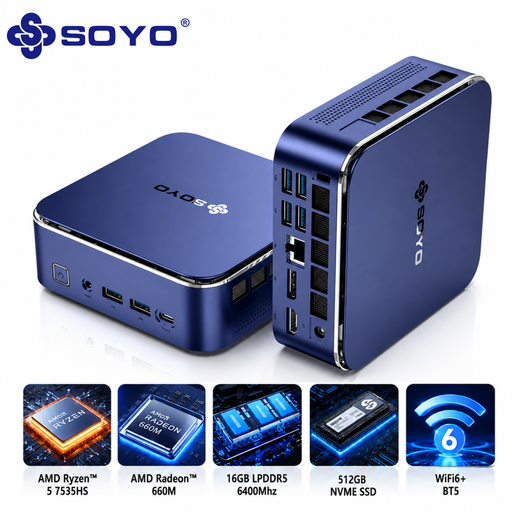 Image unavailable
A Windows mini PC to consider if your test brief requires Windows 11 Pro.
The product name lists an AMD Ryzen 5 7535HS, 16 GB of LPDDR5 memory and a 512 GB NVMe SSD.
 Image unavailable
A Windows 11 Pro mini PC to include in your comparison for a shared Windows testing workstation.
The product name lists an Intel Core Ultra 7 155H, 16 GB of DDR5 memory, a 1 TB SSD and Windows 11 Pro.
 Image unavailable
A Windows 11 Pro model to compare for a fixed Windows testing workstation.
The product name lists an Intel Core i7-14700T, 16 GB of DDR5 memory, a 512 GB SSD and Windows 11 Pro. According to the product description, the power adapter isn’t included and must be purchased separately.
Go through the page you’re testing without using a mouse, pressing Tab and Shift+Tab, and check that you can reach all the controls and focusable elements. Microsoft Learn describes this manual approach; PC specifications alone can’t show whether a website is easy to use with a keyboard.
Windows supports separate user accounts, each with its own files, browser favourites and desktop. Agree who will manage the accounts and test settings before several testers use the workstation.
According to the Dutch government, for a consumer purchase the seller must provide a solution if the product is faulty. The manufacturer’s guarantee is in addition to this.
The requirement described by DigiToegankelijk applies to websites and apps run by government organisations, and doesn’t automatically apply to every private testing setup. If you’re testing for a government contract, check separately which version of the standard applies to that contract. DigiToegankelijk reported that EN 301 549 version 4.1.1 was published on 3 September 2026; that publication alone doesn’t determine which standard applies to a specific contract.
The Dutch government says that electronic devices offered for sale in the EU must carry a CE mark. Check the mark on the specific product; a brand name or product range doesn’t confirm it for an individual listing.