Start by checking whether your editing software and source files work with the exact configuration. Then work out how much space you need for originals, cache and any proxies. A ready-to-use Windows mini PC saves you the hassle of installation, a Mac mini suits a compatible macOS workflow, and a barebone gives you more choice over components but requires a complete configuration and installation. Specifications alone won’t predict how smoothly your own timeline will play back.
Who should consider this choice?
Editors working with large source files
You want to keep interview footage, project files and cache organised. Available SSD space and connections for external storage are therefore important considerations. Adobe recommends fast storage for video media and cache.
Editors working with complex timelines
If you’re combining multiple tracks or working with demanding source files, first check the requirements of your editing software and files. Adobe describes proxies as a possible workflow for suitable large video clips in Premiere.
Creators who want to get started straight away
You’ll want to know whether memory, an SSD and an operating system are included, and whether you can connect your existing monitor and external drives. Check the exact configuration and the items supplied.
What should you look for when buying?
Ready-to-use Windows mini PC
A good fit if: you use Windows software and would rather not install memory, storage and an operating system yourself.
Consider: check that the supplied configuration meets your editing needs; the Lenovo configuration reviewed comes with 16 GB of memory and a 512 GB SSD.
Mac mini
A good fit if: your software, plug-ins and peripherals are compatible with macOS. Apple lists hardware support for formats including H.264, HEVC and ProRes on the M6.
Consider: codec support doesn’t tell you how quickly your timeline will play back; also work out how much space you need for originals and cache.
Barebone mini PC
A good fit if: you want to choose your own memory and SSD and can handle the installation.
Consider: ASUS says the NUC 15 Pro kits reviewed do not include memory, storage or a pre-installed operating system, so compare the complete configuration.
| What to consider |
What should you check? |
Who should consider this? |
| Storage for source files |
Compare the size of your files with the available SSD space, and check expansion options and connections for external storage. |
If you want to keep interview originals, project files and cache together, storage space is a priority. Around 29% of consumers say storage space is their main concern when buying. |
| Suitability for your editing work |
Make a note of your software, version, operating system, source codec, resolution and number of simultaneous tracks. Then check the exact configuration against the software requirements. Adobe recommends 32 GB of RAM or more for Windows or Intel Mac systems running Premiere. |
If you edit multiple tracks or demanding files, you’ll want to know first whether your setup will work for you. Around 36% of consumers say suitability for editing is their main concern when buying. |
| Connections |
List the connections used by your monitors and drives, then compare them with the ports on the exact configuration. |
If you want to keep using your existing monitors and drives, the connections need to be compatible. Around 21% of consumers say connections for peripherals are their main concern when buying. |
| Everything included |
Check whether RAM, an SSD and an operating system are included, and find out who the seller is. Keep commercial services separate from your statutory consumer rights. |
If you want to get started without buying separate components or doing extra installation, it helps to know exactly what’s included. Around 14% of consumers say a complete, ready-to-use package is their main concern when buying. |
Common pitfalls
-
Assuming the SSD has enough space
Storage needs to accommodate your software, source footage and cache. The capacity figure alone won’t tell you how much space your project needs.
Add up the space required for your own files and check the SSD capacity and connections on the configuration.
If the internal storage isn’t enough, a separate fast external drive could become part of your editing setup.
-
Comparing a barebone with a complete PC
According to ASUS, the NUC 15 Pro kits reviewed don’t include memory, storage or a pre-installed operating system. The Lenovo configuration reviewed does list these components.
Only compare them once you’ve checked which components and installation are needed to get the PC up and running.
-
Expecting one specification to make every timeline play smoothly
Your editing software, codec, source files and timeline all play a part. A listed processor or media engine isn’t a test of your specific editing work.
Check your software and files against the exact configuration. Adobe describes proxies as a possible workflow for suitable clips in Premiere.
-
Confusing a service plan with your statutory rights
A commercial warranty or service agreement is separate from your statutory rights against the seller. ACM ConsuWijzer explains that you have statutory rights if a product doesn’t meet what you could reasonably expect when used normally.
Check separately what your statutory rights and any additional cover include.
A paid service plan is an additional expense; consider it separately from your statutory rights.
Brands to consider
Apple
Mac mini for a compact macOS editing setup, provided your software and peripherals are compatible.
- For the Dutch M6 specification, Apple lists hardware support for formats including H.264, HEVC and ProRes.
- Codec support doesn’t tell you how quickly your timeline will play back; also check storage space and software compatibility.
ASUS
NUC 15 Pro kits for anyone who wants to choose their own memory and storage.
- ASUS lists two SSD slots and Thunderbolt 4 for the kits reviewed.
- The kits reviewed are supplied without RAM, an SSD or a pre-installed operating system; processor and graphics specifications vary by configuration.
Lenovo
ThinkCentre M75q Gen 5 Tiny as a compact Windows option; compare the full part numbers.
- For configuration 12RQ003QEZ, Lenovo lists Windows 11 Pro, 16 GB RAM and a 512 GB SSD.
- The specifications for this configuration don’t confirm how quickly your own editing work will run; other configurations may differ.
Dell
Dell Pro Micro QCM1250 as a compact business Windows option, with a choice of configurations and services.
- Dell lists a configuration with Core Ultra 5 235T, Windows 11 Pro, 16 GB of memory and a 512 GB SSD.
- Check your chosen configuration and review any service options separately.
MINISFORUM
UM890 Pro for anyone comparing connections and different configurations.
- MINISFORUM’s product information lists two USB4 ports and OCuLink, among other features.
- Barebone and fully equipped versions are available, with different adapter options; check which configuration and adapter are included with your purchase.
Joybuy products for compact editing setups
These product picks are aimed at compact editing setups: a Mac mini option and Windows mini PCs with different storage and connection configurations.
 No image available
Apple Mac mini M6, 12-core CPU, 12-core GPU, 24 GB, 512 GB SSD
An option if your editing software and peripherals work with macOS.
The product title lists 24 GB of memory and a 512 GB SSD. Apple lists hardware support for H.264, HEVC and ProRes on the M6; this isn’t a speed test of a specific timeline.
View at Joybuy
 No image available
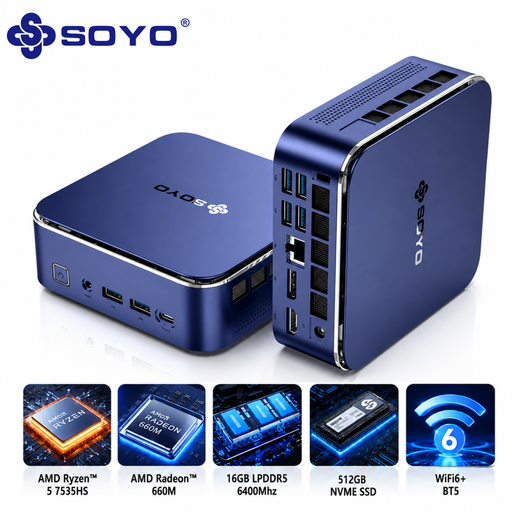
SOYO S5Air, AMD Ryzen 5 7535HS, 16 GB, 512 GB NVMe SSD
A Windows mini PC option if the listed configuration meets your software and storage needs.
The product title lists Windows 11 Pro, 16 GB of memory and a 512 GB NVMe SSD. The product description lists HDMI, DisplayPort, USB-C and six USB 3.0 ports; check that they suit your monitors and drives.
View at Joybuy
 No image available
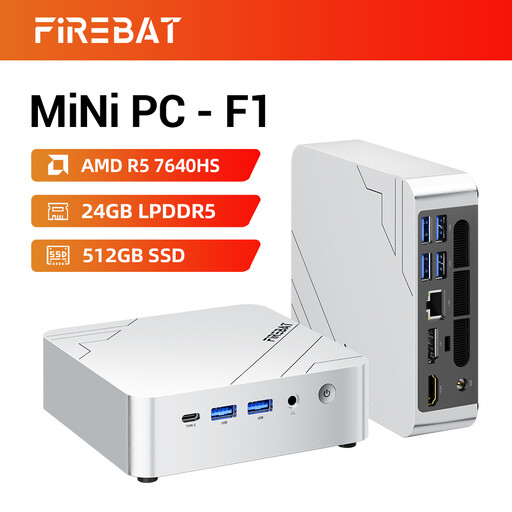
FIREBAT F1, AMD Ryzen 5 7640HS, 24 GB, 512 GB PCIe 4.0 SSD
A compact PC option if the listed configuration suits your workspace and editing software.
The product title lists 24 GB of LPDDR5 memory, a 512 GB SSD, USB 4.0 and HDMI 2.1 connections. These details don’t confirm how quickly a specific editing project will run.
View at Joybuy
 No image available
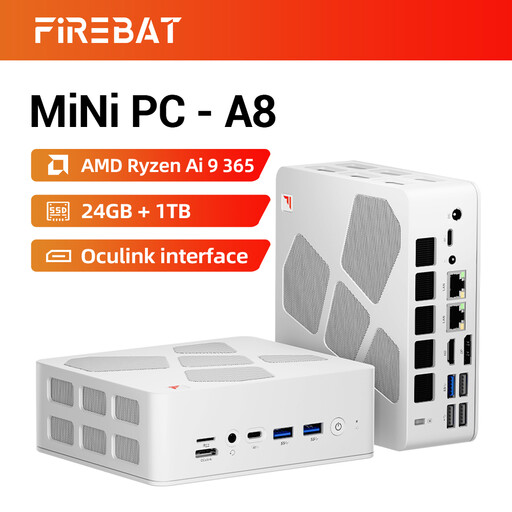
FIREBAT A8, AMD Ryzen AI 9 365, 24 GB, 1 TB PCIe 4.0 SSD
An option to compare if you need space for projects and cache as well as your editing files.
The product title lists 24 GB of DDR5 memory, a 1 TB SSD, USB4, HDMI 2.1 and OCuLink connections. Work out how much storage your own files need.
View at Joybuy
 No image available
MSI CUBI NUC AI 1UMG-005EU, Intel Core Ultra 7 155H, 16 GB, 1 TB SSD
A Windows mini PC option if you’re looking for a configuration with the listed storage capacity.
The product title lists Windows 11 Pro, 16 GB of memory and a 1 TB SSD. The product description says it supports up to four displays; check that the connections suit your monitors.
View at Joybuy
Frequently asked questions
Is a 512 GB SSD enough for my interview footage?
It depends on the size of your source files, other projects and how much space you need for cache. Add up the required space first. Adobe recommends fast SSD or NVMe storage for media and cache; external storage may be an option if your internal space is limited.
Can proxies help if my timeline plays back slowly?
In Adobe Premiere, proxies can help you edit suitable large video clips. They’re lower-resolution copies; check that your clips and workflow are suitable for them.
Do I need to install a barebone PC myself?
For the ASUS NUC 15 Pro kits reviewed, ASUS says that memory and storage aren’t included and that there’s no pre-installed operating system. Check which components are included with the configuration you’re considering.
What warranty applies to a purchase as a consumer in the Netherlands?
Your statutory rights when buying as a consumer are separate from a commercial manufacturer’s warranty or service agreement. According to ACM ConsuWijzer, the seller is responsible if a product doesn’t meet what you could reasonably expect when used normally; a solution could be a repair, replacement or, in some cases, a refund.
Can I return a mini PC bought online if it isn’t right for me?
Online consumer purchases generally come with a statutory cooling-off period. ACM ConsuWijzer says this ends 14 days after delivery, subject to exceptions. Check whether an exception applies, and distinguish this statutory right from any longer voluntary returns policy.


