
Writers with limited desk space
You share a small work surface and want to keep the computer out of the way without being tied to one screen position. Lenovo says the ThinkCentre M70q Gen 5 can be mounted behind a monitor or under a desk.


If you share a desk with limited space, a mini PC with a separate monitor gives you the flexibility to position the computer and screen independently. An all-in-one is better suited to anyone who wants a single integrated setup, while a larger desktop or tower is an option if you have the space. Whichever you choose, check that the software, connections and included components suit your workspace.
You share a small work surface and want to keep the computer out of the way without being tied to one screen position. Lenovo says the ThinkCentre M70q Gen 5 can be mounted behind a monitor or under a desk.
You switch between your text, source material and reference management software as you write. Check in advance that the software, monitors and connections suit the way you work.
If other people use the same PC, separate user accounts and a plan for your files are important, whatever the form factor. Microsoft and Apple explain how to set up separate accounts in Windows and macOS.
A good fit if: you share a small desk and want to position the computer and monitor separately.
Bear in mind: a monitor and input devices aren’t included with every version; the ASUS NUC 14 Pro Kit is supplied without a pre-installed operating system, memory or storage.
A good fit if: you value an integrated setup more than being able to position the computer and monitor separately.
Bear in mind: check the adjustability and connections of the specific model; Dell offers all-in-ones as well as desktops.
A good fit if: you have space under or beside your desk and want to keep the monitor separate.
Bear in mind: measure the case and allow for cables and peripherals too; a larger size doesn’t, in itself, tell you anything about performance or expandability.
First, work out how the computer and monitor will fit on the shared desk. Then check the software, accounts and full contents of the version you’re considering.
| Priority | What to check before buying | Who should consider this? |
|---|---|---|
| Space and screen position | Check the mounting options, monitor adjustability and whether the computer is compatible with the screen you want to use. | If I share a small work surface, I want to leave room for writing and position the screen comfortably. Around 33% of consumers put space and screen position first. |
| Writing workflow and software | Check the required software version, operating system, configuration and video outputs. | If I often switch between my text, PDFs and reference management software, I want to know that my software and screen setup will work together. Around 27% of consumers prioritise their writing workflow. |
| Accounts and files | Check whether users can have separate accounts and how you can back up attachments and your manuscript. | If other people use the computer too, I want to keep my files and settings separate and save a copy of my work. Around 20% of consumers prioritise shared computer use and keeping their files safe. |
| Complete setup | Check whether the monitor, keyboard, mouse, cables, storage and operating system are included with the version you’ve chosen. | I want to know in advance which components I’ll still need to use the computer. Around 20% of consumers mainly want to see what’s included in the complete setup. |
ASUS distinguishes between the NUC 14 Pro Mini PC and a Kit, which comes without a pre-installed operating system, memory or storage.
Check the full product number and what you’ll need for your setup before comparing versions.
A Kit may still need memory, storage, an operating system or installation.
For the ThinkCentre M70q Gen 5, Lenovo states that a monitor, wireless keyboard and mouse are sold separately.
Make a list of the components you already have and check what’s included with each version you’re considering.
You may still need a suitable monitor, keyboard, mouse or cable.
Separate accounts help users keep their settings and files apart. Zotero says that data syncing does not automatically sync attachments such as PDFs.
Use your own accounts and check that attachments are syncing. Keep a separate backup of your manuscript too.
The ThinkCentre M70q Gen 5 Tiny is a compact business Windows option if you want to position the computer behind a monitor or under a desk.
HP positions the Pro Mini 400 G9 as a compact business desktop for small, varied workspaces.
The Mac mini is a compact macOS option if the writing and study software you need works on macOS.
Dell offers the Pro Micro QCM1250 as a business micro desktop, as well as larger desktop form factors and all-in-ones.
The NUC 14 Pro is a small PC for anyone choosing between a fully equipped version and a kit that still needs to be built up.
These mini PC picks are designed for a setup with a separate monitor at a shared desk.
 No image available
A mini PC option for a workspace with a separate monitor.
Windows 11; Bluetooth 5.2; Wi-Fi 5.
 No image available
This mini desktop is an option if you’re looking for a computer to use with a separate monitor.
Windows 11 Home; Intel Graphics; Wi-Fi 7; Seashell.
 No image available
A mini PC worth considering for a desk where the computer and monitor are positioned separately.
 No image available
A mini PC for a workspace with a separate monitor.
Wi-Fi 6; Bluetooth 5.2; support for three 4K monitors.
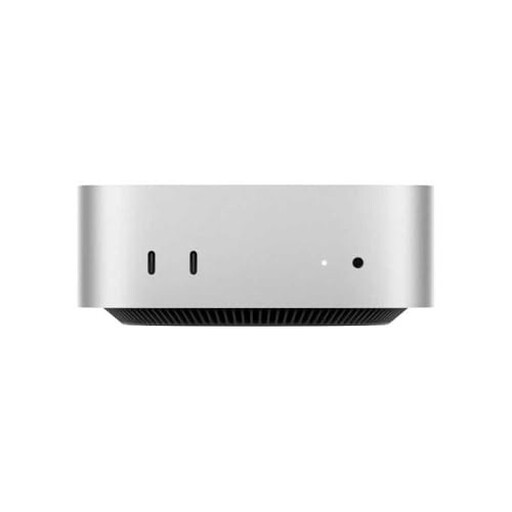 No image available
This mini desktop is an option if the software you need for your dissertation works on macOS.
10-core CPU; 10-core GPU.
Not necessarily; first check what you already have and what comes with the desktop you’ve chosen. Arboportaal outlines specific requirements for employees who use display screens for more than two hours a day. This doesn’t automatically mean the same requirements apply by law to every student.
Create a separate account for each user. Microsoft and Apple explain how to set up separate accounts for Windows and macOS respectively. You should also agree who will take care of updates, backups and administration.
Not automatically: Zotero distinguishes between syncing library data and syncing attachments. Check the attachment settings and keep a recent backup of your work files too.
According to ACM ConsuWijzer, online consumer purchases generally come with a 14-day cooling-off period from delivery, subject to legal exceptions. Your statutory guarantee is separate from any manufacturer’s or retailer’s guarantee: the retailer must supply a product that meets what you could reasonably expect from it.
It depends on the personal data you process, your role and your institution’s rules; sharing a desk alone doesn’t determine this. The Dutch Data Protection Authority outlines security obligations for organisations that process personal data. Ask your department about the procedures to follow if your research includes personal data.