Choose a ready-to-use mini PC if you want to get started without installing components yourself; an expandable kit is a better fit if you want to choose your own memory, storage and operating system. For local dataset analysis, the RAM actually installed matters more than the stated maximum capacity, and positioning your screen can help prevent window glare — a faster PC cannot. Before buying, also check the exact configuration, included power supply and applicable product compliance information.
Who is this choice relevant to?
Explorer of larger datasets
You analyse data locally and want to match the installed and expandable RAM to your dataset and analysis method. pandas explains that processing data in memory becomes more challenging when datasets are larger than the available memory.
Analyst who wants to get started straight away
You want to get started without building a PC yourself, so you compare complete configurations with kits. ASUS states that the NUC15CRS-B comes without memory, storage or a pre-installed operating system; Lenovo and MSI specify complete configurations.
Analyst working beside a sunny window
You spend a lot of time reading tables and charts in daylight and want to reduce reflections on your screen. Arboportaal advises positioning your line of sight parallel to the window when working at a screen.
What should you look for when choosing?
Expandable barebone kit
A good fit if: you want to choose your own RAM, SSD and operating system for your analysis tasks.
The trade-off: configuration flexibility means sourcing and installing separate components; the ASUS NUC15CRS-B is supplied without them.
Ready-to-use business mini PC
A good fit if: you would rather start with a complete configuration than install components yourself.
The trade-off: assess the RAM supplied against the way you work; a complete configuration is not automatically suitable for every dataset.
| Consideration |
What should you check? |
Who is this important for? |
| Memory for local analysis |
Compare the installed RAM and memory slots with your dataset and analysis method; maximum capacity does not mean memory is included. |
I want to know whether the RAM suits my data and how I work, not just how much could be installed later. Around 33% of consumers give memory for local analysis top priority. |
| Ready to use or build it yourself |
Check whether RAM, an SSD and an operating system are included for the exact product code. |
I want to get started without building a PC and know in advance which components I still need. Around 27% of consumers prioritise a ready-to-use configuration. |
| Screen readability in daylight |
Check the screen's position relative to the window and make sure its video output is compatible with your monitor. |
I want to read tables and charts without daylight from the window getting in the way. For around 20% of consumers, readability in daylight comes first. |
| Connections and data files |
Compare the video and USB connections you need with the exact configuration; also check the installed SSD and available expansion options. |
I want to connect my screens and external files without finding out later that I'm short of ports or storage. Around 20% of consumers give connections and storage top priority. |
The amount of memory you need for dataset work depends on both the dataset and the analysis method. DuckDB supports certain workloads that are larger than the available RAM, but that does not mean every analysis has the same memory requirements. A bright workspace is a separate consideration: first position your screen and manage the light from the window, then check which video connection you need.
Common buying mistakes
-
Confusing maximum expandable RAM with the memory included
The ASUS kit we looked at is supplied without RAM. According to MSI, the memory slots are occupied on the MSI configuration we looked at, so upgrading may mean replacing modules.
For the exact configuration, check the installed RAM, which slots are occupied and the maximum capacity separately.
Practical implication: you may need extra memory modules, and installing them will take time.
-
Choosing a faster PC to fix screen reflections
A different mini PC will not stop light from the window falling on your monitor; the issue is the screen's position and the direction of the light.
First adjust the screen's position relative to the window and consider whether you need window coverings.
Practical implication: you may need to adjust your monitor setup or use window coverings.
-
Comparing a kit directly with a complete PC
The ASUS kit we looked at is missing components that are specified as included with the Lenovo configuration we looked at. The contents of a kit and a complete configuration are therefore not directly comparable.
Only compare them once you know which components and installation are needed for a complete, usable configuration.
Practical implication: a kit may still require RAM, an SSD, an operating system and time to install everything.
Brands to consider
ASUS
The Dutch NUC 15 Pro+ specification describes the NUC15CRS-B as a kit for people who want to choose their own components.
- ASUS lists two memory slots and two M.2 storage positions for this configuration.
- According to ASUS, memory, storage and a pre-installed operating system are not included; this does not automatically apply to other ASUS mini PCs.
MSI
The Cubi NUC AI 1UMG-005EU is a specified complete configuration for people who do not want to start with an empty kit.
- For this configuration, MSI lists Windows 11 Pro, 16 GB RAM and a 1 TB SSD.
- According to MSI's specifications, both memory slots are occupied; check which modules need replacing if you want to upgrade.
Lenovo
The ThinkCentre M75q Gen 5 with product code 12RQ003QEZ is a specified business mini PC.
- For this product code, Lenovo lists Windows 11 Pro, 16 GB RAM, a 512 GB SSD and three years of on-site service.
- Lenovo's statements about productivity and security are manufacturer claims, not performance measurements for your datasets.
HP
The Elite Mini 800 G9 in configuration 622W3ET#ABH is another business option to consider.
- For this configuration, HP lists Windows 11 Pro, 16 GB RAM and a 512 GB SSD.
- HP's claim about processing large sets of figures is not an independent benchmark for your dataset work.
Joybuy mini PCs for this workspace
This selection includes mini PCs with different RAM, storage and operating system configurations for local dataset work and screen setups. Compare the specifications with the way you work and the equipment you want to connect.
 No image available
SOYO Y5Pro Mini PC, Intel Core i5 8250U/8350U
A good fit if you want a mini PC with Windows and storage included in the configuration.
The product title lists Windows 11, 8 GB DDR4 and a 256 GB SATA SSD. The description mentions two HDMI outputs and one Type-C video output. Whether 8 GB RAM is enough depends on your dataset and analysis method.
View at Joybuy
 No image available
NVIDIA DGX Spark Founders Edition, 128 GB RAM, 4 TB SSD
A good fit if you want plenty of installed RAM and SSD storage for local dataset work.
The product title lists 128 GB RAM, a 4 TB SSD and NVIDIA DGX OS. The description mentions HDMI and USB-C video outputs and support for multiple screens.
View at Joybuy
 No image available
ASUS Ascent GX10 GX10-GG0003BN, 128 GB LPDDR5x, 1 TB SSD
A good fit if you want a mini PC with 128 GB RAM and a 1 TB SSD for local work.
The product title lists 128 GB LPDDR5x SDRAM and a 1 TB SSD.
View at Joybuy
 No image available
FIREBAT R3, AMD Ryzen 5 7430U, 16 GB RAM, 512 GB SSD
A good fit if you want a mini PC with the stated RAM and SSD configuration for local dataset work.
The product title lists 16 GB RAM, a 512 GB SSD, Wi-Fi 6 and support for 4K output across three screens.
View at Joybuy
 No image available
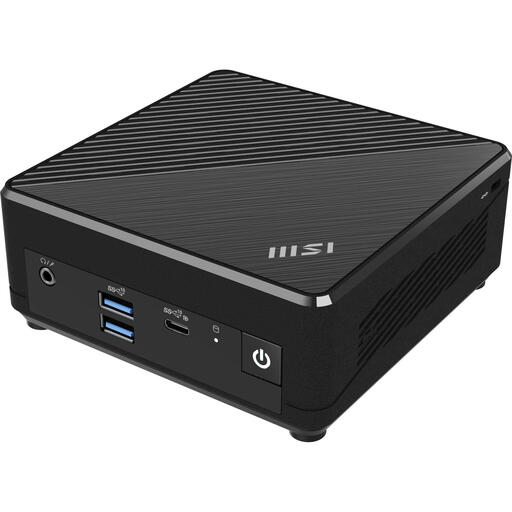
MSI Cubi N ADL S-078EU, Intel N100
A good fit if you want a compact mini PC with Windows and SSD storage; assess the RAM against your own analysis work.
The product title lists 4 GB DDR4, a 128 GB SSD and Windows 11 Pro. The description mentions VESA mounting and one HDMI port. Whether 4 GB RAM is enough depends on your dataset and analysis method.
View at Joybuy
Frequently asked questions
Can you tell how much RAM you need from the size of a dataset?
Not without taking your analysis method into account as well. pandas explains that intermediate steps can use extra memory, while DuckDB supports certain operations on data that is larger than the available RAM. So assess your own files and workflow instead of relying on a single fixed RAM threshold.
What can you do if the window is reflected on your screen?
According to Arboportaal, you can position your screen workspace so that your line of sight is parallel to the window. You could also consider window coverings if needed; this is workspace advice, not a mini PC specification.
Can you use a barebone kit straight away?
Not always. ASUS states that the NUC15CRS-B we looked at does not come with memory, storage or a pre-installed operating system. Check exactly what is included and which compatible components you will need before choosing this kit.
Who should you contact about a faulty mini PC bought in the Netherlands?
Contact the seller to make a claim under the statutory guarantee. According to the Dutch government, there is no fixed statutory guarantee period in the Netherlands; a manufacturer's guarantee is additional and does not replace your statutory rights.
Does a CE mark tell you how quickly datasets will be analysed?
No. CE marking relates to applicable EU product rules, not the processing speed of your datasets. The rules and conformity information that apply depend on the exact configuration and relevant product characteristics; check these details for the version sold in the Netherlands.


