What should you look for when choosing?
Ready-to-use Windows mini PC
A good fit if: you want to set up your route planner quickly without having to install components first.
Keep in mind: the chosen version determines how much memory and storage you get, so check that the configuration suits your needs.
Windows or Linux barebones PC
A good fit if: you want to choose the memory, storage and operating system yourself.
Keep in mind: buying the components and installing the system are part of this option.
Mac mini with M4
A good fit if: you want to plan routes as part of an existing macOS workflow.
Keep in mind: Apple’s support for two displays depends on resolution and refresh rate. Check that your software and peripherals are compatible too.
Before choosing a version, check that your monitors, route planner and preferred way of working are all compatible.
| What to consider |
Check before buying |
Who should pay particular attention? |
| Two separate displays |
Compare the outputs on the exact PC version with the inputs, resolutions and refresh rates of both monitors. |
If you want map details on the second screen while drawing a route, simultaneous support is essential; around 40% of consumers prioritise two screens. |
| Getting started straight away |
Check whether memory, an SSD and an operating system are included with each version. |
If you want to open your route planner without installing components first, a complete configuration matters more; around 25% of consumers prioritise being able to get started straight away. |
| Saving and sharing routes |
Check which file format your navigation device accepts and what your route planner’s export function includes. |
If you transfer routes to a navigation device, you’ll want to know which data is included in the file; around 17% of consumers prioritise route files. |
| Your complete setup |
Compare what’s in the box with what you already have, such as monitors, cables, a keyboard, mouse, memory and storage. |
If you still need components for your setup, you’ll want to see the full configuration at a glance; around 18% of consumers prioritise a complete setup. |
Mini PCs at Joybuy
Compare these compact mini PCs for a cycling route-planning setup. Check the video outputs on each version and make sure they work with your two monitors; the product names don’t provide the same information for every model.
 No image available
SOYO Y5Pro Mini PC, Intel Core i5 8250U/8350U, 8 GB DDR4, 256 GB SSD
This mini PC is an option to compare for a compact Windows setup; check the video outputs on the exact version to make sure they work with your two monitors.
The product name specifies Windows 11, 8 GB DDR4, a 256 GB SATA SSD, Bluetooth 5.2 and Wi-Fi 5.
Joybuy
 No image available
ASUS Ascent GX10 GX10-GG0003BN GB10, 128 GB LPDDR5x, 1 TB SSD
This mini PC is worth comparing if you’re looking for a compact computer; check the operating system and connections for both monitors before choosing.
The product name specifies 128 GB LPDDR5x memory and a 1 TB SSD.
Joybuy
 No image available
SOYO M5 Mini PC, AMD Ryzen 4300U, Windows 11 Pro, 16 GB LPDDR4, 512 GB SSD
This mini PC is worth comparing for a multi-screen setup; check the listed connections against your monitors’ resolution and refresh rate.
The product name specifies support for a triple-display setup, with HDMI 2.0, Type-C and DisplayPort 1.4. It also lists Wi-Fi 5 and Bluetooth 4.2.
Joybuy
 No image available
FIREBAT A8 Mini PC, AMD Ryzen AI 9 365, 24 GB DDR5, 1 TB SSD
This mini PC is worth comparing if you want to connect multiple screens; check that the listed connections work with your monitors and preferred display settings.
The product name specifies support for up to four 4K screens, HDMI 2.1, USB4 and Wi-Fi 6E. It also lists a 1 TB SSD, 24 GB DDR5 and Bluetooth 5.2.
Joybuy
 No image available
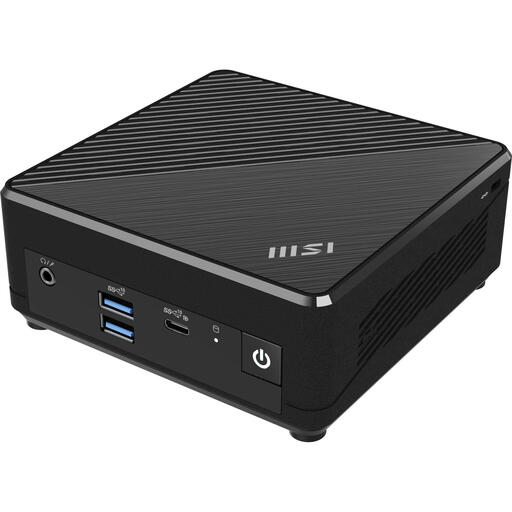
MSI Cubi N ADL S-078EU, Windows 11 Pro, 4 GB DDR4, 128 GB SSD
This compact Windows mini PC is worth comparing if you’re looking for a complete entry-level configuration; check that the memory and storage are suitable for your route planner and other applications.
The product name specifies Windows 11 Pro, 4 GB DDR4 and a 128 GB SSD. Check the video outputs on this exact version before connecting two monitors.
Joybuy
Frequently asked questions
How do you use two separate displays in Windows?
Connect both displays with suitable cables, then set them up separately in Windows. Microsoft Support explains how to rearrange detected displays and adjust the settings for each one; first, check that both physical connections are working.
Can you transfer a cycling route to your navigation device as a GPX file?
Yes, if your route planner offers GPX export and your navigation device accepts the file. Komoot says that the region where the route starts must be unlocked and that the export contains route geometry only, not added waypoints, voice navigation or Komoot maps.
Do you need to buy extra components for a barebones PC?
For the ASUS NUC 14 Essential Kit, yes: ASUS says it doesn’t include memory, storage or a pre-installed operating system. Check other kits individually, as the included components may vary between versions.
What rights do you have when shopping online in the Netherlands?
For a consumer purchase made at a distance, ACM ConsuWijzer says you generally have a 14-day cooling-off period after delivery, although exceptions may apply. If a product doesn’t meet what you could reasonably expect, your statutory guarantee applies alongside any manufacturer’s warranty, and the retailer is your point of contact. Business purchases and specific circumstances should be considered separately.
Which product safety rules apply to a mini PC in the Netherlands?
Electrical and electronic equipment placed on the market in the Netherlands must comply with the applicable European rules, as explained by the Dutch government. Check the product information and accompanying documentation for the version on offer.


