For planning routes in a browser, a mini PC with a suitable cooling design, a complete configuration and the right display connection matters more than extra processing power. If you work with maps locally or run several programmes at once, pay closer attention to memory and storage; also check how noisy the exact model is in use. If you use Garmin BaseCamp, check operating system compatibility too, especially on a Mac with Apple silicon.
Who is a mini PC for route planning suitable for?
Quiet-focused route planner
You mainly plan cycling routes in a browser and want as little noise as possible while you concentrate. Check the cooling design of the exact model, rather than relying on its compact size. MSI describes the Cubi N ADL S series as fanless.
Map and GPX file editor
You manage route files or use mapping software, so you’ll want to check that the memory, storage and operating system are suitable for your programmes. Komoot says that a GPX export includes the route geometry, but not added waypoints or maps.
Planner with existing equipment
You want to connect an existing screen or cycling device. Check which ports are available and whether your software runs on the operating system. Garmin describes BaseCamp as software for Windows and macOS; compatibility with Apple silicon has not been confirmed outright.
What should you look for when choosing one?
| What to consider |
What should you check? |
Who is this important for? |
| Noise |
Check whether the exact model is fanless; a small case alone tells you nothing about its cooling design. |
If I work in a quiet study, I want to know what cooling design my chosen model has. Around 36% of consumers prioritise a quiet workspace. |
| Browser-based planning |
Check the operating system, the display connection you need and whether the configuration suits the way you use your browser. |
If I mainly plan cycling routes on websites, I want a setup that supports my screen and everyday workflow. Around 29% of consumers prioritise straightforward route planning in a browser. |
| Maps and files |
Check how much memory and storage the model has, and whether you can upgrade them later. |
If I manage route files locally or do more extensive mapping, I want to factor in my software and storage needs beforehand. Around 21% of consumers prioritise GPX file management and mapping. |
| Connections and software |
Check that you have the video and USB ports you need, and that the operating system is compatible with your cycling software. |
If I want to keep using my existing screen or Garmin equipment, I want to know in advance whether the connections and software will work together. Around 14% of consumers give the most weight to existing equipment and software compatibility. |
What to consider when buying and using one
-
The Cubi N ADL model name doesn’t tell you the cooling design
MSI distinguishes between the fanless Cubi N ADL S series and models with a fan. So a compact size doesn’t mean a particular model will be quiet.
Compare the full model code and check the cooling design of the model you’re considering.
-
Assuming a basic configuration will automatically suit all mapping tasks
According to MSI, the Cubi N ADL S-078EU has 4 GB of memory and a 128 GB SSD, with support for up to 16 GB of memory. That doesn’t automatically make this model suitable for large projects or running many applications at once.
Think about which software and files you’ll use, and check the upgrade options for this exact model.
Upgrading the memory or storage later may involve extra steps.
-
Expecting a GPX export to include all route information
According to komoot, a GPX export includes the route geometry, but not added waypoints, voice navigation or komoot maps. The start region must also be unlocked before you can export.
Before setting off, check that the export file contains the information you need on your own device.
-
Only factoring the mini PC into your workspace setup
The monitor and keyboard are sold separately with the Lenovo ThinkCentre model reviewed.
Check which peripherals and cables you already have and which connections you need.
If you don’t already have a screen or keyboard, you’ll need to arrange these separately.
Brands to compare for this kind of use
MSI
The Cubi N ADL S series is worth considering if fanless cooling is important to you.
- MSI describes the S series as fanless.
- The specific S-078EU configuration has 4 GB of memory and a 128 GB SSD; don’t assume these specifications apply to all Cubi models.
Lenovo
The Dutch ThinkCentre Neo 50q Gen 4 Tiny model 12LM006LEZ is a pre-configured Windows option.
- Lenovo specifies 16 GB of RAM, a 512 GB SSD and Windows 11 Pro for this model.
- The monitor and keyboard are sold separately; this configuration doesn’t indicate how noisy it is in use.
Apple
The Mac mini is a macOS option for browser-based planning and mapping software available for macOS.
- Apple lists an M6 chip, 16 GB of memory and a 256 GB SSD for the Dutch basic configuration.
- Garmin describes BaseCamp for Mac as designed for Intel Macs; Rosetta may be needed on Apple silicon. The specifications don’t tell you how noisy it is.
HP
The Pro Mini 400 G9 is a business-focused Windows option; the Dutch model discussed is 9H6Z2ET#ABH.
- HP specifies 16 GB of RAM, a 512 GB SSD and Windows 11 Pro for this model.
- Manufacturer claims about security or performance aren’t independent tests of route planning or noise levels.
ASUS
The ExpertCenter PN42 series is a fanless alternative worth looking into for straightforward route planning.
- ASUS describes the PN42 as available with N100 or N200 processors and configurable ports.
- The available model information relates to the US market and doesn’t confirm a specific Dutch configuration.
Mini PCs at Joybuy for route planning
These Windows mini PCs are suited to browser-based planning and, depending on your software and configuration, local route or mapping work. If you’ll use one in a quiet room, check the cooling design of the exact model; only the MSI Cubi N ADL S series is described here as having fanless cooling.
 No image available
ACEMAGIC AK1PLUS, Intel Celeron N5095
A Windows mini PC to consider for browser-based planning; check the cooling design of this model if keeping noise to a minimum is important.
16 GB LPDDR4X memory, 256 GB SSD, HDMI 2.0 and Windows 11 Pro.
View at Joybuy
 No image available
ACEMAGIC E3B, AMD R5 7430U
A Windows mini desktop to consider if you want to manage route files locally as well as plan routes in a browser; choose a configuration that suits your own software.
16 GB LPDDR4X memory, 512 GB SSD, HDMI 2.0, DisplayPort 1.4b, USB-C and Windows 11 Pro.
Check the cooling design of this model if noise is an important factor.
View at Joybuy
 No image available
SOYO S5Air, AMD Ryzen 5 7535HS
This Windows mini PC has a specified memory and storage configuration to consider when choosing a computer for local route or mapping work. Check that it suits the programmes you use.
16 GB LPDDR5 memory, 512 GB NVMe SSD, HDMI, DisplayPort, USB-C and Windows 11 Pro.
Check the cooling design of this model if you’ll be using the computer in a quiet study.
View at Joybuy
 No image available
MSI Pro DP21 14M-1042EU, Intel Core i7-14700
A Windows mini PC to compare if you store route files locally; check whether this configuration suits your needs based on the software you use.
16 GB DDR5 memory, 1 TB SSD and Windows 11 Pro. The product description lists HDMI and DisplayPort connections.
Check the cooling design of the exact model if noise levels are important.
View at Joybuy
 No image available
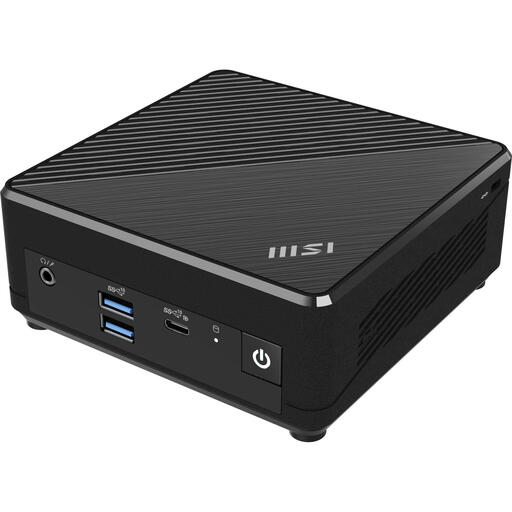
MSI Cubi N ADL S-078EU, Intel N100
According to MSI, the Cubi N ADL S series is fanless. This model could suit browser-based planning if fanless cooling is your priority; make sure the configuration also meets the needs of your software and files.
4 GB DDR4 memory, 128 GB SSD and Windows 11 Pro. MSI states that the S-078EU supports up to 16 GB of memory.
Don’t assume that 4 GB of memory and 128 GB of storage will be enough for large mapping projects or running many applications at once without checking first.
View at Joybuy
Frequently asked questions
Do you need QGIS to plan a cycling route?
Not if a web-based route planner meets your needs: komoot describes planning routes and adjusting them with waypoints on its website. QGIS is separate mapping software; choose this option if you want to do more extensive mapping locally.
What does a komoot route include when you export it as a GPX file?
According to komoot, the export includes the route geometry, but not the waypoints, voice navigation or komoot maps added during planning. The region where the route starts must also be unlocked.
Can Garmin BaseCamp run on any mini PC?
No. Garmin lists Windows and macOS as supported operating systems, but not Linux. Garmin describes the Mac version as designed for Intel Macs; Rosetta may allow it to run on Apple silicon, but check that it suits your setup.
What should you check when putting together a mini PC workspace?
Check whether a monitor, keyboard and any cables you need are included, and whether your screen can connect to one of the available video outputs. Lenovo states that the monitor and keyboard are sold separately for the ThinkCentre Neo 50q Gen 4 Tiny 12LM006LEZ.
What rights do you have in the Netherlands when you buy a mini PC online?
According to ACM ConsuWijzer, online purchases generally come with a statutory cooling-off period that ends 14 days after delivery, subject to applicable exceptions. If a product is faulty, you also have statutory guarantee rights against the seller; these rights aren’t automatically limited to a fixed two-year period.


