If fan noise is your main concern and your builds are modest, prioritise silence. For larger builds that regularly run in parallel, a suitable actively cooled system is another option to consider. Neither choice alone tells you how quickly your projects will compile or how quiet the PC will be under load. So check the exact processor, memory, storage, operating system and applicable CE marking of the version you’ll receive.
Who is this choice relevant to?
Programmers who prioritise silence
If you work in a quiet room and are happy to accept longer build times when needed to avoid fan noise, a fanless design is worth exploring. ASUS describes the ExpertCenter PN42 as fanless, but that alone says nothing about the compile time of a specific version.
Programmers who regularly run large builds
For larger projects with parallel build tasks, the processor and memory configuration are important factors to consider. Kitware documents that CMake can limit the number of simultaneous build tasks; this is not a performance measurement of any specific mini PC.
Developers who want to configure their own system
If you want to choose the memory, SSD and operating system yourself, check in advance which components are included with the exact version. MSI lists expansion options for the Cubi NUC 1M series; with a barebone, you’ll also need to factor in configuration and installation.
Which buying concerns matter?
Fanless
A good fit when: you want to avoid fan noise from the PC itself and silence matters more to you than short build times for larger projects.
Trade-off: ASUS describes the PN42 as fanless, but that doesn’t prove how quickly a specific configuration will run your builds.
Upgradeable barebone
A good fit when: you want to choose and install your own memory, storage and software.
Trade-off: check which components are missing and allow for the extra configuration and installation work.
Pre-configured mini PC
A good fit when: you want to assess a specific combination of processor, memory, storage and operating system.
Trade-off: check what’s included for each order number; a configuration might include memory but not an SSD, for example.
Also check that the exact version you receive carries the applicable CE marking. The Dutch government lists electronic devices as products that require this marking; a general model description does not automatically confirm that every individual unit carries it.
| Buying concern |
What to look for |
Who does this matter to? |
| Noise while compiling |
Check whether the exact model is fanless, or look for a noise measurement under load that includes the testing conditions. |
In a quiet study, my main priority is avoiding fan noise that could disrupt my work. Around 31% of consumers put silence at the top of their buying priorities. |
| Speed with parallel tasks |
Check the processor version and your build tool’s parallel settings; if possible, look for tests of long-running builds for similar projects. |
For larger projects, I regularly want to run several build tasks at once, so I need to weigh up the processor and configuration carefully. Around 31% of consumers put build speed first. |
| Memory and storage |
Check the installed RAM and SSD separately from the supported maximums, and look at the slots and upgrade options. |
If I want to tailor my development environment, I need to know what I can upgrade and what’s already built in. Around 23% of consumers prioritise memory and expandability. |
| Supplied complete |
For each order number, check whether memory, storage and an operating system are included, and what still needs to be installed. |
I want to know whether the mini PC will be ready for my development environment when it arrives and which components I’ll need to source myself. Around 15% of consumers prioritise being ready to use. |
Common buying mistakes
-
Comparing a barebone as if it were a complete PC
Support for memory or storage doesn’t mean those components are included. The operating system and any necessary configuration may also need your attention.
Check everything included in the box and list the components and installation steps your development environment requires.
-
Assuming noise at idle is the same as noise during a build
MSI publishes separate noise figures for idle and full load. Without the same testing conditions, figures from different devices aren’t directly comparable and won’t necessarily predict how a PC will sound in your study.
Where possible, look for data under sustained load and check the testing conditions and distance from your workstation.
-
Automatically choosing fanless for large parallel builds
The ASUS ExpertCenter PN42 is fanless, and the series mentioned uses Intel N100 or N200 processors. Build tools such as CMake can run multiple tasks at once; the available information doesn’t establish how long a specific configuration will take to complete your builds.
Consider the size and frequency of your builds alongside your need for quiet, and check the processor in the exact version.
Brands to consider
ASUS
The ExpertCenter PN42 offers a fanless option; the NUC 15 Pro kit is for those who want to choose their own components.
- ASUS describes the PN42 as fanless.
- For the NUC 15 Pro kits reviewed, ASUS lists no pre-installed operating system, memory or storage. The PN42 and NUC kit are different configuration options, not evidence of equal compile performance.
MSI
The Cubi NUC 1M series offers a compact, upgradeable barebone option.
- MSI lists two memory slots and storage upgrade options for the series.
- The series’ noise figures are manufacturer data; without matching testing conditions, they don’t provide an independent comparison between models.
Lenovo
The ThinkCentre M75q Gen 5 is a business mini PC series whose specific configuration you can assess by order number.
- Lenovo Netherlands lists 32 GB RAM for order number 12RQCTO1WWNL1.
- For this configuration, the hard drive is listed as ‘None’. The series name doesn’t prove that every version is complete or quiet under the load of compiling.
Joybuy products for development work
These mini PCs offer configurations for development work, from systems with plenty of memory to a barebone you can build yourself. The product details don’t prove compile times or noise levels during your builds; also check the CE marking for the exact version.
 No image available
NVIDIA DGX Spark Founders Edition GB10, 128 GB RAM, 4 TB SSD
If you’re looking for a generous memory configuration for development work, the product title lists 128 GB RAM; this isn’t a compile test.
The title lists a GB10 processor, a 4 TB SSD and DGX OS. Leave at least 10 cm of space around the PC for ventilation.
View at Joybuy
 No image available
ASUS Ascent GX10 GX10-GG0003BN GB10, 128 GB LPDDR5x, 1 TB SSD
If you’re considering a high-memory configuration for development work, the product title lists 128 GB LPDDR5x; this doesn’t demonstrate performance on any specific build.
The title lists a GB10 processor and a 1 TB SSD. Make sure there’s enough airflow around the PC.
View at Joybuy
 No image available
FIREBAT R3 AMD Ryzen 5 7430U, 16 GB RAM, 512 GB SSD
For a compact workstation, the product title lists a mini PC with a Ryzen 5 7430U, 16 GB RAM and a 512 GB SSD.
No compile time has been established for this configuration; assess the processor and memory configuration against your own projects.
View at Joybuy
 No image available
MSI Cubi NUC AI 1UMG-005EU Core Ultra 7 155H, 16 GB DDR5
If you want to assess a pre-configured PC for development work, the product title lists a combination of processor, memory, storage and operating system.
The title lists a 1 TB SSD and Windows 11 Pro. Keep the ventilation openings clear; the stated specifications aren’t a measurement of compile performance.
View at Joybuy
 No image available
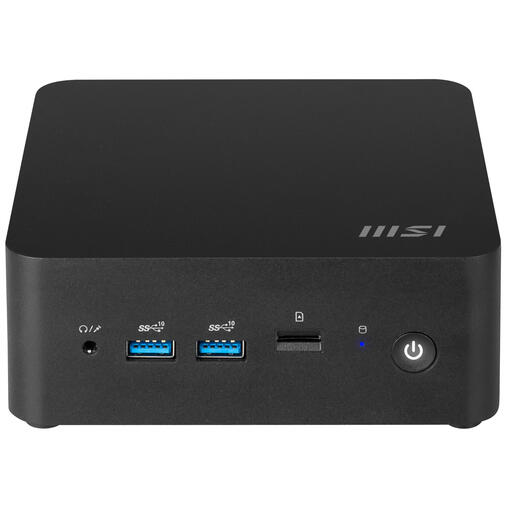
MSI Cubi NUC 1MG-237BEU Core 7 150U barebone
This barebone is worth considering if you want to configure and install your own memory, storage and software.
MSI lists two DDR5-SO-DIMM slots and support for up to 64 GB RAM for the Cubi NUC 1M series. Check which components are included with this version and keep the ventilation openings clear.
View at Joybuy
Frequently asked questions
Will a fanless mini PC make every build silent?
A fanless ASUS ExpertCenter PN42 doesn’t produce fan noise from the PC itself. Other sounds in your workspace, and the suitability or duration of your builds, haven’t been established.
What do you need to install yourself with a barebone?
Check what’s included with the exact version. For the NUC 15 Pro kits reviewed, ASUS lists no memory, storage or pre-installed operating system; you’ll need to source and install these components yourself.
Can you limit the number of parallel CMake build tasks?
Yes. For a CMake build, you can set the maximum number of simultaneous build tasks using CMAKE_BUILD_PARALLEL_LEVEL, as documented by Kitware. This setting doesn’t guarantee that a specific mini PC will finish a build within a given time.
Does a new mini PC need the applicable CE marking?
Where CE marking is required for the electrical product in question, the version must comply. The Dutch government lists electronic devices as products subject to this requirement; check the specific version you receive, as a general model page doesn’t prove that your unit carries the marking.
How can you tell whether memory or storage is already included?
Check what’s supplied with the exact order number and distinguish between installed components and what the model supports. A supported maximum memory capacity doesn’t mean that amount is already installed.


