First, choose a mini PC that works with your existing editing software and audio interface. Then compare the storage, ports and upgrade options of the exact configuration. Keep active Audacity projects on suitable local storage and make separate project backups: an exported broadcast doesn’t preserve the same editing options. A complete PC, a kit you assemble yourself and a Mac mini are different routes, so check the configuration and compatibility before you choose.
Who is this for?
Producer working with lots of project versions
You want to keep raw recordings, editable episodes and earlier versions organised. Check the storage in the configuration you choose, and allow for a separate backup. Audacity Support and the Audacity Manual describe project and backup features.
Recording with an audio interface
You connect microphones through an interface and want to know in advance whether the ports, operating system and drivers will work with your existing setup. Focusrite provides specific driver instructions for its Windows configuration; check the requirements for your interface.
Editorial team sharing a workspace
You’re looking for a compact computer for editing and other editorial tasks, and want to choose between a ready-to-use configuration and a kit you assemble yourself. ASUS describes different supply options for the NUC 14 Pro; Lenovo lists maintenance and upgrade options for the ThinkCentre M70q Gen 5 Tiny.
What should you look for when buying?
Start by checking compatibility with your software and audio interface. Then decide how many project versions you need to keep locally and whether you want to install the components yourself.
Complete Windows mini PC
A good fit if: you use Windows software and a Windows driver for your audio interface, and want to get started without assembling a PC kit yourself.
Bear in mind: components and what’s included can vary by configuration; check the full model code and the ports.
Windows kit to assemble yourself
A good fit if: you want to choose your own memory and storage and are happy to handle the installation.
Bear in mind: according to ASUS, the NUC 14 Pro Kit is supplied without memory, storage or a pre-installed operating system; the Mini PC is a different configuration.
Mac mini
A good fit if: your editing software, plug-ins and audio interface work with macOS, and you choose your storage configuration in advance.
Bear in mind: check that the storage you choose suits your project archive; a configuration specification doesn’t predict how your mixing workflow will perform.
| What to consider |
What should you check? |
Who is this important for? |
| Keeping project versions |
Check the supplied SSD, upgrade options and a separate backup routine. Don’t store an active Audacity project on an external drive, USB stick or network storage. |
If I want to keep several editable episodes and versions locally, I focus on storage and my backup routine. Around 31% of consumers put keeping project versions first. |
| Connecting an audio interface |
Check the required connection, operating system and driver for the exact interface model. |
If I want to keep using my existing interface for microphones, I want to know in advance whether it will work with the computer and its drivers. Around 25% of consumers give recording setup compatibility top priority. |
| Combining mixing and editorial work |
Compare the processor and memory configuration of the exact model, and check it against your own software and workflow. |
If I want to work with multiple audio tracks alongside other editorial tasks, I compare the PC’s configuration with my own software. Around 25% of consumers prioritise their mixing workflow. |
| Complete PC or kit |
Check whether memory, SSD, operating system, adapter and a suitable power cable are included with the full order code. |
If I want to do as little installation as possible, I want to know exactly which components are already in the box. Around 19% of consumers make the supply format and installation work required their top priority. |
Common pitfalls
-
Keeping only the broadcast mix
An exported audio file isn’t the same as the editable Audacity project, with its tracks and edits.
Keep the project and separate, dated project backups alongside the broadcast export.
-
Mistaking a kit for a complete computer
The ASUS NUC 14 Pro Kit and the NUC 14 Pro Mini PC aren’t supplied in the same way. According to ASUS, the Kit doesn’t include memory, storage or a pre-installed operating system.
Check what’s included with the exact order code and whether a suitable power cable is supplied.
-
Assuming any spare USB port will do
An available port doesn’t prove that your interface, driver and operating system will work together.
Check the interface model, required connection, operating system support and driver as a complete combination.
Brands and product ranges to consider
MSI
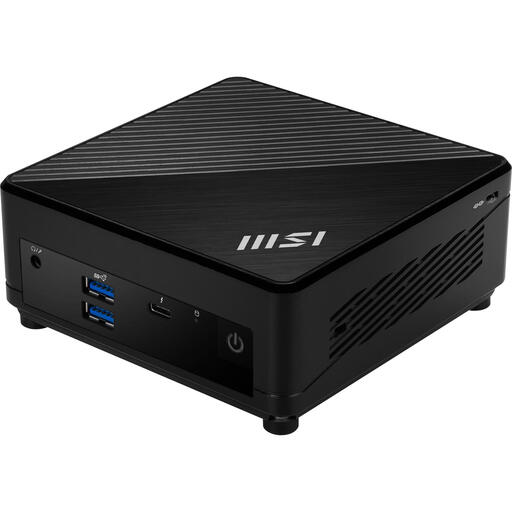
The Cubi 5 1M is a compact Windows range worth comparing if ports and expandable storage matter to you.
- MSI lists an M.2 storage slot, a space for a 2.5-inch drive and several USB ports for the Cubi 5 1M.
- The processor, memory and included components depend on the configuration. These specifications aren’t an audio performance test.
ASUS
The NUC 14 Pro is available as a Mini PC and as a Kit; check which format applies to the configuration you choose.
- ASUS lists two supported SSD slots.
- According to ASUS, the NUC 14 Pro Kit doesn’t include memory, storage or a pre-installed operating system. Some SKUs also don’t include a power cable; check the exact configuration.
Lenovo
The ThinkCentre M70q Gen 5 Tiny is worth considering for a compact, shared Windows workspace where maintenance and upgrades matter.
- Lenovo describes tool-free access to the memory and storage.
- This access doesn’t tell you how much memory or storage is installed in a specific configuration, or anything about its audio performance.
Apple
The Mac mini is a macOS option for anyone using software and recording equipment on that platform.
- Apple lists a Mac mini with M6 configuration featuring 16 GB of unified memory and a 256 GB SSD, as well as configurations with more storage.
- Check your archive’s storage requirements and whether your existing plug-ins and audio interface are compatible with the configuration you choose.
Products at Joybuy
This selection includes an MSI mini PC for anyone who’ll complete the setup themselves, and Mac mini configurations for a macOS setup.
 No image available
MSI Cubi 5 12M-405BEU, i7-1255U, 0.66L
A good fit if you want a compact PC for an existing interface and are happy to install the operating system yourself.
This listed configuration has an Intel Core i7-1255U processor and no operating system installed.
Check the included components, ports and any product documentation for the exact configuration.
View at Joybuy
 No image available
Apple Mac mini with M6 chip, 16 GB, 256 GB SSD
A good fit if you use your existing editing software, plug-ins and audio interface with macOS; check compatibility in advance.
This configuration lists a 12-core CPU, a 12-core GPU, 16 GB of memory and a 256 GB SSD.
View at Joybuy
No image available
Apple Mac mini with M6 chip, 16 GB, 512 GB SSD
A good fit if you use your existing editing software, plug-ins and audio interface with macOS; check compatibility in advance.
This configuration lists a 12-core CPU, a 12-core GPU, 16 GB of memory and a 512 GB SSD.
View at Joybuy
No image available
Apple Mac mini with M6 chip, 24 GB, 512 GB SSD
A good fit if you use your existing editing software, plug-ins and audio interface with macOS; check compatibility in advance.
This configuration lists a 12-core CPU, a 12-core GPU, 24 GB of memory and a 512 GB SSD.
View at Joybuy
Frequently asked questions
Is an exported audio file enough to edit an old mix later?
No, not if you want the same editing options in Audacity. Keep the editable project and separate project backups, as well as exporting the audio file you want to play or share.
Can I work on an Audacity project directly from an external drive?
Audacity advises against storing active projects on external drives, USB sticks or network storage while recording and editing. This advice is about working storage; it doesn’t rule out keeping a separate backup copy.
What should I check when connecting my existing audio interface?
First, check that the interface supports your chosen operating system and find out which connection it needs. For the Windows setup described by Focusrite, install the appropriate driver and select the Focusrite ASIO driver in your recording software. For other interfaces, follow the relevant manufacturer’s instructions.
Do I need to install components in a mini PC kit?
It depends on the configuration. ASUS states that the NUC 14 Pro Kit doesn’t include memory, storage or a pre-installed operating system. Check the power cable too; according to ASUS, some SKUs don’t include one.
What product safety rule applies to an electric mini PC in the Netherlands?
For applicable electrical equipment placed on the market in the Netherlands, the manufacturer must apply the CE marking once the technical and administrative requirements have been met, according to the Dutch government’s Business.gov.nl. A general product listing doesn’t confirm that a specific configuration has been assessed.


