What should you look for?
First, check that the rota app and monitor will work with the PC you have in mind. Then look at the complete configuration and user access options.
| What to consider |
What should you check? |
Who is this important for? |
| Access to the rota |
Work out whether the rota contains personal data, and check that you can set up suitable accounts and access permissions. |
If you want to decide who can view or edit the rota on a shared PC, access controls come first; around 33% of consumers say this is their main requirement. |
| Connections |
Check that the chosen model’s ports match the monitor input and the connections for your keyboard, mouse and network. |
If you want to keep using your existing monitor and peripherals, the connections need to be compatible; around 27% of consumers put connectivity first. |
| Software and everyday use |
Check the requirements of your rota app and which version of the operating system is installed. |
If you want to continue using your existing rota software, check that it’s compatible with the PC first; around 20% of consumers give this top priority. |
| Complete configuration |
Check whether memory, storage and the operating system are included, and whether you’ll need to install any components yourself. |
If you want to get started without fitting components yourself, you’ll need to know in advance what’s ready to use; around 20% of consumers say this is their main requirement. |
Mini PCs at Joybuy
These Joybuy products are mini PCs designed for compact desk setups. Check that the configuration, connections and operating system for each model work with your monitor and rota app.
 No image available
SOYO Y5Pro mini PC, Windows 11, 8 GB DDR4, 256 GB SSD
Worth considering if you’re looking for a mini PC with Windows 11 for rota management.
The product title lists 8 GB DDR4 and a 256 GB SSD. It also names two possible processor models: Intel Core i5 8250U/8350U.
View at Joybuy
 No image available
SOYO M5 mini PC, AMD Ryzen 4300U, Windows 11 Pro
Worth considering if you’re looking for a Windows 11 Pro configuration for managing the rota.
The product title lists 16 GB LPDDR4, a 512 GB SSD and an AMD Ryzen 4300U processor.
View at Joybuy
 No image available
FIREBAT R3 mini PC, AMD Ryzen 5 7430U
A mini PC worth considering for everyday office work at a desk.
The product title lists 16 GB RAM, a 512 GB SSD, Wi-Fi 6 and output for three 4K displays.
View at Joybuy
 No image available
FIREBAT F1 mini PC, AMD Ryzen 5 7640HS
Worth considering if you need multiple display outputs as well as a rota.
The product title lists 24 GB LPDDR5, a 512 GB SSD, three display outputs and 2.5G Ethernet.
View at Joybuy
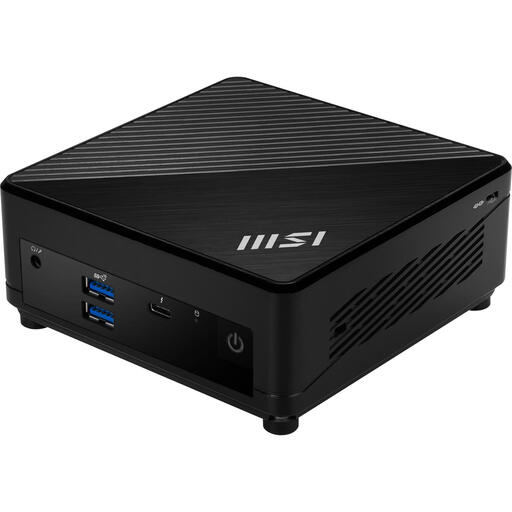 No image available
MSI Cubi 5 12M-002EU, Intel Core i5-1235U
Worth comparing if you’re looking for a compact mini PC with Windows 11 Pro.
The product title lists 8 GB DDR4 and a 512 GB SSD.
View at Joybuy
Frequently asked questions
Can I mount the mini PC behind my existing monitor?
Only if the PC model, monitor and mounting hardware are compatible. MSI lists VESA 100 × 100 mm for the Cubi N ADL family; also check that the power button and connections will remain accessible.
Can I use a barebone straight away to manage a rota?
Don’t assume so. Check whether memory, storage and an operating system are installed in the exact model you’re considering. The product description for the MSI S-225BEU identifies it as a barebone.
What does the end of Windows 10 support mean for a second-hand mini PC?
Microsoft ended regular free security updates and support for Windows 10 on 14 October 2025. If you want to use Windows, check which version is installed and whether the specific device meets the requirements for Windows 11.
What rights apply when buying a mini PC online?
For an online purchase covered by Dutch consumer law, you’ll generally have a statutory 14-day cooling-off period after delivery. ACM ConsuWijzer also explains that the seller is responsible for the statutory guarantee if a product is faulty. Check who the legal buyer is: a purchase made on behalf of the club isn’t automatically covered by the same consumer rules.
Does the club need to do anything about personal data on a shared PC?
If the club processes personal data in the rota, it must decide on appropriate security measures based on the risks, as required by the Dutch Data Protection Authority. Also decide who needs access; individual accounts and access permissions may be relevant. No mini PC specification can replace this kind of management.


