Start with the operating system that works with your DAW, plug-ins and audio interface. Then choose enough memory and storage for your projects. A complete mini PC needs less setup than a barebone model, while the latter gives you more choice over components but may require extra configuration. A small case alone tells you nothing about fan noise or performance while mixing.
Who is this for?
Mixer with an existing Windows audio setup
You want to keep using your DAW, plug-ins and audio interface. Check that the Windows version and driver on the mini PC you choose are compatible; Steinberg discusses ASIO-compatible audio hardware for low latency.
Choir editor working with lots of tracks
You’re combining vocal tracks and plug-ins, and want a computer that suits your projects. Ableton points out that the capacity you need depends on the number of tracks and the plug-ins you use.
Mixer with limited desk space
You want to leave room for a monitor and audio interface. So check the dimensions, ports and cable clearance of the exact model.
What should you look for?
| What to consider |
What to look for |
Who should prioritise this? |
| Software compatibility |
Compare your DAW version, plug-ins, interface and driver with the operating system on the exact model. Ableton recommends an ASIO driver for Live on Windows. |
I want to keep using my existing DAW, plug-ins and interface without having to replace anything that works. Around 31% of consumers prioritise compatibility with their existing audio setup. |
| Room for tracks and plug-ins |
Choose the processor and installed memory to suit the demands of your projects. Ableton lists 8 GB of RAM as the minimum for Live and recommends 16 GB or more; this isn’t a general requirement for every DAW. |
I want enough processing headroom for my own mix, especially with lots of vocal tracks and plug-ins. Around 25% of consumers prioritise this. |
| Positioning and connections |
Check the case dimensions, space for cables and ventilation, and whether the ports suit your interface and monitor. A manufacturer’s cooling claim isn’t an independent noise measurement. |
I want to fit the computer, interface and monitor on a small desk without missing any connections I need. Around 25% of consumers put positioning and connections first. |
| Storage and back-up |
Check that the installed SSD has enough space for recordings, project files and exports, and arrange a separate back-up. Ableton lists external storage as a back-up location for Live projects. |
I want to keep my original recordings and projects, and be able to restore a separate copy. Around 19% of consumers give storage and back-up top priority. |
Pitfalls to avoid when buying
-
Assuming a barebone is ready to use straight away
A barebone may come with different components from a complete mini PC. ASUS distinguishes between the NUC 14 Pro Kit and the Mini PC; the Kit is supplied without installed memory, storage or an operating system.
Compare everything included with the exact model before weighing up your options.
-
Assuming the DAW’s minimum requirements guarantee smooth mixing
Ableton says that actual requirements depend on the number of tracks and the plug-ins you use. So a minimum specification doesn’t tell you how your choir project will run.
Assess the demands of your own projects and the components actually installed, not just the minimum system requirements.
-
Storing everything on the internal SSD
If project files are lost or damaged, a separate back-up can help you restore them.
Set aside space for original files and exports, and make a separate back-up before you start mixing.
-
Assuming a small case means a quiet PC
The dimensions or a manufacturer’s description of the cooling system won’t tell you how noisy a particular model is in use.
Consider noise separately for the exact model, and don’t treat a manufacturer’s claim as an independent measurement.
Brands to consider
Apple
The Mac mini is a compact macOS option if your existing audio software and interface work with the configuration you choose.
- Apple lists 16 GB of unified memory and a 256 GB SSD for the Dutch-market M6 base model; larger storage capacities are available to configure.
- Check in advance that your software and equipment work with the Mac configuration you choose, and that it has enough storage. These are specifications, not performance measurements for choir mixing.
ASUS
The NUC 14 Pro is available as a complete Windows mini PC or as a Kit for those who want to choose their own components.
- ASUS lists 16 GB of memory, a 512 GB SSD and Windows 11 Home for the Dutch-market Mini PC model.
- The NUC 14 Pro Kit is supplied without installed memory, storage or an operating system. Its listed ports and case dimensions don’t tell you how noisy the fan is in measured tests.
Lenovo
The Yoga Mini Gen 11 is a compact Windows option. The ThinkCentre M75q Gen 5 Tiny is a separate range that gives you access to the memory and SSD.
- Lenovo lists a Core Ultra 5 325, 16 GB of memory and a 512 GB SSD for one Dutch-market Yoga Mini Gen 11 model.
- The memory in that Yoga model is soldered. The upgrade information for the ThinkCentre M75q applies to that product range and not automatically to the Yoga Mini.
MSI
The Cubi NUC AI 1UMG is a compact Windows range with several configurations.
- MSI lists Windows 11 Pro for the 1UMG-005EU model.
- Check the components included with the exact model. MSI’s product information isn’t an independent assessment of DAW performance or noise levels.
MINISFORUM
The UM890 Pro is a configurable mini PC range for those who want to consider storage expansion.
- The manufacturer offers a barebone model as well as versions with memory and an SSD.
- MINISFORUM’s statements about cooling and noise are manufacturer claims, not independent measurements. Check which components are included with the model you choose.
Joybuy product picks
Mini PCs for mixing a choir when desk space is limited, including a barebone option for those who want to configure their own system.
 No image available
FIREBAT F1 mini PC, AMD Ryzen 5 7640HS, 24 GB RAM, 512 GB SSD
This compact mini PC suits a workspace with limited room. Check that its connections and configuration work with your interface and DAW.
The product name lists a Ryzen 5 7640HS with 6 cores and 12 threads, 24 GB LPDDR5 RAM and a 512 GB PCIe 4.0 SSD.
Also listed: Radeon 760M graphics, USB 4.0 and HDMI 2.1.
Joybuy
 No image available
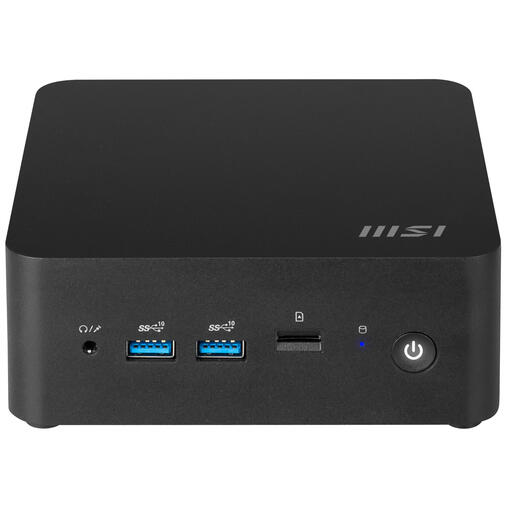
MSI Cubi NUC 1MG-237BEU barebone
Its 0.84-litre case suits a compact setup. As a barebone model, it needs configuring, so check which components are included with this version.
The product information lists an Intel Core 7 150U and support for up to 64 GB RAM.
Joybuy
Frequently asked questions
Do I always need an external audio interface for mixing?
No, you won’t need one for every editing project. If you use an existing interface or want to record and monitor with low latency, check the connection and driver; Ableton recommends an ASIO driver for Live on Windows. The number of inputs you need depends on your recording setup.
Is 8 GB RAM enough for a choir mix?
There’s no single rule that applies to every choir mix. Ableton lists 8 GB as the minimum and recommends 16 GB or more for Live; if you use lots of tracks or plug-ins, what you need depends on your project. Also check whether the memory in your chosen mini PC can be upgraded.
How can I avoid missing files when saving or transferring a mix?
Keep the associated audio files with the project and make a separate back-up. Ableton lists an external drive as a back-up location for Live projects; check which feature in your own DAW gathers all the media you’ve used.
What are my rights after buying online in the Netherlands?
For eligible distance sales from a business, you’ll often have a 14-day cooling-off period, subject to exceptions, according to the Dutch government. You’re also entitled to a legal guarantee for a product; this is separate from any manufacturer’s or additional warranty.
Can a choir publish a mixed recording without making further arrangements?
First check which rights and permissions apply to the recording and how you plan to use it. Performers have rights over the recording and use of their performances; permission may be needed to distribute or make copyright-protected music available to the public. If an organisation processes recordings that make people identifiable, the relevant GDPR rules also apply, including a lawful basis for processing and appropriate security. What’s required in a particular case depends on the people involved, the repertoire and how the recording will be used.


