
Card player with limited desk space
Wants to give their PC a small footprint, so compares its dimensions and options for placing it away from the desktop. ASUS and MSI publish dimensions for their compact models.


For digital card games at a small desk, a compact PC with integrated graphics is a sensible first option, as long as the exact configuration meets the game’s requirements. If you also play more graphically demanding games, a version with a dedicated graphics card may be a better fit. In either case, check the dimensions, monitor connections and included components before choosing.
Wants to give their PC a small footprint, so compares its dimensions and options for placing it away from the desktop. ASUS and MSI publish dimensions for their compact models.
Has a specific second game for which graphics performance may matter more than having the smallest possible PC. Wizards of the Coast publishes system requirements for MTG Arena; ASUS describes versions of the ROG NUC with dedicated graphics.
Wants to connect the PC to their existing monitor, mouse and keyboard, and avoid buying a kit without the components they need. ASUS and MSI list the connections and different configurations available for their compact PCs.
Start with the requirements of the games you play and the space you have available. Then check that the exact PC configuration is complete and connects to your monitor and peripherals.
The breakdown below covers consumers looking for a PC for card games at a small desk; each row links one main buying concern to the proportion of consumers who prioritise it.
| What to consider | What should you check? | Who is this important for? |
|---|---|---|
| Desk space | Compare the dimensions of the exact configuration with the space you have available. Remember to allow room for cables and ventilation openings too. | If I have limited desk space, I want to know how much room the case and cables will take up. Desk space is the main concern for around 36% of consumers. |
| Suitability for your games | Compare the requirements of the specific games you play with the processor, graphics card, memory and operating system of the exact configuration. | If you want to know first whether your card games and any other games will run, focus on the full configuration. Game compatibility comes first for around 29% of consumers. |
| Connections and what’s included | Check that the video output is compatible with your monitor and that memory, storage and an operating system are included. | I want to use my existing monitor and know whether I’ll need any extra components after delivery. Connections and a complete package are the main concern for around 21% of consumers. |
| Total cost and aftercare | Compare complete configurations and check which components are included and who you can contact with warranty questions. | Consumers who want to avoid unexpected additional purchases and are thinking about aftercare prioritise this. That’s around 14% of consumers. |
The name mini PC doesn’t tell you whether memory, storage and an operating system are included. ASUS distinguishes between a configured Mini PC and a Kit for the NUC 14 Pro.
Check what’s included with the exact configuration before comparing options.
A NUC 14 Pro Kit may need memory, storage and an operating system purchased separately.
A product label doesn’t confirm that a specific configuration meets the requirements of your games. Wizards of the Coast lists a minimum graphics requirement for MTG Arena.
Check the requirements of the specific games you play and compare them with the full configuration. Choose dedicated graphics hardware if you have a clear need for it for other games.
The usable space on a small desk also depends on the connections, cables and the room needed to keep ventilation openings clear.
Plan where the PC will go, how it will connect to your monitor and where the cables will run before choosing a configuration.
You may need a different position or connection solution if the cables won’t fit in the space you’ve measured.
The NUC 14 Pro is a range of compact mini PCs, while the ROG NUC is a separate range with more powerful graphics.
The ThinkCentre neo 50q Gen 5 is a compact desktop range for anyone looking for a configured PC with several connections.
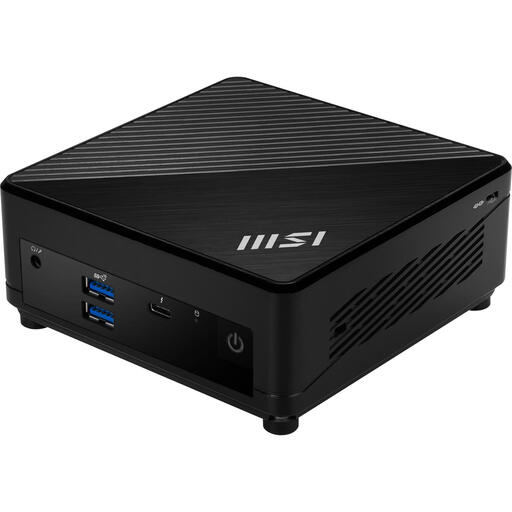
The Cubi 5 12M is a compact desktop range with HDMI, DisplayPort and a VESA mounting option.
The Pro Mini 400 G9 is an alternative for anyone considering a small, configured desktop PC.
This selection features compact mini PCs for a small desk setup. Check whether each model’s configuration meets the requirements of your games, works with your monitor and includes the components you need.
 No image available
The compact mini PC form factor is worth considering when desk space is limited; check the processor option against your games’ requirements.
The title lists Windows 11, 8 GB DDR4 memory and a 256 GB SATA SSD. The processor is listed as Intel Core i5 8250U/8350U; check which version you’ll receive.
 No image available
This mini desktop is worth considering if you’re looking for a compact PC with a listed monitor output; check that it’s compatible with your monitor.
The title lists Intel Core Ultra 5 325, 16 GB LPDDR5X memory, a 512 GB PCIe 4.0 SSD, Intel Graphics and Windows 11 Home.
 No image available
The title lists dedicated graphics hardware, which you can compare with the requirements of your card games and any other games you play.
The stated configuration includes an AMD Ryzen 5 7535HS, Radeon 660M, 16 GB LPDDR5 memory, a 512 GB NVMe SSD and Windows 11 Pro. The title lists HDMI 2.0 and DisplayPort 1.4.
 No image available
The title lists graphics hardware and monitor outputs; compare these features with the requirements of the games you want to play.
The title lists an AMD Ryzen 5 7640HS, Radeon 760M, 24 GB LPDDR5 memory, a 512 GB PCIe 4.0 SSD, HDMI 2.1 and USB 4.0.
 No image available
This configuration is worth considering if you’re looking for a compact PC with a listed monitor output; also check that what’s included meets your needs.
The title lists an Intel Core i5-1235U, 8 GB DDR4 memory, a 512 GB SSD and Windows 11 Pro.
Not necessarily. Start by checking the requirements of the game you actually play and the graphics specifications of the exact PC. Wizards of the Coast publishes requirements for MTG Arena; integrated graphics won’t necessarily meet every graphics requirement listed.
No. Compare your monitor’s connection with the outputs on the PC you’re considering. ASUS lists HDMI for the NUC 14 Pro, while MSI lists HDMI and DisplayPort for the Cubi 5 12M. Check the exact configuration and whether you’ll need a cable.
Measure the available space, including room for cables, and keep ventilation openings clear. MSI specifies VESA mounting dimensions for the Cubi 5 12M; only mount it behind a monitor if both the PC and your setup are suitable.
Check what’s included with the exact configuration. ASUS says the NUC 14 Pro Kit is supplied without a pre-installed operating system, memory or storage; the configured Mini PC comes with different inclusions.
According to ACM ConsuWijzer, the legal guarantee applies alongside any seller’s warranty; a product must do what you can reasonably expect of it. For an online consumer purchase, ACM says you usually have up to 14 days after delivery to change your mind. Check the terms and any exceptions that apply to your purchase.