
Vandaag of morgen in huis

Kwaliteit gegarandeerd

Welkomstaanbiedingen ontgrendelen: GRATIS bezorging | Tot 80% korting | Gratis 30 dagen JoyPlus-proefperiode
Download de app
Buying a mini PC sounds simple: choose a small case, check the processor and keep an eye on the price. But disappointment often comes down to details that are less obvious in product titles. These include a barebone mini PC without RAM or storage, not enough ports, or integrated graphics that aren’t suitable for the games you want to play.
As a Joybuy Product Recommendation Officer, I focus on specifications you can verify. This makes it easier to find a compact desktop PC that suits working from home, studying, office work, multimedia or light gaming.
With a barebone mini PC, you’ll often need to install the RAM, SSD and operating system yourself. For example, the MSI PRO DP180 14A-059BEU supports up to 64 GB of memory and M.2 and SATA storage, but according to the product specifications, it comes without an operating system installed. Always check:
Otherwise, a low price can soon rise once you add the cost of extra components and installation.
An Intel Core i7 or AMD Ryzen processor doesn’t tell you everything about overall performance. The type of RAM, cooling, storage and graphics chip all affect how well a PC performs. A model with 8 GB of RAM may be enough for browsing and word processing, but could struggle with lots of browser tabs, video editing or video calls.
Also consider the difference between an Intel mini PC with integrated graphics and a system with a dedicated graphics card. A compact gaming mini PC with integrated graphics isn’t automatically suitable for modern games.
A smaller size can mean less room for ports. Check in advance whether you need HDMI, DisplayPort, USB-C, Ethernet and audio. If you use two or three screens, check how many monitors the PC can support at once. And a stated 4K output doesn’t guarantee that every game will run smoothly in 4K.
For a mini PC for working from home, modern Intel Core 3, Core 5 or Ryzen 5 processors are generally suited to office software, browsing and video calls. For heavier multitasking, you could look at models with, for example, an Intel Core Ultra 7, Intel Core i7 or AMD Ryzen 7/AI processor.
The graphics chip matters for gaming, image editing and 3D applications. The Radeon 880M in the FIREBAT A8 and the Radeon 760M in the FIREBAT F1 are integrated graphics. By contrast, the MSI MAG Infinite S3 has a dedicated NVIDIA GeForce RTX 5060 Ti. For gaming, this difference matters more than the number of processor cores alone.
For everyday use, it’s best to choose at least 16 GB of RAM if you use several programmes at once. 8 GB may be enough for simple tasks, but upgrade options become important. Check whether the memory can be replaced or is soldered to the motherboard.
A mini PC with an SSD starts up faster than a system with only a traditional hard drive. 512 GB is a practical amount for office software and documents. If you store lots of photos, videos or games, you may need 1 TB or a model with extra M.2 or SATA slots.
Compare the dimensions in millimetres, not just the case volume. A model of around 0.5 litres can fit behind a monitor, while a compact desktop PC with a volume of several litres may offer more ports or room for upgrades.
Place any mini PC on a hard, flat surface and keep the ventilation openings clear. How quietly it runs depends on the workload, ambient temperature and cooling solution. So don’t place it on a soft surface such as a bed or thick carpet.
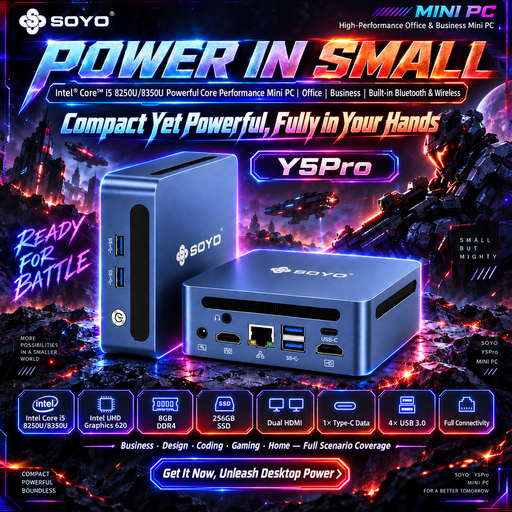
Why it suits this user: The combination of an Intel Core i5-8250U/8350U, 8 GB DDR4 and a 256 GB SATA SSD is well suited to simple tasks such as browsing, word processing and streaming.
The key components are listed, so you’re less likely to assume you’re getting a barebone model with no storage. Do check the exact processor variant before buying.
HDMI, USB ports, Wi-Fi 5 and a compact size of 105 × 113 × 45 mm.

Why it suits this user: This model combines an Intel Core Ultra 7 155H with 16 GB DDR5, a 1 TB SSD and Windows 11 Pro in a 0.52-litre case.
The fixed configuration makes it clear which storage, RAM and software you’ll receive, avoiding surprises about components you need to buy separately.
Wi-Fi 6E, Bluetooth 5.3, two 2.5G Ethernet ports and support for multiple screens.
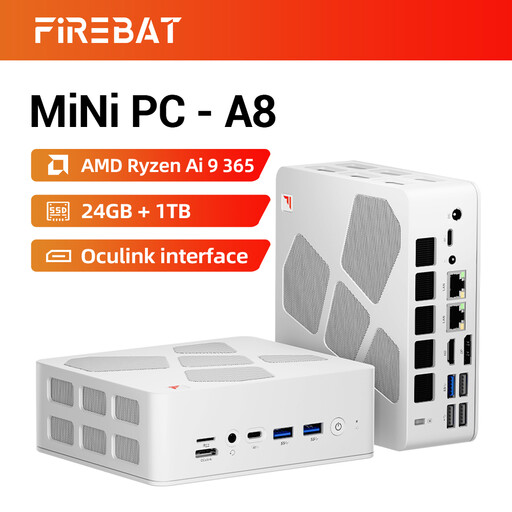
Why it suits this user: The AMD Ryzen AI 9 365, 24 GB DDR5 and Radeon 880M are designed for multitasking, multimedia and light to moderate gaming.
The 1 TB PCIe 4.0 SSD and included RAM make an extra basic upgrade less necessary. Always check the recommended system requirements for the games you want to play.
Support for four 4K displays, USB4, HDMI 2.1 and two 2.5G Ethernet ports.
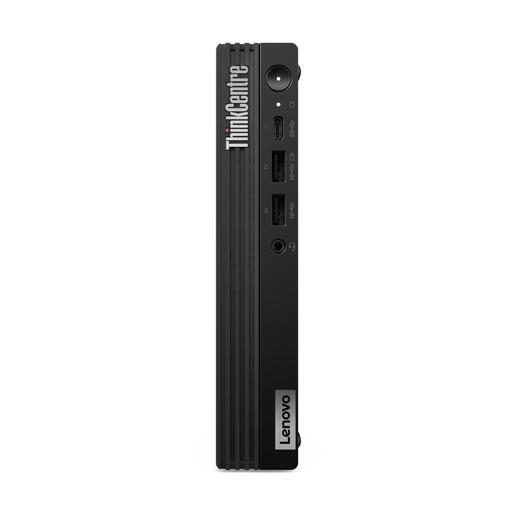
Why it suits this user: This business mini PC has an Intel Core i7-14700T, 16 GB DDR5, a 512 GB SSD and Windows 11 Pro.
The configuration lists the RAM, SSD and operating system separately. Do check the product note about the charger, which must be bought separately.
VESA mounting, up to 64 GB of DDR5 memory, Wi-Fi 6E and TPM 2.0 for business management features.
We’ve put together a complete, up-to-date list of products that meet these strict selection criteria and current European safety regulations.
Yes, as long as the configuration suits the programmes you use. For video calls, documents and browsing, a model with 8 GB of RAM and SSD storage is often suitable. For large spreadsheets, lots of browser tabs and using video-conferencing apps at the same time, 16 GB of RAM is a more practical choice. Also check whether you’ll need to buy a webcam, microphone and monitor separately.
Its lifespan depends on how you use it, cooling, dust and whether the RAM or storage can be replaced. A model with upgradeable memory and extra M.2 slots can adapt to your needs for longer. Keep the ventilation clear and install security and driver updates as directed by the manufacturer.
A mini PC often has a lower rated power than a large desktop, but actual power consumption varies depending on the processor, graphics chip and workload. A gaming mini PC or compact PC with a dedicated graphics card can use more power during demanding tasks. So compare the power supply rating and choose a configuration that’s no more powerful than your everyday needs require.
