
Vandaag of morgen in huis

Kwaliteit gegarandeerd

Welkomstaanbiedingen ontgrendelen: GRATIS bezorging | Tot 80% korting | Gratis 30 dagen JoyPlus-proefperiode
Download de app
A mini PC fits on a small desk, behind a monitor or in a professional workspace. However, a compact case says little about performance. A model for email and word processing needs different specifications from a business mini PC for heavy multitasking or a computer for gaming.
The biggest mistakes usually come down to three things:
For everyday office work, studying and web use, a modern Intel Core 3, Intel Core 5 or Intel N100 may be sufficient. For intensive spreadsheets, software development, virtual machines and sustained multitasking, additional processing headroom is useful.
Look out for:
An Intel Core i7 PC is therefore not automatically the right choice. Check the full processor code and make sure the graphics solution suits your intended use.
16 GB RAM is a useful starting point for working from home, business applications, video calls and running several programmes at once. 8 GB may be enough for basic use, but leaves less room for growth. Some mini PCs have upgradeable memory; in other systems, it is soldered in place.
A 512 GB SSD offers a practical balance for documents, programmes and everyday files. An SSD starts up more quickly than a traditional hard drive and operates quietly. For large video files, photo archives or lots of locally stored business data, 1 TB may be more convenient.
Also check:
A compact PC is only useful if it has enough ports. Check the number of USB ports, HDMI or DisplayPort, Ethernet and wireless standards. If you use multiple screens, check specifically how many video outputs can operate simultaneously.
VESA mounting can free up desk space by attaching the PC behind a monitor. Measure the available space beforehand and check the VESA standard of the monitor or bracket.
Also pay attention to the power supply. The product information for several models states that a power adapter is not included as standard and must be purchased separately. Check this before ordering and use only a suitable adapter approved by the manufacturer.
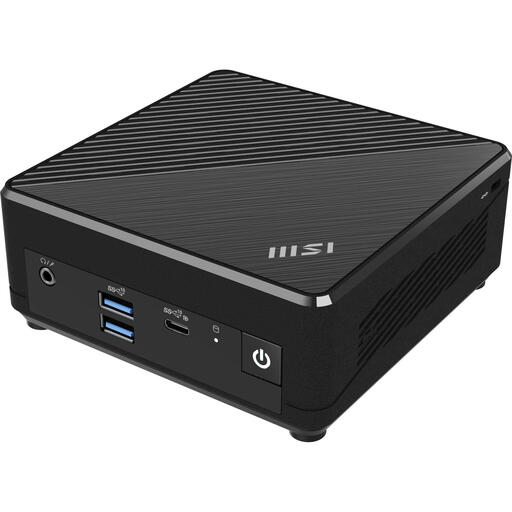
Why it suits this profile: Measuring 124 × 124 × 53.7 mm and weighing 540 grams, this is an accessible compact PC for email, documents, education and simple home use.
It is clearly specified as a complete system with Windows 11 Pro, 4 GB RAM and a 128 GB SSD. Do bear the limited memory capacity in mind.
Intel N100, Wi-Fi 5, Bluetooth 5.0, two Ethernet ports and support for VESA mounting.
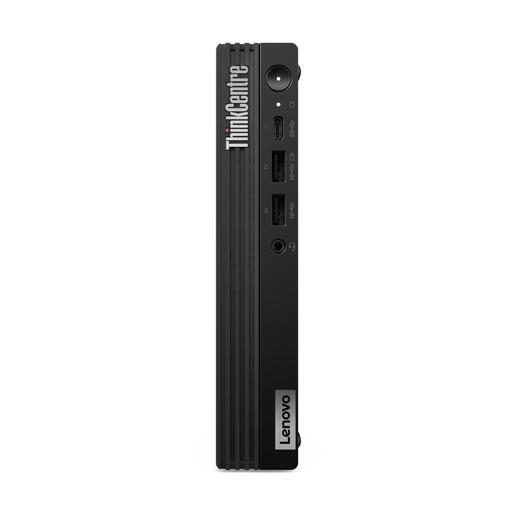
Why it suits this profile: This business mini PC combines an Intel Core i7-14700T with 16 GB DDR5 and 512 GB SSD storage for intensive office software and multitasking.
The configuration lists the processor, dual-channel DDR5 memory, SSD and Windows 11 Pro separately. According to the product information, the power adapter must be purchased separately.
20 cores, up to 64 GB internal memory, Wi-Fi 6E, DisplayPort 1.4a, HDMI 2.1 and VESA mounting.

Why it suits this profile: The combination of 16 GB DDR5, a 1 TB SSD and support for multiple monitors is well suited to administrators, developers and users with lots of locally stored data.
The product details clearly list the storage, memory, network ports and video outputs. For the exact configuration, check whether Windows 11 Pro and the power adapter are included.
Intel Core Ultra 7 155H, Intel Arc integrated graphics, two 2.5Gbps Ethernet ports, two HDMI outputs and Thunderbolt 4.
A mini PC is suitable if you already have a monitor, keyboard and mouse and want to use as little space as possible. An all-in-one PC combines the computer and screen. This creates a tidy setup, but replacing or upgrading individual components is often less flexible.
For gaming, a standard mini PC with integrated graphics is usually limited to light or older games. A separate gaming PC, such as an MSI MAG Infinite S3 with RTX 5060 Ti, requires a dedicated graphics card and a larger case. In return, you get greater dimensions and typically higher power consumption.
When considering energy consumption, look at the processor power, the power supply and how long the PC runs each day. A lower stated power rating does not automatically mean lower total costs, but it does provide a useful basis for comparison. Set up sleep mode correctly and switch the computer off when it will not be used for an extended period.
We have compiled a complete, up-to-date list of products that fully meet these strict selection criteria and the applicable European safety regulations.
For word processing, browsing, video calls and running many business programmes at once, 16 GB RAM is generally a practical configuration. If you use demanding virtual machines, large media files or specialist software, you may benefit from more memory. Check whether an upgrade is possible.
Its lifespan depends on the workload, cooling, updates and upgradeability. A model with an SSD, sufficient RAM and a supported operating system can remain practically useful for longer than an entry-level model with 4 GB RAM and 128 GB storage. Keep the ventilation openings free of dust and use the correct adapter.
A compact PC often uses less power than a desktop PC with separate, high-performance components, but exact consumption varies depending on the processor, graphics card and usage scenario. Compare the stated processor power, power supply and graphics configuration before making your choice.
