
Vandaag of morgen in huis

Kwaliteit gegarandeerd

Welkomstaanbiedingen ontgrendelen: GRATIS bezorging | Tot 80% korting | Gratis 30 dagen JoyPlus-proefperiode
Download de app
A mini PC can fit on a small desk, behind a monitor, or in a cabinet using a VESA bracket. However, a low weight or a high turbo frequency doesn't tell you everything about its suitability for your work. That's why people working from home, small businesses, and IT administrators should pay close attention to the complete configuration: processor, RAM, storage, ports, and expandability.
With a barebone mini PC, the RAM, SSD, and sometimes even the operating system are not included. This can be a good option if you want to build your own configuration, but the final cost will be higher than the initial price suggests. Therefore, always check:
For example, the MSI Cubi 5 12M-405BEU is a barebone model that supports up to 64 GB of RAM and storage via M.2 and 2.5-inch SATA. You will need to add the missing components and the operating system yourself.
A processor with a high turbo frequency isn't automatically suitable for sustained, heavy workloads. The number of cores, the cooling system, and the available RAM are just as important. For documents, web browsing, and video calls, an Intel N100 may be sufficient. For large spreadsheets, virtual machines, or intensive multitasking, a more powerful mini PC with more cores and at least 16 GB of RAM makes more sense.
A compact desktop PC sometimes has less room for expansion cards and ports than a traditional desktop. Check the number of HDMI, DisplayPort, USB, and Ethernet ports beforehand. Also, check if a power adapter is included. Some business models state that the charger must be purchased separately.
For everyday office work, 8 GB of RAM is often a practical minimum, but 16 GB gives you more headroom for multiple browser tabs, video conferences, and business software. If you work with local databases, image editing, or virtual machines, you should look for a model that supports 32 or 64 GB.
An Intel mini PC with an efficient mobile processor can take up very little space while still being suitable for office work. The Intel Core Ultra 7 155H in the MSI CUBI NUC AI series has 16 cores and supports up to 64 GB of DDR5 memory. These are verifiable product specifications; the actual performance also depends on the software, cooling, and overall configuration.
A mini PC with an SSD will generally start up faster than a model with only a traditional hard drive. For documents and standard programs, 512 GB is a useful starting point. For large media files, local backups, or multiple work environments, 1 TB is more practical.
With a barebone model, pay attention to the number of free slots. The MSI CUBI NUC AI 1UMG-005EU has two M.2 slots for PCIe 4.0 storage. The MSI Cubi 5 also supports a 2.5-inch drive. This allows you to expand your storage later without having to replace the entire computer.
A mini PC with Wi-Fi 6E supports the 6 GHz band in addition to 2.4 and 5 GHz, provided your router also supports it. This can be useful in a busy office or apartment building, but the range and speed will still depend on your router, the distance, and any walls in between.
Also, check whether you want to connect one or multiple monitors. Models from the MSI CUBI NUC AI series have HDMI and Thunderbolt 4 ports and can drive multiple displays according to the product specifications. A VESA mini PC can be mounted behind a compatible monitor. When doing so, check the VESA size, maximum weight, and the space required for ventilation.
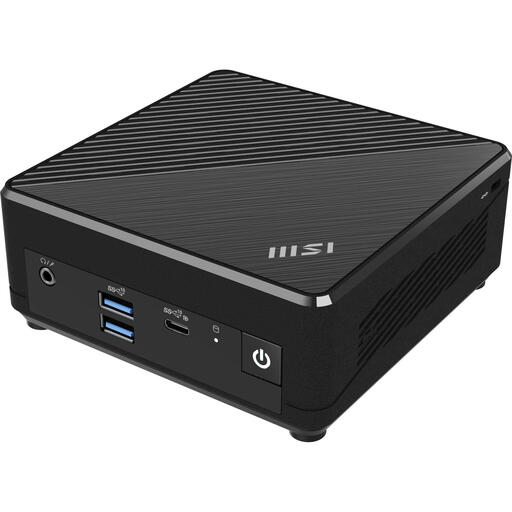
Why it's a good match: This model combines Windows 11 Pro, a 128 GB SSD, and a compact design, making it ideal for simple office, streaming, and home tasks.
The product listing explicitly mentions the RAM, SSD, and Windows 11 Pro. This makes it clear which components are included right out of the box.
Intel N100, 128 GB SSD, two Ethernet ports, and VESA mounting; the RAM is expandable up to 16 GB.

Why it's a good match: Suitable for professionals who use multiple applications and screens in a small workspace.
The configuration lists 16 GB of DDR5 RAM, a 1 TB SSD, and Windows 11 Pro. This prevents you from having to source essential components separately.
Intel Core Ultra 7 155H, two M.2 slots, Wi-Fi 6E, two 2.5Gbps Ethernet ports, and support for up to four displays.
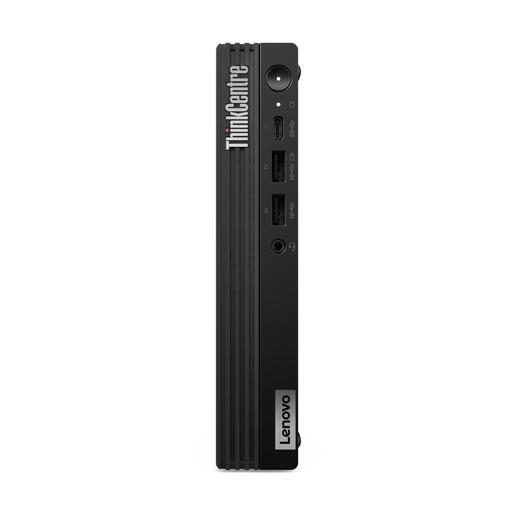
Why it's a good match: This business-focused mini PC is designed for office management, security features, and mounting in a fixed workstation.
The product information lists Windows 11 Pro, TPM 2.0, 16 GB of DDR5 RAM, and a 512 GB SSD. Please note: the listing states that the charger must be purchased separately.
Intel Core i7-14700T, two RAM slots, two M.2 slots, VESA support, and business-grade security features.
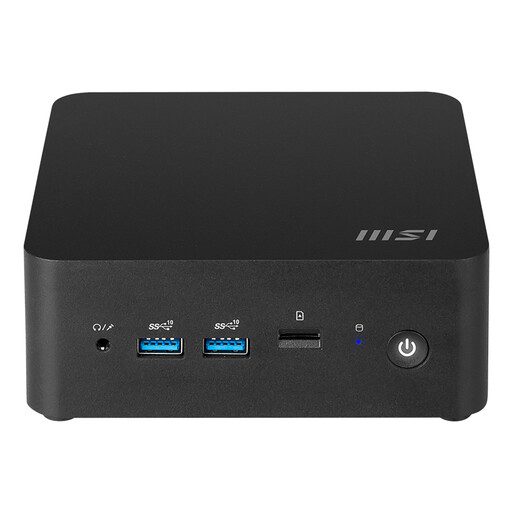
Why it's a good match: A compact barebone for users who want to choose their own RAM and storage and need extensive networking and monitor options.
The storage options, memory limits, and ports are clearly described. However, be sure to check before buying whether you need to install Windows, RAM, and an SSD yourself.
Intel Core Ultra 7 155H, up to 64 GB of DDR5 RAM, Wi-Fi 6E, two 2.5Gbps LAN ports, and a chassis of approximately 0.52 litres.
Place the mini PC on a stable, flat surface and keep the ventilation openings clear. When mounting it behind a monitor, ensure there is enough space for air intake and exhaust. Use the included power adapter or one specified by the manufacturer. Connect your monitor, keyboard, and network before setting up the operating system.
For business deployment, Windows 11 Pro, TPM 2.0, VESA mounting, and remote management capabilities are important points to check. For home use, factors like noise level, size, Wi-Fi, and the number of USB ports often carry more weight. Energy costs depend on actual consumption, usage duration, and your electricity price; a lower stated wattage is not a firm guarantee of lower monthly bills.
We have compiled a complete, up-to-date list of products that fully meet these strict selection criteria and comply with current European safety regulations.
Yes, a mini PC with at least 8 GB of RAM, an SSD, and enough USB ports is suitable for word processing, web browsing, video calls, and administrative software. Choose 16 GB of RAM if you often use multiple programs at the same time.
Its lifespan depends on the workload, ventilation, maintenance, and software support. A model with expandable RAM and replaceable M.2 storage can remain useful for longer. Keep the vents free of dust and do not block the air openings.
Compact models often have a lower stated wattage than large desktops, but actual consumption varies depending on the processor, power adapter, and usage. Therefore, you should compare the stated wattage and your daily usage rather than just looking at the size.
