
Vandaag of morgen in huis

Kwaliteit gegarandeerd

Welkomstaanbiedingen ontgrendelen: GRATIS bezorging | Tot 80% korting | Gratis 30 dagen JoyPlus-proefperiode
Download de app
A cluttered desk with a large, humming computer tower is a thing of the past for many. Whether you work from home, study, or simply want a tidy living room, the demand for compact computers is growing. A mini PC offers the power of a traditional desktop in a chassis that is sometimes no larger than a stack of coasters. But with a growing market, how do you choose the right model?
This article will guide you. We'll cover the key considerations when buying a mini PC and highlight some popular choices, helping you find a model that fits your needs and budget.
Choosing a small desktop PC is about more than just its size. The specifications determine what you can actually do with it. Here are a few practical tips.
The processor (CPU) and random-access memory (RAM) determine your computer's speed and multitasking capabilities.
mini pc for office.powerful mini pc ensures that everything continues to run smoothly.gaming mini pc requires not only a fast processor (like a Ryzen 7) but also a capable graphics chip (GPU). Look for models with integrated AMD Radeon graphics or a dedicated graphics card.A compact size doesn't mean you have to compromise on connectivity. Check if the mini PC has the ports you need. Consider enough USB ports for your mouse, keyboard, and external hard drive. HDMI and DisplayPort are essential for connecting your monitor(s). A Thunderbolt port offers blazing-fast data transfer and the ability to connect multiple devices through a single cable. Modern standards like Wi-Fi 6 and Bluetooth 5.2 or higher ensure a fast and stable wireless connection.
Most mini PCs are equipped with an SSD (Solid State Drive) instead of a traditional hard drive. An SSD is significantly faster, which you'll notice in the computer's boot time and when loading programs. A storage capacity of 256 GB is a good starting point for basic use, but 512 GB or more gives you more breathing room for software, documents, and media. Many models run on mini pc windows 11 pro, which immediately provides a familiar and secure environment.
Based on specifications and functionality, we have lined up a few interesting models for you.
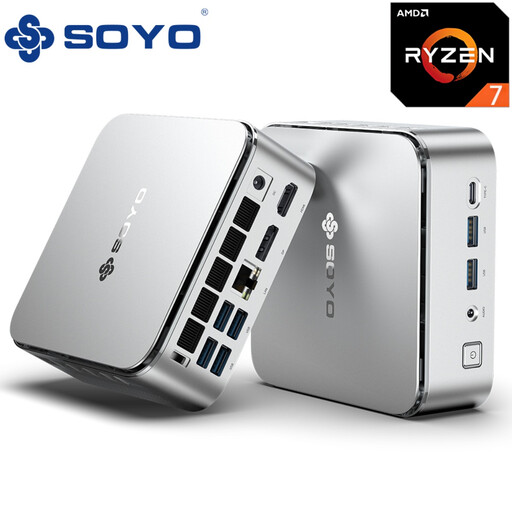
Why It Stands Out This SOYO S4PLUS is a powerhouse in a small package. The combination of the AMD Ryzen 7 H255 processor and the AMD Radeon 780M graphics chip makes it suitable for heavy applications and even for playing modern games. According to the manufacturer, the GPU supports ray tracing, which can enhance the graphical quality in supported games.
Pros
Who Is It For? For the power user, creative professional, or gamer looking for a powerful mini pc that looks great on a modern desk. The specifications are focused on performance, from demanding software to entertainment.
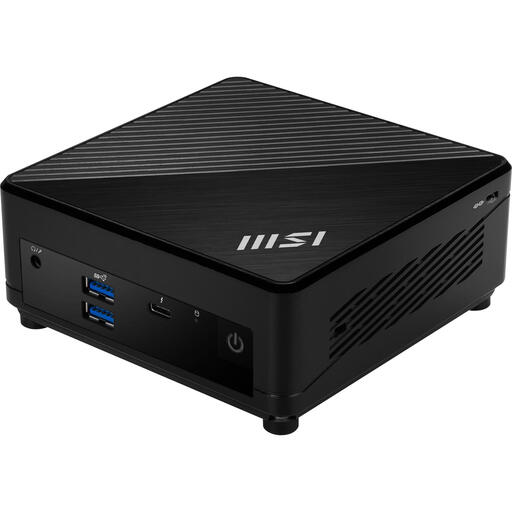
Why It Stands Out The MSI Cubi 5 is a well-known name in the world of compact computers. This model, with an Intel Core i3-1215U processor, is a reliable and efficient choice for daily tasks. It comes with Windows 11 Pro and offers excellent connectivity, including a Thunderbolt 4 port, which is rare in this price range.
Pros
Who Is It For? Perfect for the office worker, student, or home user looking for a reliable and small desktop pc for productivity tasks. The focus is on efficiency, connectivity, and a clutter-free workspace.
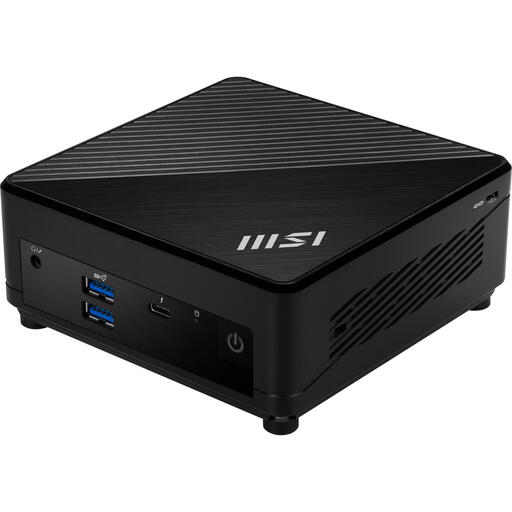
Why It Stands Out This MSI Cubi 5 model offers a step up in performance with its Intel Core i5-1235U 10-core processor. Combined with a 512 GB SSD, this mini PC provides a noticeably faster experience when working with multiple programs simultaneously. It retains all the benefits of the Cubi 5 series, such as its compact size and excellent connectivity.
Pros
Who Is It For? For the professional who needs a bit more processing power for multitasking, data analysis, or media editing. It's an excellent middle ground between a basic model and a high-end powerful mini pc.
Is one of these models not quite what you're looking for? There are countless configurations and sizes available. Explore our full range to find the perfect match for your desk.
Yes, certain models are definitely suitable for gaming. A gaming mini pc is typically equipped with a powerful processor (like an AMD Ryzen 7) and a capable integrated graphics chip (like the AMD Radeon 780M) or even a dedicated (discrete) GPU. These systems can run many modern games at good settings. Always check the specifications and compare them with the recommended system requirements of the games you want to play.
A mini PC often offers better value for money in terms of performance, as there are no costs for a built-in screen, keyboard, and battery. They also typically provide more connectivity options for multiple monitors and peripherals. Because they are designed for a stationary setup, they often have better cooling than a similarly priced laptop, allowing them to maintain high performance for extended periods.
The upgrade options vary by model. On many mini PCs, like the MSI Cubi series, you can easily replace or expand the RAM and storage (SSD). The processor and graphics chip are usually soldered to the motherboard and cannot be replaced. Always read the product information to see which components are user-accessible.
