
Vandaag of morgen in huis

Kwaliteit gegarandeerd

Welkomstaanbiedingen ontgrendelen: GRATIS bezorging | Tot 80% korting | Gratis 30 dagen JoyPlus-proefperiode
Download de app
A large, humming computer tower under or on your desk is a thing of the past. It takes up valuable space, collects dust, and is often more powerful than necessary for your daily tasks. A mini PC offers the solution: a full-fledged computing experience in a chassis that is sometimes no larger than a stack of coasters.
As a Joybuy Product Recommendation Officer, I'm here to help you make the right choice. In this article, I'll provide a practical framework for finding a model that fits your needs, whether you want a clutter-free home office, an efficient corporate setup, or a compact media centre. We'll look at the specifications that truly matter, without the marketing jargon.
The market for mini PCs is diverse. To make the right choice, it's wise to consider a few key points.
One of the first decisions you'll need to make is between a complete system and a so-called barebone PC.
Not everyone needs the same amount of processing power. For a business mini PC, a responsive processor (like an Intel Core i5 or i7) and sufficient memory (at least 8 GB, preferably 16 GB) are important for smooth multitasking. For simpler home use or as a media centre, a less powerful configuration is often sufficient. A fast SSD (Solid State Drive) is the standard today and ensures that the computer and its programs boot up quickly.
A small desktop is designed to save space. Check if the model has the right ports for your monitor(s) (HDMI, DisplayPort), peripherals (USB-A, USB-C), and network. Many mini PCs support a VESA mount, allowing you to attach the computer to the back of your monitor for a completely clutter-free desk.
Based on objective specifications and various use cases, we have compiled a list of popular choices for you.
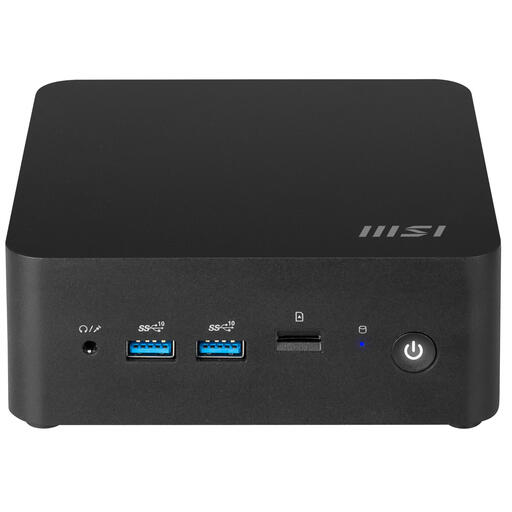
Why This Model Stands Out The MSI Cubi NUC is a barebone PC designed for users who want control over their specifications. It's built around a powerful Intel Core 7 150U processor, which can reach a max turbo frequency of 5.4 GHz. The modern architecture supports up to 64 GB of DDR5 memory and offers extensive connectivity with two Thunderbolt 4 ports and Wi-Fi 6E.
Advantages
Who Is It For? This model is ideal for IT professionals and tech enthusiasts who want to build a powerful, custom compact computer for specific tasks, such as a home server, a development environment, or a high-end office workstation.
View the MSI Cubi NUC 1MG-237BEU
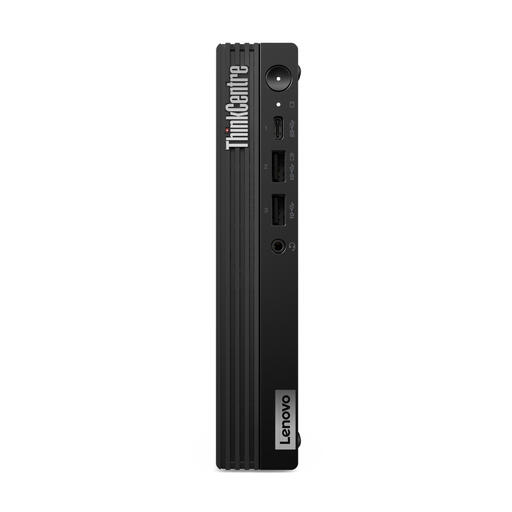
Why This Model Stands Out The Lenovo ThinkCentre M70q Gen 5 is a complete business mini PC that's ready to go out of the box. It combines the reliability of the ThinkCentre line with serious performance, thanks to the 20-core Intel Core i7-14700T processor. With 16 GB of DDR5 memory, a 512 GB SSD, and Windows 11 Pro pre-installed, it's a powerhouse for demanding office environments.
Advantages
Who Is It For? Perfect for business users, government agencies, and remote workers who need a reliable, secure, and powerful small desktop that requires no configuration. Suitable for heavy multitasking, data analysis, and other intensive office applications.
View the Lenovo ThinkCentre M70q Gen 5
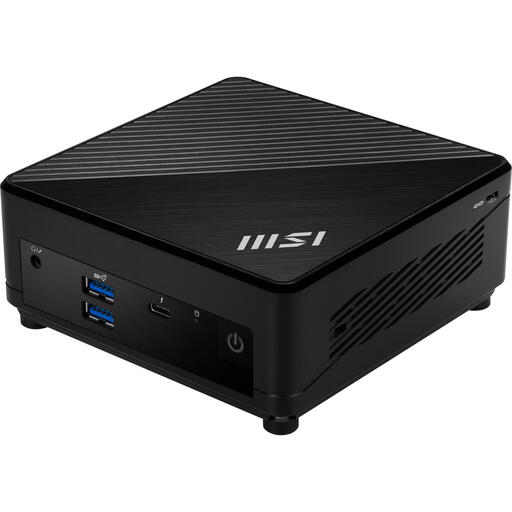
Why This Model Stands Out The MSI Cubi 5 is an excellent all-rounder that strikes a great balance between performance, size, and price. This complete system is equipped with an efficient Intel Core i5-1235U processor, 8 GB of RAM, and a spacious 512 GB SSD. With Windows 11 Pro and modern connectivity like Wi-Fi 6E and Thunderbolt 4, it's a versatile choice for various applications.
Advantages
Who Is It For? A great choice for home users, students, and small offices. This mini PC is ideal for web browsing, office work, media streaming, and other everyday computing tasks in a compact and energy-efficient package.
The choice of a mini PC is a personal one. After reading this article, you might have decided to assemble a barebone PC yourself. A good SSD is essential for a fast and reliable computer. Explore our selection of black SSDs here to complete your system.
The main advantages are space savings, lower energy consumption, and quieter operation compared to traditional desktops. Despite their small size, they are powerful enough for most office and home applications.
For most users, yes. For general office work, browsing the internet, email, and media consumption, a mini PC is a full-fledged replacement. Only for very demanding tasks like high-end gaming or professional video editing might a larger desktop with a dedicated graphics card still be preferable.
