Choose a mini PC that can actually run the app and test tools you intend to use: a Windows PC cannot replace a required macOS test, and vice versa. To reduce the impact of daylight, focus on positioning your separate monitor well, then check the ports and the exact configuration included. Without the app requirements and documentation for the specific model, it’s not possible to recommend a particular model as ready to buy.
Who is this buying guide for?
Tester with platform requirements
You need to test a desktop app on a specific operating system or architecture. Note down the app and test tool requirements before comparing processor specifications. Microsoft Learn lists support for 64-bit operating systems, including Windows 11, for Visual Studio 2022.
Tester working beside a bright window
You work beside a bright window and want to position your separate monitor to reduce glare. Arboportaal recommends facing parallel to the window when working at a screen.
Tester using multiple monitors
You want to use the app and test tools on separate screens. Check the connections on the exact mini PC configuration and compare them with your monitors and peripherals.
What should you look for?
First, establish which operating system and test environment your app requires. Then plan your screen setup beside the window and check that the specific configuration has the connections and components you need.
| What to consider |
What should you check? |
Who is this important for? |
| App and platform compatibility |
Note the required OS version, architecture and test tools. Check that the specific configuration meets those requirements; Microsoft Learn lists 64-bit Windows 11 among the supported operating systems for Visual Studio 2022. |
If I need to test an app on a prescribed platform, I want to be sure the entire test environment will run on it. Compatibility is the top priority for around 31% of consumers. |
| Monitor beside the window |
Plan where to position your separate monitor. Arboportaal recommends facing parallel to the window when working at a screen. |
At a workstation beside a bright window, I want to position the screen to reduce direct light. Around 25% of consumers prioritise readability and reducing reflections. |
| Connections for monitors and peripherals |
Compare your monitor and USB connections with the ports on the specific configuration. Lenovo lists HDMI and DisplayPort for the ThinkCentre M70q Gen 5 range; Apple lists Thunderbolt and HDMI for the Mac mini with M6 chip. |
I want to know in advance which connections are available for my screens and test equipment. This is the top priority for around 25% of consumers. |
| Complete PC or build your own |
Check for each configuration whether the operating system, memory, storage and power supply are included. ASUS offers the NUC 14 Pro as both complete systems and kits. |
If I want to get started with testing quickly, I need to know which components I still need. The included configuration is the top priority for around 19% of consumers. |
Common pitfalls
-
Choosing more processing power before settling on a test platform
A powerful configuration doesn’t prove that your intended app and test tools will run on the chosen operating system or architecture.
First, note down the app requirements. Then compare the exact mini PC configurations.
-
Expecting the mini PC to solve problems with light from the window
The position of the computer won’t automatically change how light falls on your separate monitor. Arboportaal recommends facing parallel to the window.
Consider where to position your screen before letting a PC specification determine your choice; moving it further away or using a sun blind may also help.
-
Comparing a barebone kit as if it were a complete PC
ASUS states that the NUC 14 Pro Kit doesn’t include a pre-installed operating system, memory or storage. A kit therefore requires preparation before you can use it for testing.
Check the exact SKU and work out which components you still need before comparing configurations.
Brands to compare
These product ranges offer different options. Always check the specifications and configuration of the exact model.
Lenovo
The ThinkCentre M70q Gen 5 is a business-class Tiny range for anyone looking for a compact Windows mini PC.
- Lenovo lists HDMI and DisplayPort for the range.
- Optional ports are only available on selected configurations, so check the exact model.
Apple
The Mac mini is a compact desktop option when your app and test tools require macOS or Apple silicon.
- The Dutch specifications for the Mac mini with M6 chip list Thunderbolt and HDMI for external displays.
- A Mac can’t replace testing on native Windows if the app requires that environment; you’ll also need to assess your monitor setup beside the window separately.
ASUS
The NUC 14 Pro is an option if you’re considering either a complete mini PC or a kit you can configure yourself.
- ASUS describes configurations with Windows as well as kits without a pre-installed operating system, memory or storage.
- Check which components and power cable are included for each SKU.
HP
The Pro Mini 400 G9 is a compact business desktop range to consider alongside other complete systems.
- HP describes the range as suitable for small and varied workspaces.
- Check the ports and suitability for testing on each configuration; these can’t be assumed to be the same across the entire range.
Mini PCs at Joybuy
This selection includes mini PCs for a range of testing setups, including configurations listed with Windows 11 or NVIDIA DGX OS, and a barebone model for which you’ll need to install an operating system yourself. Before buying, check that your app and tools are compatible with the stated platform and specific configuration.
 Image unavailable
SOYO Y5Pro Mini PC, Intel Core i5 8250U/8350U, 8 GB DDR4, 256 GB SATA SSD
Could suit a testing setup that requires Windows 11 and multiple display outputs; first check that your app is compatible with this configuration.
The product name lists Windows 11, 8 GB DDR4 and a 256 GB SATA SSD. The description mentions two HDMI outputs and Type-C video.
View at Joybuy
 Image unavailable
NVIDIA DGX Spark Founders Edition, NVIDIA GB10, 128 GB RAM, 4 TB SSD
Consider this configuration only if your desktop app and test tools work with NVIDIA DGX OS or are designed for it.
The product name lists 128 GB RAM, a 4 TB SSD and NVIDIA DGX OS. The description mentions HDMI and USB-C video outputs.
View at Joybuy
 Image unavailable
FIREBAT R3 Mini PC, AMD Ryzen 5 7430U, 16 GB RAM, 512 GB SSD
An option to compare if you’re looking for a compact PC with support for multiple displays; also check that the operating system meets your app requirements.
The product name lists support for three 4K displays, 16 GB RAM and a 512 GB SSD.
View at Joybuy
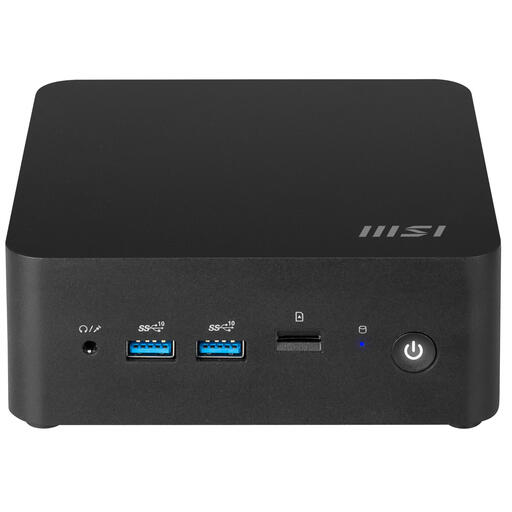 Image unavailable
MSI CUBI NUC 1MG-244BEU barebone mini PC
Suited to a self-configured testing setup if you want to provide the operating system and required components yourself.
No operating system is installed, so you’ll need to set one up before testing. The description lists two HDMI ports, two Thunderbolt 4 ports and four USB-A ports. Check which other components are included for each configuration.
View at Joybuy
Frequently asked questions
How do you choose between Windows and macOS for app testing?
Choose the platform your app and test tools require. Check the supported OS version and architecture; Microsoft Learn lists 64-bit Windows 11 among the supported operating systems for Visual Studio 2022.
Does a mini PC make a screen beside a bright window easier to read?
Not by itself. Arboportaal recommends facing parallel to the window when working at a screen. Also consider whether you need to reposition the screen, move it further away or use a sun blind.
Can you use any ASUS NUC 14 Pro straight away?
No, it depends on the configuration. ASUS offers both complete mini PCs and kits without a pre-installed operating system, memory or storage. Check the exact SKU and whether the power cable and components you need are included.
Which connections should you check for multiple monitors?
Compare your monitor inputs with the video outputs on the exact mini PC configuration. Lenovo lists HDMI and DisplayPort for the ThinkCentre M70q Gen 5 range; Apple lists Thunderbolt and HDMI for the Mac mini with M6 chip.
Which product documentation is relevant for a mini PC in the Netherlands?
Check which European product rules apply to the specific configuration. Business.gov.nl explains that electrical and electronic equipment sold in the Netherlands must comply with the applicable European rules. Where CE rules apply, this includes CE marking and an EU declaration of conformity. Rules for radio equipment may also apply to products with Wi-Fi or Bluetooth.


