
iOS app tester
You want to work locally with Xcode at a shared desk. So first check whether the macOS version on the Mac you’re considering is suitable for the version of Xcode you need; Apple Developer publishes the compatibility requirements.


For local testing with Xcode, you’ll need a Mac that’s compatible with the required version of Xcode. For Android testing, a suitable Windows desktop may also be an option. Then check the exact memory and storage configuration, the ports available for test devices, and whether the computer can manage accounts for different users. A compact case saves desk space, but on its own it doesn’t determine whether a desktop is right for your testing work.
You want to work locally with Xcode at a shared desk. So first check whether the macOS version on the Mac you’re considering is suitable for the version of Xcode you need; Apple Developer publishes the compatibility requirements.
You use Android Studio with one or more virtual devices. Choose a memory and storage configuration that suits the devices and testing workload you need; Android Developers sets out the requirements for Android Studio and the emulator.
You want multiple testers to be able to use their own accounts and connect the test devices they need. Apple Support and Microsoft Support explain how to set up user accounts; also check the ports on the specific desktop configuration.
When to choose it: if you build or test iOS apps locally with Xcode, choose a Mac that supports the required versions of Xcode and macOS.
Consider: check the exact Mac configuration; memory and storage can vary between models.
When to choose it: if local Android testing is your main focus and you don’t need to run Xcode on this desktop, compare Windows configurations that suit your tools.
Consider: a Windows desktop isn’t a substitute for a Mac if you need to work locally with Xcode.
When to choose it: if you mainly use connected Android devices, Android Developers says you can also test without the Android Emulator.
Consider: physical devices don’t automatically replace tests using different virtual device configurations.
| What to consider | What should you check? | Who is this important for? |
|---|---|---|
| Local iOS testing | Compare the required version of Xcode with the macOS version on the exact Mac configuration. | I want to test locally with Xcode, so I need to know whether my Mac supports the version of macOS I need. Around 36% of consumers give compatibility with local iOS testing top priority. |
| Android emulators | Compare the memory and storage with the number and type of virtual devices you want to use. Android Developers recommends 16 GB RAM for the best emulator experience. | I want to use Android emulators and choose a configuration to suit the virtual devices I plan to use. Around 29% of consumers prioritise capacity for Android emulators. |
| Shared workspace | Check whether you can set up separate user accounts and whether the case will fit the available desk space. | I want several testers to be able to use their own accounts and keep their settings separate. Around 21% of consumers give shared workspace management top priority. |
| Physical test devices | Count the ports you need for devices and peripherals, and check that they’ll be accessible where you plan to set up the desktop. | I regularly connect physical test devices and want the ports to be easy to reach at my workspace. Around 14% of consumers prioritise connecting physical test devices. |
Being suitable for Android testing doesn’t mean a computer is suitable for local Xcode testing. For this work, the Mac must also support the required versions of macOS and Xcode.
Before comparing options, decide whether you need to build or test iOS apps locally with Xcode.
Android emulators use memory and storage. The capacity you need also depends on how many virtual devices you want to use at once and what types they are.
Make a note of your planned emulator setup and compare it with the memory and storage configuration of the exact model.
Ondernemersplein distinguishes between sales to consumers and sales to businesses; consumer cooling-off rules don’t automatically apply to a business order.
Check the seller’s returns policy before placing a business order.
The Mac mini is a compact macOS desktop to consider if you want to test locally with Xcode.
The ThinkCentre M70q Gen 6 is a compact Windows desktop range for a space-conscious workspace.
The Pro Mini 400 G9 is a compact Windows desktop range. The 6D494EA#ABH configuration lists Windows 11 Pro, 16 GB RAM and 512 GB SSD.
The Dell Pro Micro QCM1250 is a compact business Windows desktop range.
These Joybuy picks are compact Windows mini PCs for Android testing and a shared workspace. They’re not a substitute for a Mac if you need to work locally with Xcode.
 Image unavailable
A compact Windows mini PC to consider for Android emulator testing; Google recommends 16 GB RAM for the best emulator experience.
Intel Core Ultra 5 325; 16 GB LPDDR5X; 512 GB PCIe 4.0 SSD; Windows 11 Home. The product description lists a 0.65-litre case and support for up to four displays.
 Image unavailable
This mini PC is an option to compare for Android testing and connecting peripherals; check that the exact configuration suits your emulator setup.
Windows 11 Pro; 16 GB LPDDR4; 512 GB SSD; processor listed as 4C/4T, up to 3.7 GHz. The product description lists HDMI, DisplayPort, USB-C and six USB 3.0 ports.
 Image unavailable
A compact Windows desktop to compare for Android testing and a shared workspace. Check the ports on the configuration you choose.
Intel Core i7-14700T; 16 GB DDR5; 512 GB SSD; Windows 11 Pro. The listed power adapter isn’t included and must be purchased separately.
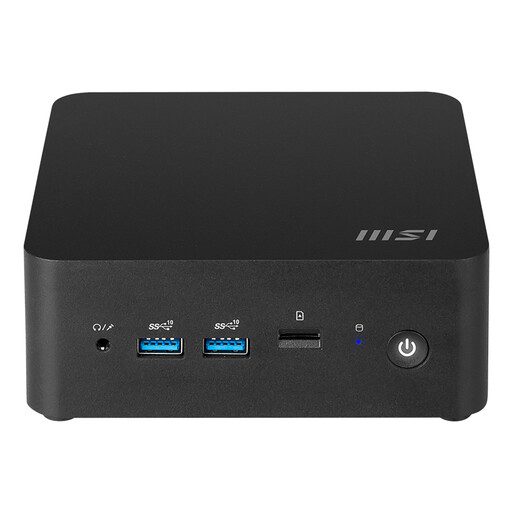 Image unavailable
Consider this barebone if you’re looking for a compact base and want to install your preferred operating system yourself.
The product title lists a 155H Intel SoC. According to the product description, you’ll need to install your preferred operating system.
 Image unavailable
This Windows mini PC could suit a compact shared workspace; for Android emulator testing, pay attention to the listed memory capacity.
The title lists Intel Core i5 8250U/8350U, 8 GB DDR4, 256 GB SATA SSD and Windows 11. Android Developers recommends 16 GB RAM for the best emulator experience; this configuration lists 8 GB.
Yes. If you test locally with Xcode, you’ll need a Mac that’s compatible with the required version of Xcode. Check the macOS version on the specific configuration against Apple Developer’s compatibility table.
No. Android Developers also explains how to test on a physical Android device without the Android Emulator. An emulator may be useful if you want to use virtual devices with different configurations or Android versions.
Create separate user accounts so testers can use their own accounts. Apple Support and Microsoft Support explain how to add accounts on macOS and Windows respectively; also decide who will manage settings and test materials.
Yes. Android Developers says you can also test Android apps on a connected physical device. Check that the desktop you choose has enough accessible ports; physical devices don’t automatically replace tests using different virtual configurations.
Treat privacy as a separate consideration if your testing setup processes personal data. The Dutch Data Protection Authority highlights that privacy rules may also be relevant to pilots and tests; whether a specific setup complies with the GDPR depends on how the data is processed.