The right choice mainly depends on your keyboard, writing software and screen. A mini PC is a good fit if you already have a suitable screen or want to choose where everything goes. An all-in-one can be a convenient option if you also need a screen and the supplied keyboard suits you. The computer itself doesn’t determine which keyboard shortcuts you can use; check the version of your writing software that you’ll actually be using. Also check the exact configuration, connections and included accessories.
Who is this choice relevant to?
Columnist who uses lots of keyboard shortcuts
You write and edit regularly, and want to know whether your keyboard, layout and writing software support the shortcuts you’re used to. Microsoft Support explains several ways to customise keyboard shortcuts in Word for Windows and Word for Mac.
Writer who wants to choose their own screen
You may already have a screen, or want to decide where to place it for reading, checking sources and writing. A mini PC lets you choose a screen separately from the computer; Lenovo sells the screen separately for the ThinkCentre neo 50q Gen 4, part number 12LM006LEZ. Arboportaal notes that small text, reflections and ambient light can affect readability.
Writer looking for a complete workspace
You don’t yet have a suitable screen and want to know what comes with the computer. HP lists a screen, wireless keyboard and mouse with the OmniStudio 24cu0612nd; Lenovo says the screen and keyboard are sold separately with the mini PC mentioned above.
What should you look for when choosing?
Start with the keyboard shortcuts and app you use. Then decide whether you want to connect your own screen or need one built in. Finally, check which accessories and how much storage you need.
| What to consider |
What to look for when buying |
Who is this important for? |
| Keyboard and shortcuts |
Check the keyboard layout and try your most important commands in the desktop or web version of your writing software. The way you use Word differs between Windows and Mac. |
If I write and edit often, I want to be able to use my usual commands from my keyboard. Around 36% of consumers prioritise keyboard shortcuts and the writing app they use. |
| Screen readability and positioning |
Assess the screen size, readability and position in your workspace; also look out for reflections and ambient light. |
When I write for long stretches, I want to be able to read text and sources comfortably and position the screen well. Screen readability and positioning are the main concern for around 29% of consumers. |
| Complete workspace |
Check whether a screen, keyboard and mouse are included with the exact model, and which connections you need. |
If I still need accessories for my workspace, I want to know in advance what I’ll need to arrange myself. Around 21% of consumers prioritise a complete set with a screen and input devices. |
| Storage and files |
Compare the SSD capacity with the space you need for your documents and any photos. Check where your writing software saves files and make sure you have a separate backup. |
When I want to keep columns and photos, I need enough local storage and a clear way to protect my files. Around 14% of consumers make storage and file retention their top priority. |
What to watch out for when buying
-
Assuming every desktop is a complete workspace
What’s included varies by model. The screen and keyboard are sold separately with the Lenovo mini PC mentioned above, while HP lists a screen, wireless keyboard and mouse with the OmniStudio 24cu0612nd.
Check what you already have for your workspace against what’s in the box for the exact model.
-
Assuming Word shortcuts work the same everywhere
Microsoft Support explains the differences between Word for Windows, Word for Mac and the web version. As a result, a command you’re used to may work differently in another version.
Check the commands you use most in the app version you’ll actually be using.
-
Treating a Windows 10 PC as a new Windows computer with regular support
Microsoft says regular support for Windows 10 ended on 14 October 2025. Microsoft also describes a separate ESU option.
Check the operating system’s current support status before choosing an older configuration.
Brands to consider
Lenovo
The ThinkCentre neo 50q Gen 4 is a compact Windows desktop that lets you choose your own screen and keyboard.
- For part number 12LM006LEZ, Lenovo lists Windows 11 Pro, 16 GB of memory and a 512 GB SSD.
- The screen and keyboard are sold separately with this model; check that the connections are compatible with your screen.
HP
The OmniStudio all-in-ones are worth considering if you’re comparing desktops with a built-in screen.
- HP lists a 23.8-inch screen, wireless keyboard and mouse with the OmniStudio 24cu0612nd.
- Check the screen positioning and included accessories for the exact model; other models may have a different configuration.
Apple
The Mac mini is a macOS desktop with a separate screen, while the iMac has a built-in screen.
- Apple lists 16 GB of unified memory and a 256 GB SSD for one Mac mini M6 configuration. Check the shortcuts in the writing app you use on your Mac.
- According to Apple, the iMac M6 has a built-in 24-inch screen and is listed as available from 6 November 2026; as of 31 October 2026, that date is still in the future.
Dell
According to Dell, the OptiPlex range includes compact desktops and all-in-ones for different workspace setups.
- The range includes both desktops and models with a built-in screen to compare.
- Check the specifications and included accessories for the exact model before putting your workspace together.
Joybuy products for writing and keyboard shortcuts
This selection includes an all-in-one PC, a separate keyboard and Mac mini models for a writing workspace. Check which other accessories you need for each product.
 Image unavailable
HP 24-cr0050nd All-in-One
A Windows all-in-one with a built-in screen and QWERTY keyboard, ideal if you’re looking for a workspace that includes a screen.
The description lists a 23.8-inch matte FHD IPS screen, Windows 11 Home and a 512 GB SSD. The power adapter must be purchased separately.
View on Joybuy
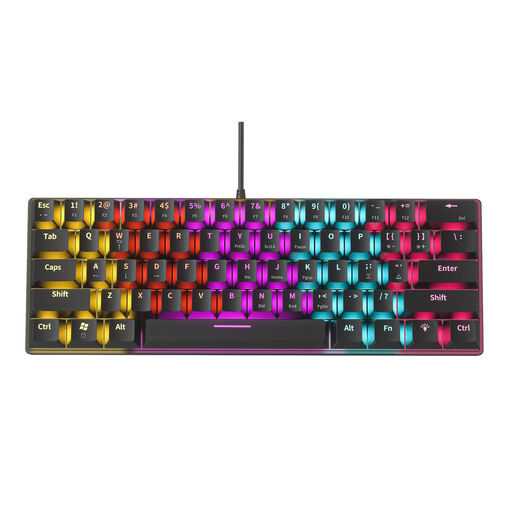 Image unavailable
NAXSIR Mini Mechanical Keyboard, 61 Keys (04-49486816)
A separate keyboard for anyone comparing input devices for a writing workspace.
The product name lists 61 keys and 12 RGB lighting effects. Check that the layout suits your keyboard shortcuts and writing software.
View on Joybuy
 Image unavailable
Apple Mac mini M6, 16 GB, 256 GB SSD
A macOS desktop for anyone who wants to choose their own screen and input devices.
This model lists 16 GB of memory and a 256 GB SSD. Check the shortcuts in your writing software; Word for Mac may work differently from Word for Windows.
View on Joybuy
Image unavailable
Apple Mac mini M6, 16 GB, 512 GB SSD
A macOS desktop for anyone who wants to choose their own screen and input devices.
This model lists 16 GB of memory and a 512 GB SSD. Check the shortcuts in your writing software; Word for Mac may work differently from Word for Windows.
View on Joybuy
Image unavailable
Apple Mac mini M6, 24 GB, 512 GB SSD
A macOS desktop for anyone who wants to choose their own screen and input devices.
This model lists 24 GB of memory and a 512 GB SSD. Check the shortcuts in your writing software; Word for Mac may work differently from Word for Windows.
View on Joybuy
Frequently asked questions
Do I need a special type of desktop for keyboard shortcuts?
No, your choice mainly depends on your keyboard and writing software. Microsoft Support explains several ways to customise keyboard shortcuts in Word for Windows and Word for Mac; the web version may differ.
What do I need to connect before I can write on a mini PC?
You’ll need a compatible screen and keyboard, and should check the connections on the exact computer. The screen and keyboard are sold separately with Lenovo part number 12LM006LEZ; the Mac mini M6 supports external screens via Thunderbolt and HDMI.
Will my columns be saved securely automatically?
First, check where your files are saved. Microsoft says AutoSave for Word with Microsoft 365 is switched on by default when a file is stored in OneDrive or SharePoint. You should also make a separate backup.
Is a manufacturer’s warranty the same as your statutory rights?
No. ACM ConsuWijzer distinguishes between a manufacturer’s or seller’s warranty and your statutory rights. If a product develops a fault sooner than you could reasonably expect under normal use, the seller must resolve the issue under the applicable conditions; in the Netherlands, there is no fixed general warranty period.
Can I return a desktop bought online in the Netherlands?
For a distance purchase from a business, you’ll often have a 14-day cooling-off period. Rijksoverheid lists some exceptions and notes that an online purchase from a private seller does not count as a distance purchase in this sense.


