
Poster designer with limited desk space
You want to design on a small desk and are deciding between a separate mini PC and monitor or a computer with the screen built in. Coolblue describes this integrated set-up as an all-in-one.


Already have a suitable monitor, or want to choose your own? A mini PC gives you a flexible set-up. If you want your computer and screen as one unit, consider an all-in-one. Before choosing, check your design software’s requirements, the connections and which components are included: a compact computer on its own isn’t a complete workstation.
You want to design on a small desk and are deciding between a separate mini PC and monitor or a computer with the screen built in. Coolblue describes this integrated set-up as an all-in-one.
You may want to keep using your current screen. Check that the computer and monitor connections are compatible, and find out which other components are included. Lenovo notes that the keyboard and mouse are sold separately with the ThinkCentre configuration reviewed.
You may use image-editing or illustration software, and want to consider both the screen and preparing the print file. Adobe explains, for example, how to set up bleed and printer’s marks in Illustrator.
A good fit if: you want to reuse a monitor or choose your own screen.
Keep in mind: the monitor also takes up space and needs to connect to the computer.
A good fit if: you want to use your computer and screen as one integrated set-up.
Keep in mind: you choose the built-in screen as part of the computer, so check the screen specification and connections.
First decide which software and screen set-up you need. Then check that your chosen configuration and all the necessary components are suitable.
| What to consider | What should you check? | Who is this important for? |
|---|---|---|
| Software compatibility | Check the operating system, RAM, storage and any graphics requirements for each software version. For Photoshop 27.x, Adobe lists 8 GB RAM as the minimum and 16 GB or more as recommended. | If I want to create poster files using my chosen design software, I’ll first check that the specific configuration meets its requirements. Around 29% of consumers prioritise software compatibility. |
| Space for the whole set-up | Measure the space for both the computer and screen, and check where the connections and cables will go. | If my desk is small, I want to know how much space the complete set-up takes up, not just the computer. Around 29% of consumers make desk space their top priority. |
| Screen and print work | Compare screen size, resolution and connections. Ask your printer about file requirements, such as any bleed needed; Adobe explains the relevant settings in Illustrator. | If I’m checking images and text for a printed poster, I want a screen that suits my work and to prepare the file according to the printer’s requirements. Around 21% of consumers prioritise the screen and print preparation. |
| Required components | Check whether a monitor, keyboard and mouse are included with each configuration, and which connections are available. | If I want to put together a complete workstation, I want to know in advance which components I already have and which I still need. Around 21% of consumers focus mainly on having a complete set-up. |
A small computer case doesn’t automatically make a complete workstation. With the Lenovo ThinkCentre configuration reviewed, the monitor, keyboard and mouse are sold separately.
Compare the computer’s connections with your monitor and check which components are included with each configuration.
Allow space for a separate monitor and, if needed, a keyboard and mouse.
Your choice of screen doesn’t determine the file settings your printer needs; printed materials may, for example, require bleed.
Ask your printer for the file specifications and set up your document accordingly. Adobe explains how to set bleed and printer’s marks in Illustrator.
The Mac mini is a compact computer for use with a separate screen, while the 24-inch iMac M4 has a built-in display.
The ThinkCentre Neo 50q Gen 5 Tiny is a compact Windows desktop designed for use with a separate screen.
The Pro Mini 400 G9 is a compact Windows option that you can pair with a screen of your choice.
These mini PC picks are designed for a compact set-up with a separate monitor of your choice.
 No image available
A mini PC for anyone who wants to use a separate screen on a compact desk.
Intel Core Ultra 5 325; 16GB LPDDR5X; 512GB PCIe 4.0 SSD; Windows 11 Home.
The case is listed as 0.65 litres. The description mentions HDMI 2.1 and two Thunderbolt 4 ports.
 No image available
A compact desktop for anyone who wants to choose a separate screen for their set-up.
The configuration described has 16 GB of memory, a 512 GB SSD and Windows 11 Home.
The case is listed as 1 litre. The connections mentioned are HDMI 2.1, DisplayPort and Thunderbolt 4.
 No image available
A mini PC for a compact workstation where you choose the screen separately.
AMD Ryzen 5 7430U; 16 GB RAM; 512 GB SSD; Wi-Fi 6 and Bluetooth 5.2.
The product title lists support for three 4K screens.
 No image available
A mini PC for anyone looking for a compact system with a separate screen of their choice.
AMD Ryzen 5 7640HS; 24GB LPDDR5 RAM; 512GB PCIe 4.0 SSD; Radeon 760M graphics.
The product description mentions output to three screens, as well as HDMI 2.1 and USB 4.0.
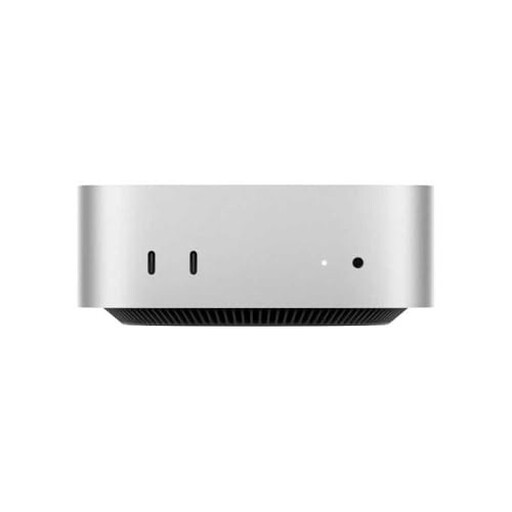 No image available
A compact desktop for use with a separate screen of your choice.
16 GB RAM; 512 GB SSD; M4 chip with 10-core CPU and 10-core GPU.
The connections listed include HDMI, USB-C and Thunderbolt.
No, it isn’t a general requirement for poster design. Adobe lists 8 GB as the minimum for Photoshop 27.x and recommends 16 GB or more. Check the requirements for the version of the software you use.
Check that the video connections on the exact computer configuration are compatible with your monitor, and find out which components are included. Lenovo notes that the monitor, keyboard and mouse are sold separately with the ThinkCentre configuration reviewed.
Ask your printer for the file specifications, including the required dimensions and any bleed needed. Adobe explains how to set bleed and printer’s marks in Illustrator; your choice of computer doesn’t determine the printer’s requirements.
For many online purchases from a business, you have 14 days to change your mind, subject to exceptions, according to the Dutch government. You also have statutory rights if a product is faulty, and the retailer is your point of contact. The Netherlands does not have a fixed statutory warranty period of two years.