If you mainly create music notation on a computer, a compact MIDI controller can be useful, but you could also start with your mouse, computer keyboard or a virtual piano. If you’d like to play melodies without a computer too, look for a standalone keyboard with built-in sounds. Also check how much space you have, the connections available and the keyboard range your examples require.
Who is this choice relevant to?
Worksheet creator with a laptop
You mainly create short exercises and want to know whether physical MIDI input offers anything over using a mouse or computer keyboard. The MuseScore Studio handbook describes these input methods alongside one another.
Student with limited desk space
You want to play in notes, but need to fit the instrument beside your computer and put it away after use. Compact controllers from brands including Arturia, Novation and Akai Professional are examples of this kind of setup.
Creator who plays examples aloud
You want to hear or practise melodies without a computer too, so you may be looking for built-in sounds. Yamaha and Casio describe standalone keyboards with built-in sounds.
What should you look for when choosing?
First decide whether you only want to enter notes on a computer or also play them without one. Then check that the instrument fits your workspace and has enough keys for your examples.
No additional keyboard instrument
Choose this if: you create short passages and want to try using a mouse, computer keyboard or virtual piano first.
Bear in mind: you won’t have a physical keyboard to play notes in.
Compact MIDI controller
Choose this if: you use notation software, want physical keys and have limited desk space.
Bear in mind: a controller such as the Akai MPK mini mk3 doesn’t make sound on its own. You’ll need computer software and a way to listen to the sound.
Standalone keyboard with a computer connection
Choose this if: you want to play or practise without opening notation software, as well as use it for computer input.
Bear in mind: standalone models such as the Yamaha PSR-E383 and Casio CT-S300 need more desk space than compact controllers. Check the connection and the cable you’ll need too.
| What to consider |
What to look for |
Who will find this most relevant? |
| Entering notes |
Try a short exercise in your notation software. The MuseScore Studio handbook describes entering notes with a mouse, computer keyboard, virtual piano and MIDI keyboard. |
When I create worksheets with short exercises, I want to check first whether physical keys suit the way I enter notes. Around 36% of consumers prioritise practical note entry. |
| Space on and around your desk |
Measure the available width and depth, including space for cables. Novation lists dimensions of 339 × 177 mm for the Launchkey Mini 25 MK4; Casio lists 930 × 256 mm for the CT-S300. |
With a computer and study materials on the same desk, I want to know how much room the instrument takes up. Around 29% of consumers give available space their top priority. |
| Sound without a computer |
Check whether the exact model produces sound on its own. Akai Professional states that the MPK mini mk3 sends MIDI to computer software and doesn’t make sound itself. |
If I want to play melodies without switching on a computer, having a built-in sound source matters. Around 21% of consumers prioritise being able to play without a computer. |
| Keyboard range and listening |
Compare the notes in your examples with the keyboard’s range. Arturia lists 25 keys for the MiniLab 3; Yamaha lists 61 keys and a headphone socket for the PSR-E383. |
For passages with a wider range or practising with headphones, I want to check the keys and listening connection in advance. Around 14% of consumers give keyboard range or private listening their top priority. |
Common pitfalls
-
Assuming a MIDI controller makes sound like a keyboard
A MIDI controller can send notes to software without producing sound itself. This means it isn’t the same solution as a standalone keyboard if you want to play without a computer.
Choose a standalone keyboard if you want to play without a computer. If you opt for a controller, check which software and listening equipment you’ll use.
You may need a suitable computer, software and listening equipment as well as a controller. Check what you already have before choosing.
-
Expecting recorded MIDI notes to automatically become a finished worksheet
In notation software, you’ll still need to check the music notation and export the score before you can share it as a readable worksheet.
Before buying, try taking a short exercise from entering the notes through to exporting it as a PDF. That way, you’ll know whether the process suits your needs.
Allow time to choose note durations, check the notation and export the document.
-
Looking only at the number of keys
A compact keyboard takes up less room, but may offer fewer keys within easy reach. Also, not all instruments produce sound on their own.
Compare the notes in your examples with the keyboard and measure your workspace. Also check whether you want to listen without a computer.
Brands to consider
Arturia
The MiniLab 3 is a compact MIDI controller for anyone who wants to play notes into a computer.
- Arturia lists 25 slim, velocity-sensitive keys, USB-C and dimensions of 355 × 220 × 50 mm.
- A 25-key keyboard offers a more limited range at your fingertips than the 61-key keyboards discussed here. The manufacturer’s software integration claims are not an independent test of notation software.
Novation
The Launchkey Mini 25 MK4 is designed for a compact computer setup and offers controls for music production software.
- Novation specifies 25 mini keys, dimensions of 339 × 177 mm and USB power.
- The manufacturer’s DAW features won’t necessarily be useful for creating simple notation worksheets.
Akai Professional
The MPK mini mk3 is a USB MIDI controller for anyone who wants to use physical keys with computer software.
- Akai Professional states that the model sends MIDI to computer software.
- According to Akai Professional, the controller doesn’t produce sound itself. The pads and knobs aren’t essential for entering notes on a worksheet.
Yamaha
The PSR-E383 is a standalone 61-key keyboard with USB audio/MIDI support.
- Yamaha lists built-in sounds, accompaniment and a headphone socket.
- A regional Yamaha specification for Africa and the Middle East lists a width of 941 mm. Check the dimensions of the version you’re considering.
Casio
The CT-S300 is a standalone keyboard for anyone who wants to play examples without a computer and is also considering connecting it to one.
- Casio lists built-in speakers, dimensions of 930 × 256 × 73 mm and a USB Type-B micro-USB-to-host connection.
- According to Casio, the USB connection requires a cable sold separately. Check which cable will work with your computer.
Joybuy products
This selection focuses on 61-key keyboards for playing without a computer. For each model, check whether USB MIDI, built-in speakers and a headphone socket suit the way you work.
 No image available
MLS-931 digital piano, 61 keys, black
An option if you want 61 keys for playing without a computer, as well as computer input.
The product title lists USB MIDI, speakers and weighted keys. The product description also mentions a headphone socket.
Joybuy
 No image available
Electronic keyboard, 61 keys, black
Suited to anyone looking for a 61-key keyboard for playing independently and entering notes on a computer.
The product title lists USB MIDI, a recording function and a metronome. The product description mentions stereo speakers and a headphone socket.
Joybuy
 No image available
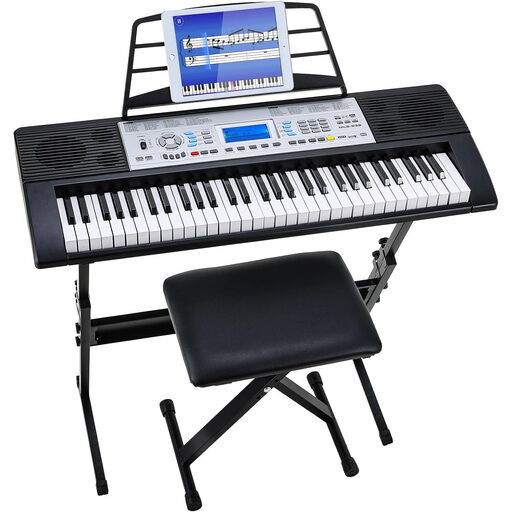
61-key keyboard set with stand and bench
A set for practising without a computer and, according to the product information, for computer input via USB MIDI too.
The product title lists a stand, bench, music rest, 300 sounds and 300 rhythms. The product description mentions speakers and a headphone socket.
Joybuy
 No image available
61-key keyboard set with stand and stool
An option if you’re looking for a 61-key keyboard with speakers to play examples without a computer.
The product title lists dual speakers, 500 sounds, a stand and a stool. USB MIDI isn’t mentioned in the product title.
Joybuy
Frequently asked questions
Do I need a MIDI keyboard to create music worksheets?
No. According to the MuseScore Studio handbook, you can also enter notes with a mouse, computer keyboard or virtual piano. Try creating a sample worksheet this way first; a MIDI keyboard is an additional input method.
How do I enter notes and export a worksheet?
Enter the notes in MuseScore Studio and check the score before sharing it. If you’re using MIDI, you can set up the input device under Audio & MIDI. Export the finished score as a PDF for a readable version.
Does a compact MIDI controller make sound on its own?
Not always. Akai Professional explicitly states that the MPK mini mk3 doesn’t make sound itself, but sends MIDI messages to computer software. Check for each model whether you’ll also need a computer and a way to listen to the sound.
Which connection and cable should I check?
Check the connection type on the exact model and whether the cable will work with your computer. Casio lists a USB Type-B micro-USB-to-host connection for the CT-S300 and says the cable is sold separately.
Can I include other people’s music in worksheets for others?
Not without checking first. According to the Dutch Government, you generally need permission to use other people’s copyright-protected music. You can’t share a private copy made for your own use. For specific educational uses, check whether you have permission or whether an applicable exception applies.


