What should you look for in a microscope for stamps?
First, measure the space the complete setup needs when in use. Then decide whether you want to view images directly on a built-in screen or view and save them on a computer.
| What to consider |
What to look for |
Who is this important for? |
| Space for the complete setup |
Measure the available space for the microscope, stand and stamp. SAFE gives the folded dimensions of the 9754 as 130 × 60 × 30 mm; these don’t tell you how much space the model needs when unfolded. |
If I have limited work surface space, I want enough room to keep both the microscope and the stamp in place while I’m looking at it. Around 33% of consumers say space is their main purchasing consideration. |
| Stable focusing |
Check whether a stand is included and whether there’s enough room beneath the lens. Celestron lists an adjustable stand for the 44302-C; the Smithsonian National Postal Museum explains how stamp tongs can help avoid touching stamps directly. |
I want to position the stamp carefully so I can focus on a detail without touching its surface unnecessarily. Around 27% of consumers prioritise stable, careful inspection. |
| Viewing without a computer |
Check whether the model displays a live image by itself, and how much space the screen and setup take up. SAFE lists a built-in, rotating screen for the 9754. |
If I don’t want to put a computer next to the stamp, I’m looking for a model that lets me view the image directly. Around 20% of consumers prioritise viewing without a computer. |
| Saving and comparing photos |
Check the connection, compatible software and supported operating systems for the exact model. Dino-Lite lists image capture and measurement software for the AM4113ZT. |
If I want to keep a record of details or compare them on a computer, image capture and storage are important to me. Around 20% of consumers say image capture is their main purchasing consideration. |
Product option at Joybuy
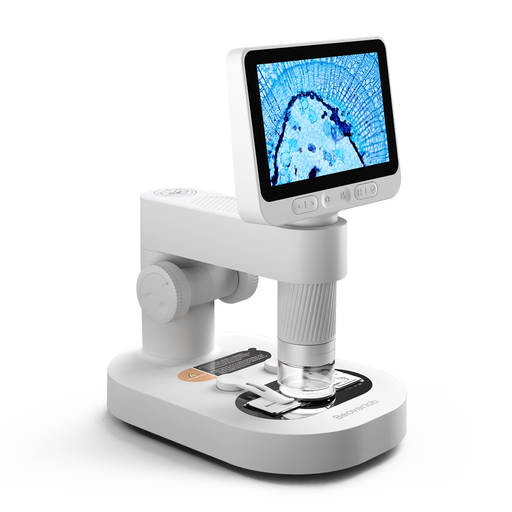
This product option has a built-in screen for direct viewing. Before you buy, check that the setup leaves enough room to place a stamp under the lens.
 No image available
Digital microscope for children with detachable screen, stand and slides
For anyone who wants to view small objects directly on a built-in screen.
The product description mentions handheld use, a detachable design with a stand, and a built-in screen.
Has 8 adjustable LED lights.
View at Joybuy
Frequently asked questions
Can I use an ordinary digital microscope to identify a stamp’s watermark?
Don’t assume so: the Smithsonian National Postal Museum explains that faint watermarks often require a specific watermark detector. Choose a microscope for visible surface details and treat watermark examination as a separate requirement.
How should I place a stamp under the lens?
Use a flat, stable surface and avoid touching the stamp directly wherever possible. The Smithsonian National Postal Museum explains how suitable stamp tongs can help prevent contamination or damage from handling; also check that there’s enough room beneath the lens and stand.
Do I need to install software to save photos?
It depends on the model. Dino-Lite lists software for Windows and macOS for the AM4113ZT; Celestron describes computer-based image capture for the 44302-C. Before you buy, check that the connection and software are compatible with your computer.
What are my rights when I buy a microscope online from a business?
For distance purchases from a business, you’ll generally have a 14-day cooling-off period, according to the Dutch government. According to the Dutch government, a purchase from a private seller doesn’t count as a distance purchase in this sense. In the Netherlands, products are also covered by a legal guarantee that they must be of satisfactory quality, with no single fixed statutory guarantee period. If there’s a fault, contact the seller.
What should I check about product safety in the Netherlands?
Check the product information and applicable markings for the exact version. The Netherlands Food and Consumer Product Safety Authority (NVWA) describes different requirements for different product groups; according to the NVWA, devices with Wi-Fi or Bluetooth are covered by the Radio Equipment Directive (RED) 2014/53/EU. Rules that apply to a different version don’t automatically apply to the model you’re considering.


