
Speakers in a noticeably echoey booth
If you can speak close to the microphone, positioning is an important part of your test recording. Shure stresses that a microphone cannot improve the room’s acoustics on its own.


For recording study summaries in a small booth, a microphone you can position close to your mouth is a practical starting point, but no type of microphone can fix the room’s acoustics. Shure therefore recommends assessing the positioning with a test recording. Then choose USB for a straightforward computer setup, USB/XLR if you also want the option of using a suitable interface, or a compact USB condenser microphone if the booth is quiet enough. For your chosen model, also check the connection, stand, cables and headphone output.
If you can speak close to the microphone, positioning is an important part of your test recording. Shure stresses that a microphone cannot improve the room’s acoustics on its own.
If you want to get started without a separate audio interface, look for USB connectivity, an included cable and, if needed, headphone monitoring. These connection and control options are listed, for example, for models from Audio-Technica, Samson and Sennheiser.
In a small workspace, the stand, mount and cable are just as relevant as the microphone’s dimensions. Product ranges from brands including Samson, Sennheiser and RØDE feature models with a desktop stand or compact desk mount.
Start with a test recording and assess speech clarity and room noise. Shure explains that a microphone cannot remove reflections from a recording by itself. Then compare the connections and physical setup with your equipment and available workspace.
Suitable if: you can speak close to the microphone and want to record straight to a computer.
Bear in mind: a directional pickup pattern and close positioning will not eliminate every reflection or unwanted sound.
Suitable if: you want a compact desk setup and your test recording shows that the booth is quiet enough.
Bear in mind: the connection and product features alone do not tell you how much echo there is in your booth.
Suitable if: you already have a suitable audio interface or mixer, or deliberately want to build that recording setup.
Bear in mind: to record straight to a computer, you’ll need the required interface and connection as well as the microphone.
| What to consider | What to look for when buying | Who is this important for? |
|---|---|---|
| Clear speech despite echo | Check the pickup pattern, whether you can speak close to the microphone and how a short test recording sounds. | If I can hear echo in my booth, I want to know whether my voice will still be clear in a test recording. Around 36% of consumers put speech clarity ahead of other reasons for buying. |
| Recording directly to a computer | Check the type of USB connection, compatibility with your recording device, the cable and whether there is a headphone output. | I want to get started on my laptop without first arranging a separate interface. Around 29% of consumers give a simple computer setup top priority. |
| Fitting it on a small work surface | Compare the available space with the stand or mount, cable routing and the direction you want to speak in. | When desk space is limited, the microphone needs to fit without crowding out my study materials. Around 21% of consumers consider the physical setup most important. |
| Connections for future use | Compare the connections and included items with the equipment you already have or genuinely want to add. | I want to choose a connection that suits my current equipment and any future upgrades. Around 14% of consumers put future connectivity first. |
Reflections in the booth may still be audible, even when you use a directional microphone. Shure explains that a microphone cannot improve the acoustics on its own.
Make a test recording first and try adjusting the microphone’s position before choosing a different type.
An XLR connection alone is not the same as recording directly via USB. Stands, cables and other items can also vary by model or package.
Compare the connections and the contents of the exact package you’ve chosen with your recording equipment.
A listed feature does not prove that a recording made in your room will be free of echo or background noise. Positioning and the room itself also play a part.
Use product features to help you choose, then assess the result with a test recording at your usual speaking volume.
RØDE offers the dynamic PodMic USB, with USB and XLR outputs, as well as the separate NT-USB Mini, a compact USB condenser microphone.
The MV7+ is a dynamic microphone with USB-C and XLR connections, designed for close-up speech recording.
According to Audio-Technica, the ATR2100x-USB is a dynamic cardioid microphone with USB and XLR connections.
The Q2U is a dynamic USB/XLR microphone that Samson says is supplied with accessories for a desktop setup.
The Profile USB is a cardioid USB-C condenser microphone with a desktop stand. The range also includes a Streaming Set with an arm.
This selection of Joybuy products for voice recording ranges from lapel microphones to compact USB desk microphones.
 No image available
This set is described as suitable for voice recording and can be attached with a clip or magnet.
According to the product description, the set includes two transmitters, one receiver and a charging case.
 No image available
This USB microphone may suit a computer setup where you want to listen through headphones while recording.
The product information lists a cardioid pickup pattern, a 3.5 mm headphone socket and a set with a scissor arm, shock mount and pop filter.
 No image available
This compact USB microphone has an adjustable stand for a desk setup. You’ll still need to make a test recording to assess echo in your booth.
The product information lists a cardioid pickup pattern, a mute button, a pop filter and an integrated shock mount. The connection is described as USB-C to USB-A.
 No image available
This USB microphone is described as an ultra-compact model for a desk setup. Check that your chosen position allows you to speak in the right direction.
The product information lists a supercardioid pickup pattern and tap-to-mute controls.
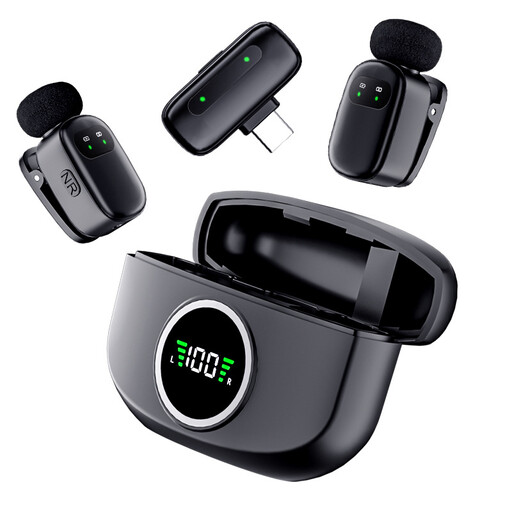 No image available
A lapel microphone offers a different setup from a fixed desk microphone. Check that the Type-C connection is compatible with your recording device.
The product name describes a set with two mini lapel microphones and a Type-C connection.
Point the microphone towards your mouth in line with its pickup pattern. Speak close to it without touching the grille, and make a short test recording at your usual speaking volume. Move the microphone if words sound echoey or plosive sounds are distracting. Shure explains that a microphone cannot fix the room’s acoustics by itself.
Not if the model only has an analogue XLR output. Choose a microphone with its own USB output, or use a suitable audio interface or mixer for an XLR setup. Check the connections on the exact model.
Before buying, check which cable and stand or mount are included in the package you’ve chosen. Make test recordings with the microphone in a consistent position, and follow the instructions for your model when cleaning and storing it.
No. According to ACM ConsuWijzer, you’re entitled to a product that does what you can reasonably expect it to do under normal use. If it proves faulty sooner than expected, the seller is responsible for providing an appropriate solution free of charge. The legal guarantee is not simply the same as any two-year manufacturer’s guarantee.
Not necessarily. The Dutch government distinguishes between making a copy for your own use and distributing or publishing copyright-protected material; you may need the creator’s permission for the latter. The Dutch Data Protection Authority says the exception for purely personal or household use is limited when publishing personal data.