What should you look for when buying?
Start by considering where you’ll record and how far you’ll be from the microphone. Then choose a connection and mounting option that suit your computer and the space available on the shared desk.
| What to consider |
What to look for |
Who is this important for? |
| Clear speech |
Check the pickup pattern and orientation, and whether you can position the microphone close to your mouth during a test recording. |
If you might hear colleagues or room noise, your main priority is making sure your own voice is clear. Around 36% of consumers in this situation say speech clarity is their main reason for buying. |
| Connection and controls |
Compare the connections on your computer and microphone, the cable you’ll need and any mute controls. |
If you want to get started without extra recording equipment, a suitable, straightforward connection is important. This is the top priority for around 29% of consumers. |
| Space and mounting |
Check how much desk space you have, the type of mount and which accessories are included with the exact model. |
At a shared desk, you’ll want a stable setup that leaves the workspace usable. Around 21% of consumers in this situation give available space and setup the highest priority. |
| Monitoring and expansion |
Check whether the model has a headphone output and includes the USB or XLR connection you need. |
If you want to monitor your recording or use an audio interface later, the connection options are key. Around 14% of consumers prioritise monitoring or expanding their setup. |
Joybuy products
This selection includes microphones for desk and voice recordings, as well as a wireless model described as being for video recording. Check that each model’s connection and setup suit your computer and shared workspace.
 No image available
USB condenser microphone with cardioid pattern
A good fit if you want to record your voice directionally via USB and monitor it as you speak.
The product name mentions a cardioid pattern and latency-free monitoring. Check which stand and connection cable will suit your setup.
View at Joybuy
 No image available
HyperX SoloCast 2 USB microphone
A good fit if you’re looking for a USB microphone described in the product name as plug-and-play.
The product name mentions a cardioid pattern. Check that the connection cable and included or required mount will suit your computer and desk.
View at Joybuy
 No image available
Razer Seirēn V3 Mini Quartz USB microphone
A good fit if you’re looking for a compact USB microphone for a desk setup.
The product name mentions tap-to-mute. Check that the required connection and mount will suit your computer and available desk space.
View at Joybuy
 No image available
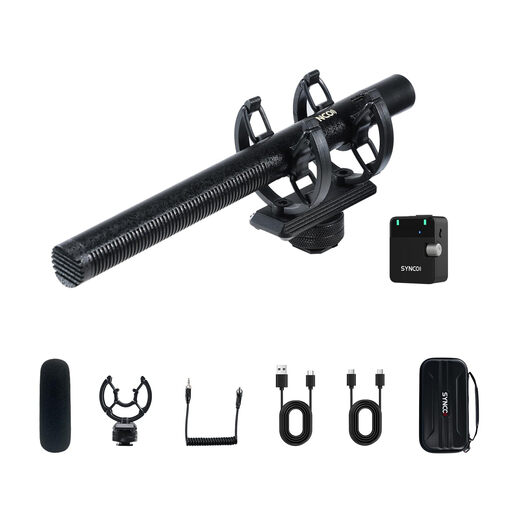
SYNCO D2 wireless microphone
The product name describes this model as being for wireless video recording with devices including a camera, smartphone, PC or DSLR.
Before use, check how to connect the model to your recording computer and which components you’ll need for your setup.
View at Joybuy
Frequently asked questions
Will a dynamic microphone automatically be quiet enough for a shared workspace?
No. Placement and the room itself also make a difference. Record a test while the workspace is being used as normal, then listen to check whether your voice is clear. Shure says that a microphone can’t improve the acoustics; RØDE’s recommendation to keep a distance of around 5–10 cm applies specifically to the PodMic USB.
What do I need to use an XLR microphone with my computer?
For the Elgato Wave DX, Elgato lists an XLR audio interface, XLR cable and stand or arm. Check the requirements for the exact model and whether the interface can connect to your computer.
What should I check during a test recording?
Listen to check that your words are clear, the microphone is pointing towards your mouth and background noise isn’t too audible. If a recording with the PodMic USB is unexpectedly quiet, check the placement and input level, among other things, as advised by RØDE.
Can I record recognisable voices of colleagues at a shared desk?
Not necessarily: a sound recording in which someone is recognisable may contain personal data. According to the Dutch Data Protection Authority, an organisation needs a valid GDPR legal basis to process personal data. Consent is one possible legal basis and must meet certain conditions. What applies in a particular situation depends on the recording and how it will be used. Where possible, avoid recording other people and check your workplace rules.
Who should I contact if a microphone breaks down too soon?
If a consumer product is faulty, contact the seller. According to ACM ConsuWijzer, the seller must resolve the problem free of charge, for example by repairing or replacing the product or refunding your money.


