
Radio play maker with a cast
If you record dialogue with several actors at once, you’ll want to be able to adjust each voice separately and limit sound bleeding between microphones. Microphone distance and direction matter too.


For roles you record one at a time, a USB microphone can be a simple way to get started. If several actors need to record simultaneously onto separate tracks, you’ll need a suitable input for each microphone and, usually, an audio interface. Elgato explains the difference between USB and XLR. In a less quiet room, speaking close to a dynamic microphone can be a practical choice, but placement and the room itself still affect the recording.
If you record dialogue with several actors at once, you’ll want to be able to adjust each voice separately and limit sound bleeding between microphones. Microphone distance and direction matter too.
If you record roles at home and can hear room noise or background sounds, pay attention to how far you are from the microphone and where you record.
If you record roles one after another and want to get started without a separate audio interface, consider a USB microphone and check that you can hear yourself while recording.
First decide how many voices need their own track at the same time. Then choose a connection and microphone that suit the space where you’ll be recording.
| What to consider | What should you check? | Who is this most important for? |
|---|---|---|
| Separate voices | Count the actors recording at the same time and check that the interface has enough microphone inputs. Test the positioning too, to limit sound bleeding between microphones. | If I want to adjust each voice separately, I look at the number of inputs and microphone positions. Around 29% of consumers prioritise separate voices when recording dialogue simultaneously. |
| Room noise | Make a test recording in the room you’ll actually use and listen through headphones for echo and background noise. | In an ordinary room, I mainly want to know whether the voice will remain clear without the room overpowering it. This is the main concern for around 29% of consumers. |
| Subtle details and extra sounds | Decide whether you’ll record dialogue only, or subtle vocal variations and other sounds too. Assess this with a test recording in your own space. | If I want to record vocal nuances or sounds for scenes as well as dialogue, the suitability of my room matters too. Around 24% of consumers put these recording capabilities first. |
| Simple connection | Check the connections, cables, stand and monitoring. With XLR, remember to allow for a suitable interface and, where necessary, phantom power. | For roles I record one after another, I want to get started without an unnecessarily complicated recording setup. A simple solo setup is the main requirement for around 18% of consumers. |
You can’t connect an analogue XLR microphone directly to a computer in the same way as a USB microphone. For computer recording, you’ll need a suitable audio interface and an XLR cable.
Plan your recording setup in advance and count how many microphone inputs you need for the actors recording at the same time.
The microphone’s distance from you and the room itself affect the recording before software processes the sound. Digital features don’t guarantee that echo or background noise will disappear.
Make a test recording where you’ll be recording and try to keep the microphone in the same position throughout each scene.
For voice-over recording with the SM7B, Shure recommends a preamp with at least 60 dB of gain.
Check the gain on your existing interface before choosing this specific model; don’t automatically apply this requirement to other microphones.
The MV7+ offers USB and XLR, while the SM7B is an XLR-only option.
The PodMic USB offers USB and XLR, while the NT1 5th Generation is a condenser model with both connections.
The AT2020USB-X is a USB condenser microphone, while the AT2040 is an XLR model.
These Joybuy products are suited to recording speech at home, from a USB microphone for a simple setup to wireless microphone kits.
 No image available
The product description mentions voice recording and connection to PCs. Check how the receiver connects to your recording equipment before buying.
The product title lists two transmitters, one receiver and a charging case.
 No image available
The USB connection and listed voice-recording use make this a good fit for a simple desktop setup. Check that the connection is compatible with your computer.
The product description lists a supercardioid pickup pattern and a tap-to-mute function.
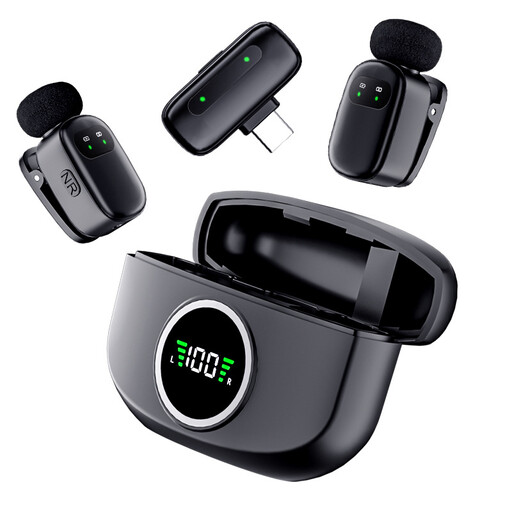 No image available
The product title describes a wireless recording set with two lapel microphones. Check that the receiver connects to your recording equipment.
The product information lists a Type-C connection and a magnetic charging case.
They can, but separate microphones and channels give you more control over each voice. If you use two microphones in the same room, you’ll still need to consider sound bleeding between them and test their positioning.
Start in a quiet room, position the microphones consistently close to the actors and, where possible, point them away from each other. Make a test recording: distance and the room affect the sound, and post-production won’t automatically fix poor microphone placement.
No. Check the requirements for the exact model. Condenser microphones may need phantom power, while passive dynamic microphones generally don’t. Focusrite recommends taking extra care when using phantom power with older microphones and non-active ribbon microphones.
In the Netherlands, consumer purchases are covered by a legal guarantee that the product must be of satisfactory quality; there is no fixed statutory guarantee period. According to the Dutch government, if there’s a problem, you should contact the seller, not just the manufacturer.