What should you look for?
Dynamic USB microphone
Best suited when: you usually speak in one place and can position the microphone close to your mouth.
Trade-off: good positioning is still essential; for computer recording via XLR alone, you’ll also need a suitable interface.
Wired headset with microphone boom
Best suited when: you move around while practising or would prefer the microphone to move with you.
Trade-off: check the boom’s position, the connection and how the unprocessed recording sounds.
USB condenser desktop microphone
Best suited when: you want to record easily via USB and can position the microphone close to you, on the correct side.
Trade-off: a cardioid pattern picks up less sound from certain directions, but it won’t eliminate sounds coming from the direction you’re speaking in.
For a pronunciation recording in a noisy flat, what matters is the balance between your voice and background noise, preserving pronunciation details, the connection and what you’ll need for your setup.
| Consideration |
What to look for when buying |
Who this matters to |
| Voice and background noise |
Test the microphone on the correct speaking side, close to your mouth and with your usual background noise. |
If I can hear my housemates, I want to record my voice clearly without expecting a directional pattern to make the room quiet. Around 36% of consumers prioritise the balance between voice and background noise. |
| Pronunciation details |
Record the same sentence with filters off and on; keep an unprocessed recording too, if possible. |
If I want to listen back to sounds in detail, I want to avoid noise processing clouding my judgement. Around 29% of consumers prioritise preserving clear, recognisable pronunciation sounds. |
| Connection and positioning |
Check that the connection is compatible with your computer and that you have room for a stand or microphone boom. |
If I want to get started quickly or change position, I want a connection and setup that suit my workspace. Around 21% of consumers prioritise easy connection and positioning. |
| Equipment required |
Check what’s included and whether you’ll need an interface, cable or stand for your chosen connection. |
If I’m putting together my first recording setup, I want to know in advance which components I’ll need. Around 14% of consumers prioritise knowing what equipment is required. |
Which brands are useful points of reference?
These brands offer different types of speech microphones and headsets. The features below apply to the product ranges mentioned and aren’t recommendations for the entire brand.
Samson
The Q2U is a dynamic cardioid microphone with USB and XLR for a fixed speech-recording setup.
- Samson says the Q2U set includes a desktop stand, windscreen and cables, and that the microphone has direct headphone monitoring.
- A directional pattern won’t make a noisy room quiet; positioning the microphone close to your mouth is still important.
Audio-Technica
According to the Dutch manufacturer’s website, the ATR2100x-USB offers USB, XLR, a headphone socket and a desktop stand.
- Audio-Technica describes it as having a dynamic cardioid capsule that picks up less sound from the sides and rear.
- Check current availability and which accessories are included with the version you’re looking at.
RØDE
RØDE says the PodMic USB combines a dynamic microphone with USB-C, XLR, headphone monitoring and built-in processing.
- RØDE says it has a built-in pop filter and shock mount.
- Check that your setup includes a suitable stand and assess processing separately for pronunciation recording; manufacturer information isn’t an independent performance test.
Shure
The MV7+ is a USB-C/XLR option for speech recording, with a headphone output and digital features.
- Shure describes voice isolation and a denoiser as features of the MV7+.
- These features don’t guarantee that every background sound will disappear. If you use MOTIV Mix, check the system requirements specified by Shure.
HyperX
The SoloCast 2 is a cardioid USB condenser desktop microphone for a simple setup.
- HyperX says its filters can be adjusted via NGENUITY.
- Compare a test recording with and without filters, and position the microphone close to your mouth on the correct side.
Logitech
The wired H390 headset is an alternative if a microphone boom is more practical than a separate desktop microphone.
- Logitech describes it as having a USB connection, an adjustable microphone boom and controls on the cable.
- Check the exact type of USB connection and decide for yourself whether the unprocessed recording sounds suitable for listening back to pronunciation sounds.
Joybuy products for microphone recording
The products below include portable microphone setups, headsets and a USB condenser microphone. Check that the wearing style and connection suit your computer and the place where you practise.
 Image unavailable
DJI Mic Mini 2S (2 TX + 1 RX + Charging Case)
According to the product information, the transmitters can be attached with a clip or magnet, allowing for a portable setup.
The product name lists two transmitters, one receiver and a charging case.
View at Joybuy
 Image unavailable
SYNCO P2ST Wireless Lavalier Microphone USB-C, Dual Mic 2.4GHz with Charging Case
This wireless lavalier setup is designed for people who want to wear their microphones rather than place one on a desk.
The product name lists a dual microphone set, a USB-C receiver, 2.4GHz and a charging case; check that the receiver is compatible with your device.
View at Joybuy
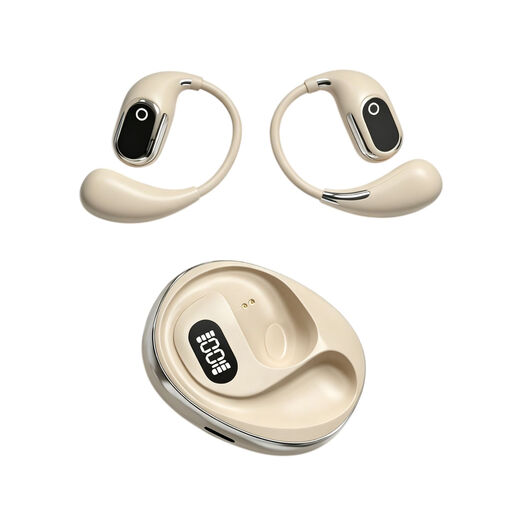 Image unavailable
OWS on-ear headphones with built-in condenser microphone
Headphones with a built-in microphone may suit anyone looking for a headphone-style option instead of a separate desktop microphone.
The product name lists a built-in condenser microphone and recording function; check how the connection and recording function work with your device.
View at Joybuy
 Image unavailable
Jabra Evolve2 30 SE
A headset can be practical if you change position while practising and want the microphones to move with you.
The product information lists integrated microphones and a USB-A connection; check that it’s compatible with your computer.
View at Joybuy
 Image unavailable
USB condenser microphone with cardioid pattern
This USB desktop microphone may suit a fixed recording spot where you can position it close to your mouth, on the correct side.
The product name lists a cardioid pattern and latency-free monitoring; a directional pattern won’t prevent sounds from the direction you’re speaking in from being picked up.
View at Joybuy
Frequently asked questions
Where should I position the microphone for a pronunciation exercise?
Point the speaking side towards your mouth and make a short test recording with the microphone nearby. RØDE recommends around 5–10 cm for the PodMic USB; this isn’t a general rule for other models. If possible, move or reduce the source of distracting noise.
Should noise cancellation always be switched on?
No, compare the recording with and without processing. Audacity’s manual warns that strong noise reduction can cause audible artefacts and that irregular background noise can be difficult to remove. If you’re listening back to your pronunciation, it’s best to keep an unprocessed version too.
Can an XLR microphone record directly to my laptop?
A microphone with only an analogue XLR output will usually need a suitable interface or mixer with conversion for digital recording on a computer. Before buying, check the connections on your exact microphone and computer.
What if the microphone develops a fault during normal use, or I change my mind after buying online?
According to ACM ConsuWijzer, if a product develops a fault sooner than you could reasonably expect, the seller must provide a remedy free of charge under the legal guarantee. The Dutch government states that many distance purchases come with a 14-day cooling-off period; check whether the terms apply to your purchase.
Can I record a pronunciation exercise in the Netherlands if my housemates can be heard in the background?
If you use the recording solely for personal or household purposes, that processing falls outside the GDPR, according to the Dutch Data Protection Authority. This isn’t blanket permission to share recordings of other people: if identifiable voices are shared or processed for an organisation, check which privacy rules apply.


