Who is this choice for?

Presenter speaking from one spot

If you’re recording the bulletin from a fixed position in a reverberant hall, clear voice recordings are the priority. Keep the microphone close to your mouth; Shure explains that a microphone cannot effectively separate direct speech from reflected speech.

Volunteer recording directly to a computer

If you want to record with minimal extra equipment, first check that the USB connection on your chosen model works with the computer you’re using. Samson and Shure describe USB recording options for the models they feature.

Reporter who moves around

If you’ll be moving around during the bulletin, consider a portable wireless kit. RØDE describes the Wireless ME as a kit with a transmitter and receiver; check that the receiver connects to your recording device.

What should you look for when buying?

Wired USB microphone in a fixed position

A good fit if: the presenter can speak close to a compatible computer and wants to record without a separate XLR interface.

Bear in mind: the cable limits where you can set up; check USB compatibility and whether you’ll need a stand or arm.

Wired XLR handheld microphone

A good fit if: the community centre already uses a mixer or recorder with a suitable XLR microphone input.

Bear in mind: the microphone doesn’t record on its own; you’ll need the right cable and recording equipment.

Wireless microphone worn by the speaker

A good fit if: the presenter will be moving around during the bulletin and you can connect the receiver to the recording device.

Bear in mind: you’ll also need to check the receiver, power supply and wireless reception in the hall.

What to consider What should you check? Which consumers is this important for?
Clarity in a reverberant hall Work out how close the microphone can be to the speaker and whether a stand, handheld microphone or transmitter will allow you to position it there. If I’m speaking in a reverberant hall, I want my voice to come through clearly on the recording. Around 36% of consumers prioritise clear speech despite reverberation.
Connecting your equipment and checking the recording Check the computer connection and whether your chosen model has a headphone output. If you want to start recording on a computer without extra recording equipment, you mainly need a suitable connection. Around 29% of consumers prioritise this straightforward set-up.
Freedom of movement Check which transmitter and receiver are included in the kit, how the receiver connects and whether the connection works in the hall. If I’m walking around during the bulletin, I want the microphone to move with me. Around 21% of consumers prioritise freedom of movement.
Connecting to the hall’s sound system Check the mixer or recorder inputs, the cables available and who will be holding the microphone. For consumers who want to use their existing mixer or recorder, having a suitable microphone input is crucial. Around 14% prioritise this connection.

Common pitfalls

  • Assuming a polar pattern will solve reverberation

    A microphone can’t fix the acoustics if reflected speech is already dominating the recording. A cardioid pattern is no substitute for keeping the microphone close to the speaker.

    First, choose a position where the speaker can stay close to the microphone, then assess a test recording in the hall.

    Changing the speaking position or microphone placement may require extra preparation.

  • Looking only for ‘USB’ or ‘XLR’ in the product name

    USB for recording on a computer and XLR for a mixer or recorder are different connection options. An XLR microphone doesn’t record a file on its own.

    Compare the output on the exact model with the input on the device you want to record with.

  • Assuming a wireless microphone is a complete, compatible kit

    The transmitter alone won’t connect to every recording device; the receiver and the right connection matter too.

    Check what’s included in the kit and how the receiver connects before choosing.

Brands to consider

Samson

The Q2U is a dynamic handheld microphone with USB and XLR for recording on a computer or connecting to a compatible mixer.

  • Samson lists a cardioid pattern, a headphone output, and USB and XLR cables included in the box.
  • The manufacturer says it picks up less background noise; this isn’t a measurement in this community centre hall and doesn’t replace good microphone placement.

RØDE

The Wireless ME is a portable wireless option for a speaker on the move; the kit described includes a transmitter and receiver.

  • RØDE lists connection options for cameras, computers and smartphones, as well as a built-in rechargeable battery.
  • Check the connection to your device and test reception on site; stated range and battery-life figures are manufacturer specifications, not measurements taken in the hall.

Sennheiser

The wired e 835 is a dynamic cardioid handheld microphone for anyone who already has a compatible XLR recording set-up.

  • Sennheiser lists a 3-pin XLR connection and positions this model for speech and singing.
  • Direct USB recording isn’t listed as a feature; you’ll need to choose a separate recording device.

Shure

The MV7+ offers USB-C and XLR for a fixed speaking position, with several possible recording set-ups.

  • Shure lists headphone monitoring and digital processing features.
  • Claims about voice isolation and noise reduction aren’t based on an independent test in a community centre; also check the system requirements Shure lists for the app.

Joybuy products

These Joybuy products are aimed at wireless recording where the speaker can move around. For each kit, check that the receiver is compatible with the camera, phone or computer you’ll be recording on.

RØDE Wireless Micro Camera Kit, 2 microphones, USB-C, black

RØDE Wireless Micro Camera Kit, 2 microphones, USB-C, black

For a speaker who moves around while recording: the kit description lists two transmitters with built-in microphones and integrated clips.

The description lists a camera receiver and a USB-C receiver; check which receiver is compatible with your recording device.

Joybuy

SYNCO P2XT USB-C wireless microphone

SYNCO P2XT USB-C wireless microphone

For mobile recording with a compatible USB-C phone: the description lists Android compatibility and monitoring through the Type-C connection.

Check that the connection on your own recording device matches the USB-C option described.

Joybuy

USB condenser microphone with cardioid pattern

USB condenser microphone with cardioid pattern

For a fixed USB set-up where you want to monitor the audio as you get started.

The product description lists a cardioid pattern, a 3.5 mm headphone socket and an included boom arm stand.

Joybuy
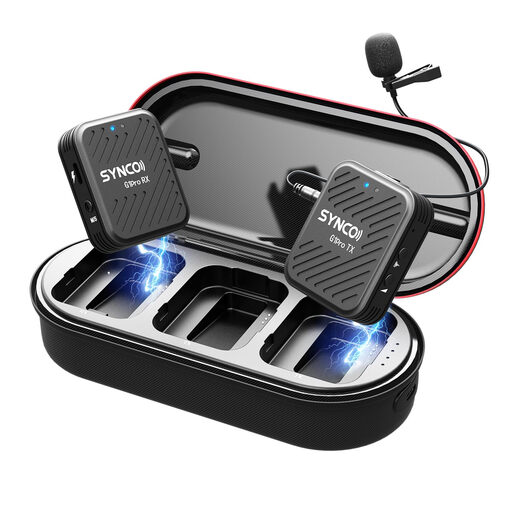
SYNCO G1(A1) Pro 2.4GHz wireless lavalier microphone system for SLR camera

SYNCO G1(A1) Pro 2.4GHz wireless lavalier microphone system for SLR camera

For mobile camera recording with a wireless transmitter and receiver.

The description lists a headphone socket on the receiver for monitoring. Check that the receiver connects to your recording device.

Joybuy

DJI Mic 3, 1 TX + 1 RX

DJI Mic 3, 1 TX + 1 RX

For wireless recording with one speaker and a compatible phone or camera.

The product information lists one transmitter and one receiver, with connection options for iPhone, Android and cameras.

Joybuy

Frequently asked questions

Can I put a microphone at the back of the hall to record the whole bulletin?

For a bulletin with one speaker, this isn’t a reliable way to deal with reverberation: according to Shure, a microphone cannot effectively separate direct speech from reflected speech. Position the microphone so it picks up the voice at close range, then listen back to a test recording.

What should I connect and test before my first recording?

Check that the output from the microphone or receiver is compatible with the input on your recording device. Then listen back to a test recording; with a wireless kit, also get the transmitter, receiver and power supply ready.

Does a two-year manufacturer’s warranty cover all consumer warranty rights in the Netherlands?

No. According to the Dutch government, there is no fixed statutory warranty period in the Netherlands: a product must meet the standards you’re entitled to expect. The manufacturer’s warranty is separate from this assessment.

Can the community centre record recognisable voices and publish the bulletin?

That depends on the recording and how it’s used. If an organisation processes personal data that can be linked to an individual, the Dutch Data Protection Authority says it needs a lawful basis under the GDPR, and the people concerned must be told about the purpose and processing. Consent is one possible lawful basis, but it isn’t automatically the only one; before recording or publishing, establish who can be recognised and what will happen to the recording.
