
Language teacher who moves around
Wants to record explanations and pronunciation while moving around the room. A microphone close to the speaker is a sensible setup to consider.


If your main priority is recording a teacher moving around the room, choose a microphone positioned close to their voice. For participants sitting around a table, a tabletop microphone may be suitable, while a portable recorder can record independently. First decide which voices need to be audible, then test the setup in the room: a microphone placed further away won’t remove echo on its own.
Wants to record explanations and pronunciation while moving around the room. A microphone close to the speaker is a sensible setup to consider.
Also wants to record participants’ questions and speaking exercises. Think about where participants will be sitting and how far they’ll be from the microphone.
Needs a standalone recording file and wants to check that the power, storage and recording are all working before the lesson.
Suitable when: the teacher moves around the room and their explanations are the priority.
Bear in mind: transmitters worn by the speaker won’t automatically record all participants at the back of the room clearly. Check the connection and make sure any internal recording is enabled.
Suitable when: participants are speaking close together around one table and a compatible device is recording.
Bear in mind: recording from several directions doesn’t guarantee clear voices from far away in an echoing room.
Suitable when: you want to record without a dedicated computer or save a separate recording file.
Bear in mind: check the power, storage and a short test recording before the lesson; positioning still matters for voices further away.
Suitable when: the community centre already has a compatible system and you want to use a microphone on a table or lectern.
Bear in mind: check the system’s connection and phantom power in advance; this is a different setup from a simple USB microphone.
| What to consider | What to look for when buying | Who this matters to |
|---|---|---|
| Teacher’s voice | Test a clip-on microphone while walking around, check the connection and listen to the recording from different spots. | If my main priority is being able to follow the teacher as they move around, I look for a microphone close to their voice; around 36% of consumers prioritise making a moving teacher easy to hear. |
| Participants’ voices | Decide where participants will speak and listen to a recording from the furthest speaking position too. | If you want to keep questions and speaking exercises, make sure participants speak within range of the microphone; around 29% of consumers prioritise clear group voices. |
| Standalone recording file | Check the storage, power and recording mode, then play back a short test file before the lesson. | If I want to create a recording file without a dedicated computer, I check that the device can record independently; around 21% of consumers say standalone recording is their top priority. |
| Connection and setup | Check the recording device, connector, any required power supply and the input selected in the recording app. | For consumers who want to connect a setup to the device they have available, it’s important that the entire route from microphone to recording file works; around 14% prioritise easy connection. |
A microphone that picks up sound from several directions won’t automatically remove distance and echo from a recording. Shure explains that a microphone cannot simply separate direct speech from reflected room sound.
Make a test recording from the furthest usual speaking position and check whether the voice is still clear.
The Audio-Technica ATR4697-USB has a USB connection. The Shure MX393 requires a compatible connection and phantom power from the system; Shure states that phantom power is required.
Check the complete signal path from the microphone to the recording file before making your choice.
According to RØDE, 32-bit float on the Wireless GO (Gen 3) applies to internal recordings on the transmitters, not automatically to a recording made on a connected camera.
Test which file is actually created, check that the right recording mode is active and listen to the file before the lesson.
The Wireless GO (Gen 3) is a wireless option for one or two speakers wearing a transmitter.
The ATR4697-USB is a USB boundary microphone for speakers around a table and a compatible recording device.
The H1essential is a portable recorder with built-in microphones for standalone recording.
The Profile Wireless 2-Channel Set is designed for a setup in which two individual speakers can wear a clip-on microphone.
The MX393 is a boundary microphone for use with a compatible audio system on a table or lectern.
These products focus on wireless clip-on microphones for a teacher or two speakers, and portable recorders for standalone recording.
 Image unavailable
The two transmitters are suitable for two priority speakers to wear; distance remains a consideration for participants elsewhere in the room.
The product description lists internal recording, 32-bit float and a charging case. The transmitters have built-in microphones and can be clipped on or attached magnetically.
 Image unavailable
The two transmitters can be worn by the teacher and a second priority speaker; they don’t replace a positioning plan for the rest of the group.
The product description lists integrated clips, a camera receiver, a USB-C receiver and a charging case.
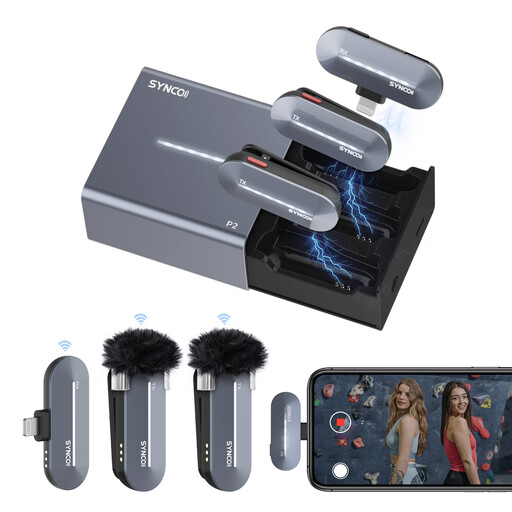 Image unavailable
This set is an option if you want to record two speakers with a compatible iPhone setup; check that the receiver fits your device.
The product description lists two transmitters, a Lightning receiver, and mono and stereo modes.
 Image unavailable
A standalone recorder may be suitable if you want to work without a dedicated recording computer; position it close to the speakers you want to capture.
The product information lists 128 GB of storage, USB-C, AVR and MP3 and WAV recording. It also mentions one-button operation and up to 35 hours of continuous recording.
 Image unavailable
This recorder is an option if you want to record independently and use the text features mentioned too; check which app and settings you’ll need.
The product information lists 32 GB of storage, four microphones, a mode for in-person recording and 30 hours of battery life. It also mentions transcription and summaries through the app.
Not necessarily. Shure explains that a microphone cannot automatically separate direct speech from reflected sound when the distance is unfavourable. Test the voices furthest away in the room and decide whether you need a different position or more recording points.
Make a short recording while the speakers talk from their usual positions, then play it back. Also check the input, power and storage. If you’re recording internally on a transmitter, select the right mode; if you’re using a recorder, check that the file has actually been saved.
No. According to ACM ConsuWijzer, the statutory warranty depends on how long you can reasonably expect the product to last. If a product is faulty under normal use, the seller is responsible for providing an appropriate solution at no cost.
According to the Dutch Data Protection Authority, a recognisable audio recording is personal data. If the GDPR applies, the party responsible must identify an appropriate legal basis before processing the data. Consent is one possible legal basis, but it is not automatically the only one or always the right one. The legal basis that applies, and whether sharing is permitted, depends on factors including the organiser, the purpose and how the recording is used.