What should you look for when buying?
First, think about how you’ll join the call: from a desktop computer, while moving around, or with other people in the same room. Then assess the microphone, connection and fit separately.
| What to consider |
What to look for |
Who it’s for |
| Clear speech |
Check the microphone’s position and adjustability, and where the mute button is. Assess microphone claims separately from noise cancellation for your ears. |
When I call from a busy room, I want my voice to come through clearly and to be able to mute the microphone quickly. Clear speech is the top priority for around 33% of consumers. |
| Connection and settings |
Check the connection on the exact model, then select the right microphone and speaker in your calling app. |
I want to use the headset with my own calling device without any hassle. Around 27% of consumers put connection type first. |
| Comfort and awareness of the room |
Consider adjustability, ear cushions and whether you prefer mono or stereo; the style of headset determines how many ears are covered. |
For a longer call, I want a comfortable fit and the option to choose how much I can hear around me. Around 20% of consumers prioritise comfort and being able to follow the conversation. |
| Freedom to move |
A cable limits how far you can move away; a wireless model needs charging and a connection test with your device. |
If I want to move around during a family call, I weigh the convenience of wireless against charging and connection reliability. Around 20% of consumers say freedom to move is their main concern when buying. |
If several family members are joining from the same room, agree which device will play the call audio and which microphone will be active. Zoom says that multiple devices with active audio in one room can cause echo; a new headset won’t necessarily solve the problem.
Headsets on Joybuy
These Joybuy products are suited to calls from a computer, conversations where you want to move around, and different connection preferences. Before buying, check that the model and connection are right for your device.
 No image available
Logitech PC 960 USB headset
A wired option for calls from a computer, provided the USB connection is compatible with your device.
The product information lists stereo sound, an adjustable microphone boom, and in-line mute and volume controls.
View at Joybuy
 No image available
Jabra Evolve2 55 Wireless Stereo Headset
A wireless stereo headset to consider if you want freedom to move and can connect your device via Bluetooth.
The product information lists Bluetooth, a Link 380 USB Bluetooth adapter, two microphones, a flexible microphone boom and a mute function. Check that the connection and UC platform compatibility suit your setup.
View at Joybuy
 No image available
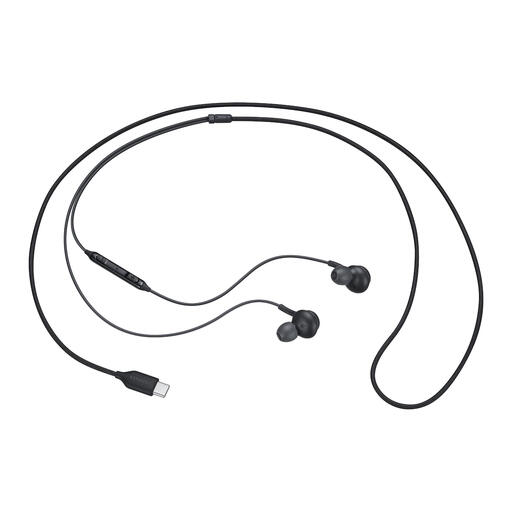
Samsung EO-IC100 wired USB-C headset
A wired in-ear option if your device has a compatible USB-C connection.
The product information lists a microphone, in-line mute controls and ear tips in several sizes.
View at Joybuy
 No image available
Logitech H150 981-000350 headset
A wired headset to consider if your device has a compatible 3.5mm connection.
The product information lists an adjustable microphone with a mute function and in-line controls. A splitter cable is listed for separate audio and microphone ports; check which connection your computer uses.
View at Joybuy
 No image available
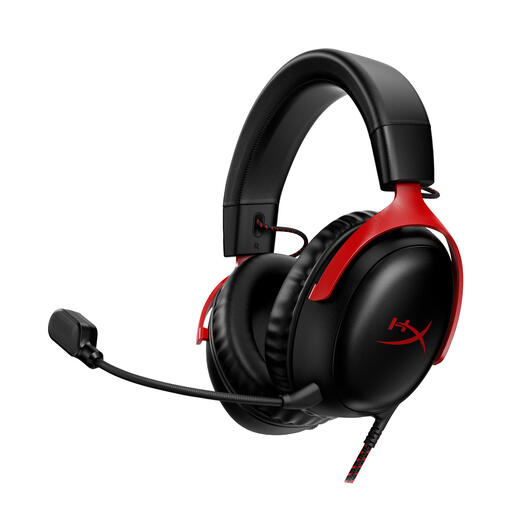
HyperX Cloud III gaming headset
An option with several listed connections, so you can choose the right one for your calling device.
The product information lists 3.5mm, USB-A and USB-C connections, a detachable microphone with a mute function, and memory foam ear cushions. Check which connection suits your device and how you plan to use it.
View at Joybuy
Frequently asked questions
Why is there echo when family members join from the same room?
Zoom says echo can occur when several devices in the same room are actively playing call audio, or when someone uses their phone and computer audio at the same time. Check which devices are playing audio; muting a microphone doesn’t turn off a speaker.
What should I check if nobody can hear me?
Check that the headset is connected and not muted, and that the intended microphone and speaker are selected in your calling app. If you have a Bluetooth headset, also check that it’s switched on and connected. Zoom recommends checking your audio connections and settings.
When should I choose a wired headset over a wireless one?
A wired headset suits calls from a fixed position if its connection is compatible with your device and you don’t want to manage a battery. A wireless Bluetooth headset may suit you if you want to move around during a call; test the connection beforehand and remember that you’ll need to charge it.
Does a headset sold in the Netherlands need to carry a CE mark?
Electrical and electronic devices placed on the market under the applicable EU rules must carry a CE mark. The Dutch government advises checking the product information and marking on the specific device; a shop listing alone doesn’t establish that a particular product meets all the requirements.
How long is the statutory cooling-off period for an online headset purchase in the Netherlands?
According to ACM ConsuWijzer, online product purchases generally come with a cooling-off period of up to 14 days after delivery. Before buying, check whether a statutory exception applies.


