What should you look for when buying?
Start with the space and a test recording. Then choose between a simple USB connection, a separately positioned XLR microphone and the option to record in stereo.
| What to consider |
What should you check? |
Which consumers should consider this? |
| Background noise |
Check the polar pattern, whether you have room for a stand or boom arm, and whether you can make test recordings from different positions. |
If I’m recording at a shared desk, I want to keep unwanted sounds out of the recording as much as possible; around 36% of consumers give background noise top priority. |
| Connection and storage |
Check that the computer and cable are compatible, and that the included mount works with your desk. |
When space is limited and I want to record quickly on my computer, a simple connection matters a lot; around 29% of consumers put convenience first. |
| Focused instrument recording |
Check the exact model’s XLR connection, phantom power requirements and available stand. |
If I want to position the microphone close to the guitar, my recording equipment needs to be suitable; around 21% of consumers prioritise flexible placement and instrument recording. |
| Stereo and expansion |
Decide whether you need a stereo track, and check that you have enough space and suitable inputs. |
When I want to create a stereo image, I need room for a more elaborate setup; around 14% of consumers consider stereo expansion their main concern. |
Joybuy products related to this topic
These Joybuy products are computer and microphone options relevant to this topic. Before buying, check that the microphone and mount suit the way you record and let you point the microphone at the guitar from your desk.
 No image available
Razer SEIRÉN V3 MINI Quartz USB microphone
Could suit you if you’re looking for a compact USB setup; make a test recording to see whether you can point the microphone at the guitar effectively from where you sit.
The product information lists a supercardioid pickup pattern, USB, tap-to-mute controls and compatibility with PC and Mac.
Joybuy
 No image available
Verbex K9-Black wireless mini lavalier microphone, Type-C
The product description lists musical instruments as a possible sound source. Before relying on it for recording an instrument, check whether this lavalier setup is practical to position towards your acoustic guitar.
The title specifies a wireless mini lavalier microphone with a Type-C connection; the description lists computer recording as a use.
Joybuy
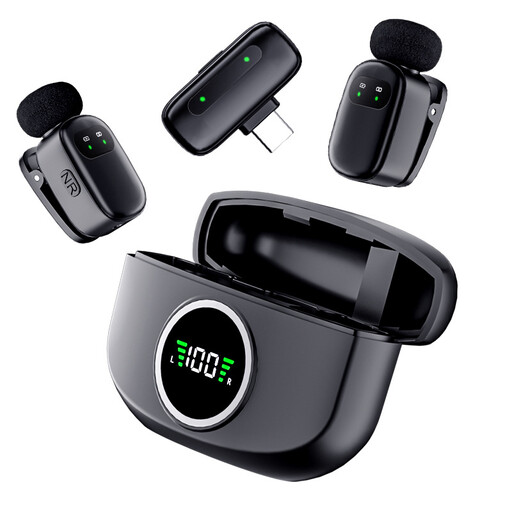 No image available
Verbex K21 dual wireless lavalier microphone, Type-C
The product description lists musical instruments as a possible sound source. Make a test recording to see whether the microphones can be positioned effectively for your guitar and room.
The title specifies two microphones and a Type-C connection; the description lists computer recording as a use.
Joybuy
Frequently asked questions
Where should I start when positioning a single microphone?
Make short test recordings as you change the position and distance. For the LCT 040 MATCH, LEWITT recommends pointing the microphone towards the area around the 12th fret; Focusrite describes a position by the bridge as another starting point for mono recording. Choose based on what you hear when recording your guitar in your room.
Can I plug an XLR condenser microphone straight into a standard USB port?
No, not with a passive cable alone. RØDE says the NT5 has an XLR output and requires P48 phantom power; AKG lists XLR and 44–52 V power for the P170. Check the connections and power requirements of your exact microphone and interface.
How can I reduce tapping and other desk noises while recording?
First, try a different microphone position and make a test recording while the desk is being used as usual. RØDE describes the NT-USB Mini as having a detachable magnetic stand with impact isolation; Audio-Technica lists an optional shock mount for the AT2020USB-X. These are product specifications, not a guarantee that all vibrations will disappear.
What costs and rights should I check when buying online in the Netherlands?
Compare the cost of the complete setup, including any interface, cable, stand and mount. According to ACM ConsuWijzer, online consumer purchases generally come with a cooling-off period of up to 14 days after delivery, subject to legal exceptions. If a product is faulty, your statutory guarantee depends on what you can reasonably expect from it; the retailer is responsible.
Can I record when someone else is sitting at the desk?
The sources cited don’t establish a general requirement to get permission before making a guitar recording that contains no identifiable voices. If an organisation collects or uses identifiable voices as personal data, the Dutch Data Protection Authority says it needs a lawful basis under the GDPR; consent is one possible basis, but it isn’t automatically required. Additional conditions apply when monitoring employees. Where possible, record when no conversations can be heard, and consider separately what to do with any voices that are captured.


