
Vandaag of morgen in huis

Kwaliteit gegarandeerd

Welkomstaanbiedingen ontgrendelen: GRATIS bezorging | Tot 80% korting | Gratis 30 dagen JoyPlus-proefperiode
Download de app
A micro ATX motherboard is a great fit for a compact gaming PC, but a smaller size doesn’t mean every model offers the same features. With a self-build, problems often arise when the socket, memory or connections haven’t been checked in advance.
The three most common buying mistakes are:
Your processor determines the starting point for your choice. An AMD AM5 motherboard is designed for compatible Ryzen processors. According to the product specifications, the Colorful models in this selection support AMD Ryzen 7000, 8000 and 9000 series processors with an AM5 socket. Always check the manufacturer’s current processor list before buying.
An Intel LGA 1700 motherboard, such as the MSI B760M Project Zero, is designed for Intel processors with a 1700 socket. The B760 chipset is therefore a sensible choice for an Intel system, but remember to check the BIOS version and processor compatibility too.
The chipset also determines, among other things:
A B650 motherboard or B850 motherboard is designed for AMD AM5 systems. Choose B650 if its M.2, USB and networking features suit your components. B850 models may appeal if you’re looking for a newer platform with PCIe 5.0, DDR5 and modern wireless features.
A modern DDR5 motherboard uses DDR5 memory and often supports profiles such as AMD EXPO or Intel XMP. These let compatible memory modules run at their specified settings, but the final speed depends on the processor, BIOS version and memory configuration.
Pay particular attention to the number of DIMM slots:
Where possible, install two identical modules in the recommended slots. Check the manufacturer’s memory compatibility list before buying, especially if you want to use high DDR5 speeds.
For a gaming PC, one or two M.2 slots are often more practical than SATA connections alone. An M.2 slot connected directly to the processor may have different capabilities from one connected through the chipset. So check the stated PCIe generation and supported form factor, such as 2242, 2260 or 2280.
Also check:
A micro ATX board is often around 244 × 244 mm, but some models are smaller. It’s still important to check the exact dimensions.
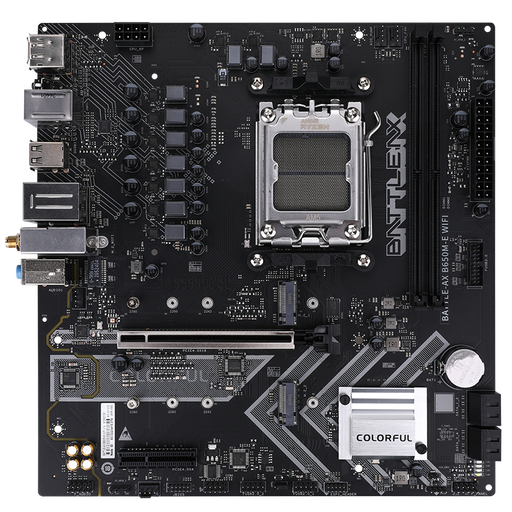
Why it suits this profile: This AMD AM5 motherboard provides a compact base for a first Ryzen PC, with DDR5 and WiFi 6. The two memory slots keep the build straightforward.
The socket, B650 chipset, DDR5 support and WiFi 6 are clearly listed in the product specifications. Bear in mind that the two DIMM slots limit your scope for expansion.
Two M.2 slots, four SATA connections, DDR5 at the stated speeds, and built-in WiFi 6 with Bluetooth 5.2.
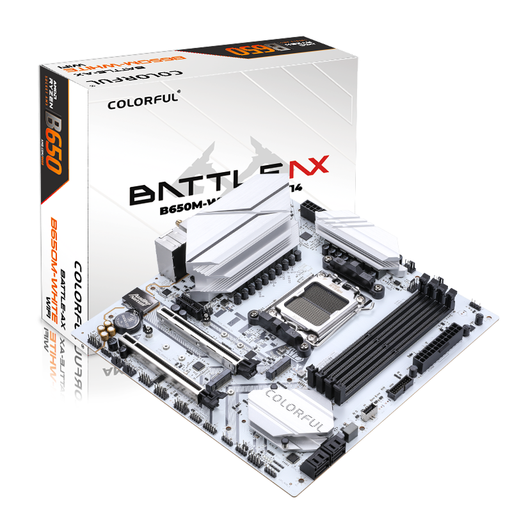
Why it suits this profile: This white M-ATX gaming motherboard is designed for a Ryzen system, with four DDR5 slots, several expansion options and WiFi 6.
The four memory slots and two M.2 slots offer more flexibility than a board with two DIMM slots. Check your case size and preferred graphics card in advance.
Four DDR5 slots supporting the stated capacity, PCIe 5.0 x16, two M.2 slots and 2.5Gb Ethernet.
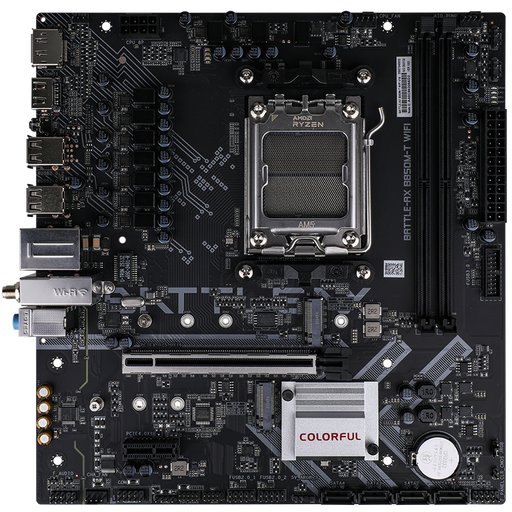
Why it suits this profile: This B850 motherboard is designed for users who want to build a compact Ryzen PC with PCIe 5.0, DDR5 and WiFi 6E.
The product specifications list AM5 compatibility, two M.2 slots and WiFi 6E. Check the processor list and regional support for the 6GHz band.
PCIe 5.0 x16, an M.2 slot with PCIe 5.0, 2.5Gb networking, DDR5 and Bluetooth 5.3.
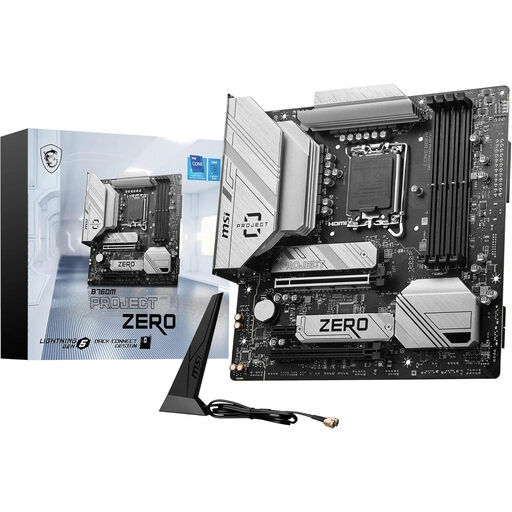
Why it suits this profile: This Intel LGA 1700 motherboard combines DDR5, WiFi 6E, Bluetooth 5.3 and a range of expansion and storage options in a micro ATX form factor.
The socket and Intel B760 chipset are clearly specified. The integrated I/O shield, two M.2 slots and 2.5Gb Ethernet reduce the need for separate expansion cards.
Four DDR5 slots, PCIe 5.0 x16, two M.2 slots, four SATA connections and USB-C on the rear panel.
We’ve put together a complete, up-to-date list of products that meet these strict selection criteria and current European safety requirements.
Not necessarily. Check that the case supports micro ATX, and also check the maximum height of the CPU cooler, the length of the graphics card and the position of the power supply. A motherboard may fit physically, but the build can still feel cramped when you add larger components.
DDR5 isn’t essential in every PC, but the models in this selection are designed for DDR5. Choose memory that’s on the motherboard’s compatibility list. Check the capacity, number of modules and support for XMP or EXPO.
Its lifespan depends on the power supply, temperature, dust and how you use it. A micro ATX motherboard with enough M.2 slots, memory slots and suitable PCIe connections may remain useful for longer if you want to replace components in future. When buying, also check the statutory warranty and the documentation supplied.
