What should you look for?
The Consumentenbond's buying guide links the number of Wi-Fi units to the space: one may be enough for a small room, while multiple rooms or floors are more likely to need two.
| What to consider |
What to look for when buying |
Who is this important for? |
| Coverage in your workspace |
Test the Wi-Fi in your home office and other important rooms. Choose the number of units based on these areas and your home's layout. |
If the connection in my home office keeps dropping, I first want to know whether moving the router will be enough or if I need an extra unit. Around 36% of consumers prioritise coverage in their workspace. |
| Several people online at once |
Compare performance when several devices are in use at once, and take your devices and broadband package into account. |
If several people are on video calls at the same time, I want to know how the network copes with different devices. Around 29% of consumers prioritise capacity for simultaneous use. |
| Wired connections |
Check the number and speed of the ports on each unit, whether Ethernet backhaul is supported and which ports will be free once you connect the modem. |
If I can use a network cable at my workspace or between the units, I want to know whether the system supports it. Around 21% of consumers give wired connections top priority. |
| Management and running costs |
Check the management features, updates, guest access, energy consumption and warranty terms for the system you choose. |
If installation, maintenance or ongoing running costs are your main concerns, find out in advance what day-to-day management involves. Around 14% of consumers prioritise management and running costs. |
Joybuy products
These Joybuy models are mesh systems for bringing Wi-Fi to two locations. Compare the Wi-Fi standard, connections and any wired connection listed with what you need at home.
 Image unavailable
ASUS ZenWiFi BT8 (2-pack)
Suited to those who want Wi-Fi in two locations and need tri-band connections.
Wi-Fi 7 (802.11be); tri-band: 2.4, 5 and 6 GHz.
The product description mentions AiMesh and a guest network.
View at Joybuy
 Image unavailable
ASUS ZenWiFi BT10 (2-pack)
Suited to those who want to connect two Wi-Fi locations and also want to consider 10-gigabit Ethernet.
Wi-Fi 7 (802.11be); tri-band: 2.4, 5 and 6 GHz.
The product description lists 10-gigabit Ethernet.
View at Joybuy
 Image unavailable
TP-Link Deco X50-PoE (2-pack)
Suited to a two-unit set-up where PoE power is a preferred connection option.
Wi-Fi 6 (802.11ax); PoE support.
The product description lists two Ethernet ports per unit.
View at Joybuy
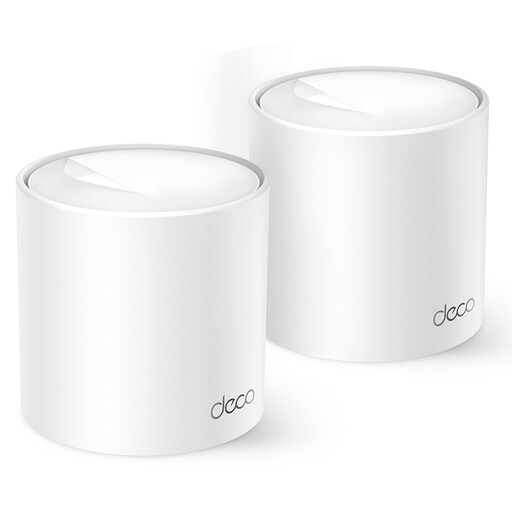 Image unavailable
TP-Link Deco X10 (2-pack)
Suited to those who want Wi-Fi in two locations and want to compare the listed features for connecting multiple devices.
Wi-Fi 6 (802.11ax); the product description mentions OFDMA and MU-MIMO.
View at Joybuy
 Image unavailable
TP-Link Deco X50 (2-pack)
Suited to those who want to connect two locations and are considering Ethernet backhaul if there is a network cable between the units.
Wi-Fi 6 (802.11ax); TP-Link lists optional Ethernet backhaul and three gigabit ports per unit.
View at Joybuy
Frequently asked questions
Do you always need several mesh units in a compact home office?
No, not always. The Consumentenbond's buying guide recommends one unit for a small space and two for multiple rooms or two floors. Test the Wi-Fi where you work; the right set-up depends on the layout of your home.
Where should you put the second mesh unit?
Place it somewhere it can still get a good connection to the first unit, then check the Wi-Fi in your workspace. Follow the installation instructions for your chosen system. If you have a network cable, you could also consider Ethernet backhaul.
Does an AX3000 rating make a 3.0 Gbit/s broadband package faster?
No. For the Deco X50, AX3000 refers to wireless speeds listed by TP-Link on separate bands. Your actual connection also depends on your equipment, network and internet connection, so don't compare the rating directly with your broadband speed.
What should you check after installation and if something goes wrong?
Check the settings and available firmware updates, and keep your proof of purchase. According to the Netherlands Authority for Consumers and Markets, there is no fixed general time limit for statutory guarantees in the Netherlands; what you could reasonably expect from the product is what matters. Contact the seller if something goes wrong.
What legal product requirement applies to Wi-Fi mesh equipment in the Netherlands?
Radio equipment sold or distributed in the Netherlands must meet the applicable European requirements. The Netherlands Radiocommunications Agency states that the correct CE marking must be displayed on the equipment. Check the product marking and information for the item you buy.


