For video calls from a fixed workspace, it’s essential that both the workspace and the connection between mesh nodes have a strong signal. The number of nodes or the advertised coverage area alone won’t guarantee this. If you have suitable network cables, you can compare systems with Ethernet backhaul. Without cables, wireless mesh depends more on where you place the nodes, while powerline backhaul may be an alternative if floors obstruct the radio signal. Also check how the system connects to your existing router, and test the connection where you make calls, as the Consumers’ Association advises.
Who is mesh Wi-Fi suitable for?
Video caller experiencing dropouts
You want reliable calls from your regular home-working spot, so first check whether the problem is with your Wi-Fi or the internet connection behind it. VodafoneZiggo has reported video-calling problems among people working from home, while Microsoft explains how to check call health in Teams.
Resident with a weak signal upstairs
You need a usable signal across three storeys and want to work out where the nodes can still connect reliably, or how to link them another way. The Consumers’ Association recommends positioning mesh nodes with as few obstacles between them as possible.
Using an existing router
You want to keep using your current modem or router, so check the connections and make sure you select the right operating mode. TP-Link explains how to connect Deco systems to an existing network using Ethernet backhaul.
What should you look for when choosing?
Mesh with Ethernet backhaul
When: if suitable network cables run between the nodes you want to use, or you can install them.
The trade-off: the nodes communicate over cable, but installation, available ports and the right router or access point mode all need consideration. A good connection between nodes won’t fix a problem with the internet connection itself.
Fully wireless mesh
When: if installing cables isn’t practical and each additional node can still receive a usable signal.
The trade-off: you don’t need to run a cable between nodes, but walls, floors and the position of each node still matter.
Mesh with powerline backhaul
When: if there are no cables and the wireless connection between floors is weak. Check that the system and your home’s electrical wiring will work well together.
The trade-off: a compatible system can use your home’s electrical wiring to connect the nodes. TP-Link describes this approach for the Deco PX50; results in a particular home will depend on the setup.
First, work out what kind of connection between nodes is possible in your home. Then compare the ports you need, where you can place the nodes and how the system connects to your existing network.
The percentages below show which needs are the top priorities for consumers in this situation.
| What to consider |
What to look for |
Who should prioritise this? |
| Reliable calls |
Test the connection at your workspace. If you use Teams, check call health during a call. |
If you work in one regular spot, you’ll want to avoid dropped calls and interruptions. Around 36% of consumers put call reliability first. |
| Coverage between floors |
Consider where your modem and workspace are, any obstacles, and the connection between nodes. |
If you make calls on a distant floor, you’ll want a usable signal there and a good connection between nodes. Around 29% of consumers prioritise coverage across floors. |
| Existing router |
Check the operating mode, the LAN ports you need and the connection instructions for the exact model. |
If you want to keep your current modem or router, you’ll need to know whether the new nodes will work with it. Around 21% of consumers prioritise keeping their existing network setup. |
| Overall cost and features |
Compare complete kits and the number of nodes you need. Check which connections and features are actually useful to you. |
If you’re looking for an affordable setup, you won’t want to pay for features you don’t need. Around 14% of consumers prioritise purchase and running costs. |
Common buying pitfalls
-
Treating the advertised coverage area as a guarantee
A manufacturer’s coverage figure doesn’t tell you how the nodes will connect in a three-storey home. Obstacles and placement matter too.
Map out the route between the nodes and your workspace, then test the connection on the floor where you make video calls. The Consumers’ Association recommends positioning mesh nodes with as few obstacles between them as possible.
-
Focusing only on the Wi-Fi generation or Mbps
A newer standard or a higher figure on the box doesn’t, by itself, tell you how well video calls will work at your desk. Your devices and the connection between nodes matter too.
Compare the ports you need, the backhaul and the placement before factoring in extra features or a newer standard. The Consumers’ Association points out that the Wi-Fi generation alone doesn’t give you the full picture.
-
Confusing similar model names or kit sizes
A Deco X50-PoE isn’t the same model as a standard Deco X50, and a kit with two nodes is different from one with three.
Before buying, check the full model name, variant and number of nodes included.
Brands to compare
TP-Link
The Deco range includes mesh systems with Ethernet backhaul and a powerline variant. TP-Link says the Deco X50 has three gigabit ports per node, while the Deco PX50 also uses powerline to connect nodes.
- Worth comparing if you’re choosing between a cable connection and a powerline connection between nodes.
- The advertised coverage isn’t a measurement of performance in your home. Also check the exact model variant and kit size.
ASUS
ASUS describes the ZenWiFi BD4 as a dual-band Wi-Fi 7 system with two 2.5G ports and support for access point mode.
- Worth comparing if 2.5G ports or expansion within AiMesh is a specific requirement.
- The Wi-Fi generation alone won’t predict how the system performs in your home.
NETGEAR
According to NETGEAR, the Orbi RBK763S kit consists of a router and two satellites, with a dedicated connection between the router and satellites.
- Worth comparing if you want to consider a three-node kit with a dedicated wireless connection between the router and satellites.
- NETGEAR’s speed and coverage figures don’t guarantee performance in your home. NETGEAR includes one year of Armor access.
FRITZ!
According to FRITZ!, the three-piece FRITZ!Mesh Set 4200 includes three FRITZ!Repeater 3000 AX nodes and can be used with an existing router.
- Worth comparing if you want to keep your existing network equipment.
- Check the connections and what’s included in the kit you choose. A manufacturer’s warranty doesn’t replace your statutory rights in the Netherlands.
Joybuy products
These Joybuy products are TP-Link Deco mesh kits with two or three nodes; the product names specify Wi-Fi 6 or Wi-Fi 6E. Check which backhaul and connections suit your network for each model.
 No image available
TP-Link Deco BE68 2-pack
Worth considering if you’re looking for a mesh kit with two nodes. Check the placement and connection at your workspace.
The product description mentions wired and wireless backhaul. Check which connections you need and how the system connects to your existing router.
View at Joybuy
 No image available
TP-Link Deco X50 3-pack Wi-Fi 6
Worth considering if you want to compare a mesh kit with three nodes for use across several floors.
The product information mentions optional Ethernet backhaul and three gigabit ports per node. The connection in your home will also depend on placement.
View at Joybuy
 No image available
TP-Link Deco XE75 Pro 3-pack Wi-Fi 6E
Worth considering if you’re looking for a tri-band mesh kit with three nodes. First check where the nodes can connect to each other in your home.
The product information lists three Ethernet ports per node. Compare the connections with your devices and network setup.
View at Joybuy
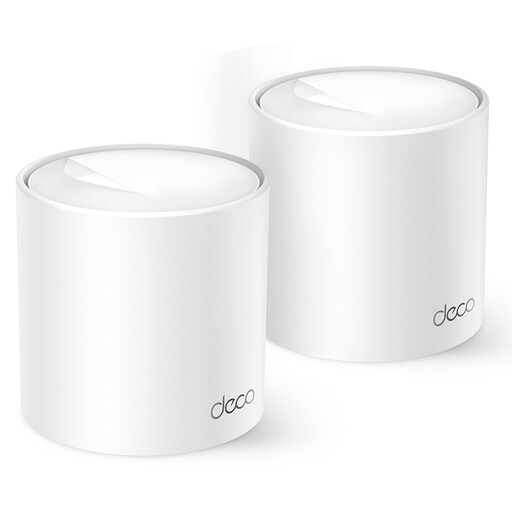 No image available
TP-Link Deco X10 2-pack Wi-Fi 6
Worth considering if you’re looking for a mesh kit with two nodes and can plan their placement along the route between your modem and workspace.
The product information mentions optional Ethernet backhaul. Check which connection and operating mode suit your existing network.
View at Joybuy
 No image available
TP-Link Deco XE75 3-pack Wi-Fi 6E
Worth considering if you want to compare a mesh kit with three nodes for coverage across several floors.
The product information lists three gigabit ports per node. Check the placement and connection at the spot where you actually make calls.
View at Joybuy
Frequently asked questions
How can I tell whether mesh could help with my video-call dropouts?
Compare the connection at your workspace with the one near your router, and check your internet connection too. If you use Teams, check call health during a call, including packet loss, response time and outgoing video. Mesh won’t fix a fault outside your home network.
Do I need exactly one mesh node on every floor?
No. The number of floors doesn’t automatically determine how many nodes you need. Choose their positions based on your modem, workspace, obstacles and the connection between nodes, then check the result where you make calls.
Can I keep my current modem or router?
That depends on the system you choose and its settings. TP-Link describes both router and access point modes for Deco, with connection instructions for a wired satellite node for each mode. Follow the instructions for your exact model.
What warranty applies to a mesh system in the Netherlands?
The Dutch government says there’s no fixed statutory warranty period in the Netherlands. You’re entitled to a product that’s fit for purpose, taking into account its reasonably expected lifespan. If the product is faulty, contact the retailer; any manufacturer’s warranty is in addition to your statutory rights.
What statutory product requirement applies to mesh Wi-Fi in the Netherlands?
Radio equipment sold in the Netherlands must meet the applicable European requirements and carry a CE marking, according to the Dutch Authority for Digital Infrastructure. This general requirement alone doesn’t prove that a specific item being sold complies.


