What should you look for when choosing?
First, work out which connection between mesh nodes is practical in your home. Then you can assess the speed where you watch.
Mesh with Ethernet backhaul
Choose this when: you can run a network cable between suitable locations, especially if walls weaken the wireless connection between nodes.
Bear in mind: you’ll need to run a cable and use ports; the stated coverage isn’t a measurement of performance in your home.
Fully wireless mesh
Choose this when: you can’t run a cable, but can position a midway node where it still has a good connection to the main node.
Bear in mind: placing a node next to the TV won’t automatically fix a weak connection to the main node.
Powerline with mesh Wi-Fi
Choose this when: running Ethernet isn’t practical and the sockets you plan to use provide a reliable connection over your electrical wiring.
Bear in mind: distance, electrical interference and the quality of your wiring can affect actual speeds, according to devolo.
| Consideration |
What to look for when buying |
Who should pay particular attention? |
| Connection through walls |
Check whether Ethernet backhaul is possible and where you can place the mesh nodes. The Consumentenbond recommends minimising obstacles between Wi-Fi nodes. |
I want to stream in the TV room, even if a thick wall weakens the connection; around 36% of consumers say coverage through walls is their main concern when buying. |
| Backhaul without a cable |
Check whether you can position a midway node with a strong enough Wi-Fi signal, or test the connection through the sockets you plan to use. |
Without Ethernet, I want to know whether a midway node or powerline is practical in my home. Around 29% of consumers prioritise backhaul without a network cable. |
| Speed while watching |
Test the connection on your streaming device; Netflix recommends at least 15 Mbps for 4K UHD streams on its service. |
If other people at home are also using the internet, I want to assess the speed on my TV rather than relying only on the stated Wi-Fi speed; around 21% of consumers say stable speeds during simultaneous use are their main concern when buying. |
| Connection and management |
Check the router or access point mode on the exact model and the settings required by your provider. |
I want to connect the system to my existing modem without unnecessarily complicated settings; around 14% of consumers say connection and management are their main concerns when buying. |
Mesh Wi-Fi products at Joybuy
This selection includes mesh systems and units for setups that may use wired backhaul, multiple mesh nodes or PoE. Check the connections and box contents for each version to make sure they suit your setup.
 No image available
ASUS ZenWiFi BD4 Dual-Band Wi-Fi 7, White
Suited to a mesh setup where you want to use wired backhaul.
The product title specifies Wi-Fi 7 and dual-band operation on 2.4 GHz and 5 GHz. The product description mentions a wired backhaul option.
View at Joybuy
 No image available
TP-Link Deco X50 (3-Pack) Dual-Band Wi-Fi 6 (2.4 GHz/5 GHz)
Suited to a setup where you need three mesh units and may want a wired connection between the Deco units.
The set includes three units and supports optional Ethernet backhaul, according to the product description; the title specifies dual-band Wi-Fi 6.
View at Joybuy
 No image available
Linksys Velop Pro 7 Tri-Band Wi-Fi 7 (2.4 GHz/5 GHz/6 GHz), White
An option to compare if you’re looking for a tri-band mesh system with Wi-Fi 7.
The title specifies Wi-Fi 7 and the 2.4 GHz, 5 GHz and 6 GHz bands. The product description mentions setup and network management through the Linksys app.
View at Joybuy
 No image available
TP-Link Deco X50-PoE (2-Pack) Dual-Band Wi-Fi 6
Suited to an installation where you want to use two mesh units with PoE support.
The product description specifies two units and PoE support; the title specifies dual-band Wi-Fi 6.
View at Joybuy
 No image available
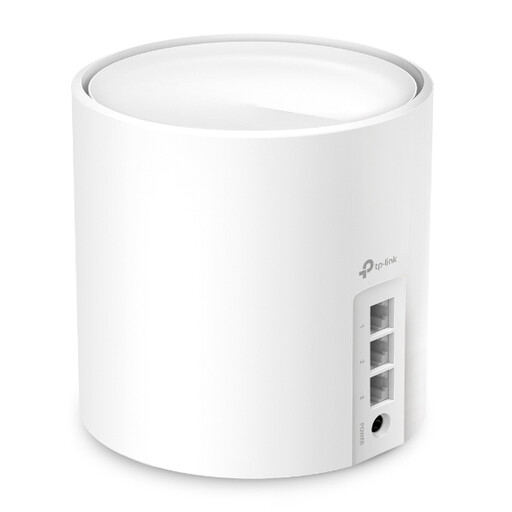
TP-Link AX3000 Whole Home Mesh WiFi 6 Unit
A single unit to consider for an expandable Deco setup; check which units are compatible with your existing system.
This version includes one unit. The product description mentions three gigabit ports, optional Ethernet backhaul and the option to add Deco units.
View at Joybuy
Frequently asked questions
Where should I put a wireless mesh node if the TV is behind a thick wall?
Don’t automatically place it next to the TV if it can barely receive a signal there. Find a midway position with as few obstacles as possible between the nodes, then check the connection where you watch.
What speed do I need to watch a nature programme in 4K?
For Netflix, the service recommends a stable connection of at least 15 Mbps for 4K UHD. Check the speed on your streaming device; this recommendation isn’t a general guarantee for other services or a particular mesh product.
Can I connect my own router instead of using my provider’s?
According to ACM ConsuWijzer, you have the right to choose your own router in the Netherlands. A provider may refuse to let you use your own device, for example, if it doesn’t meet the applicable safety requirements. Ask for the settings you need and keep the device up to date.
What should I check about a mesh Wi-Fi device’s CE marking?
The Rijksinspectie Digitale Infrastructuur states that the CE marking must be on the equipment. Check the actual version being offered; the product title alone doesn’t confirm which version you’ll receive.
Is there anything to bear in mind after installation?
Before buying, check which software features are included with the exact system and what conditions apply. Keep the firmware up to date and test the connection again if you move the mesh nodes.


