First, test your connection using an Ethernet cable at the router, then compare it with Wi-Fi in the room with the problem: mesh Wi-Fi won’t fix a slow internet connection. If the main issue is weak coverage, a wired access point or mesh system with Ethernet backhaul could be suitable if you can run a cable. Without a cable, wireless mesh may be an option, provided the nodes can still maintain a usable connection with each other. Consumentenbond recommends keeping obstacles between Wi-Fi nodes to a minimum, and Tweakers describes wired backhaul as the more stable connection.
Who is mesh Wi-Fi suitable for in a shared student house?
Student with poor Wi-Fi coverage in their room
Your study portal works near the router, but the Wi-Fi drops out in your room or on another floor. First, work out where an extra node could still get a usable connection. Consumentenbond recommends placing Wi-Fi nodes with as few obstacles between them as possible.
Housemates who are online at the same time
You all use the network at once and want to find out whether the slowdown is caused by your internet connection or the Wi-Fi in the house. Compare a wired test at the router with a Wi-Fi test in the room with the problem.
Resident who manages the shared network
You want to keep your provider’s modem and need to agree who can access the settings and install updates. Check which features remain available in the operating mode you choose.
What should you look for in mesh Wi-Fi?
Improve your existing set-up first
Choose this if: your wired connection is good and moving the router could improve coverage in your study.
Bear in mind: walls and floors can still limit coverage after you move the router.
Wired access point or mesh
Choose this if: you can run an Ethernet cable to the room or another floor.
Bear in mind: running a cable takes effort and may use up a connection point.
Wireless mesh
Choose this if: cables aren’t practical and you can place the nodes where they’ll have a usable connection with each other.
Bear in mind: placement and obstacles affect the connection between nodes.
First, test the spot where your study portal struggles. Then work out which part of your network needs attention.
| What to consider |
What to look for |
Who this is for |
| Coverage in your study |
Test in the problem area and find out where an extra node can still get a good connection; check whether Ethernet backhaul is possible. |
If the study portal drops out in my room, I want to know whether an extra node can still get a connection there; around 29% of consumers prioritise coverage in their own room. |
| Using the network at the same time |
Compare a wired speed test at the router with a Wi-Fi test in the problem area, including when housemates are online. |
When housemates are online at the same time, I want to tell the difference between slow Wi-Fi and a slow internet connection; around 24% of consumers give simultaneous use top priority. |
| Connection to the modem |
Check the operating mode of the exact model, the available Ethernet ports and who manages the router functions. |
If we want to keep the existing modem, I want to avoid accidentally changing how the network is set up; around 18% of consumers prioritise compatibility with their existing modem. |
| Managing the shared network |
Check the guest network, supported encryption and update management; agree who will manage the administrator account. |
With shared Wi-Fi, I want to make it clear who manages the settings and passwords; around 17% of consumers give secure, shared management top priority. |
| Total cost and usage |
Compare the number of nodes you need and their stated power consumption. ACM ConsuWijzer distinguishes between the statutory guarantee and the manufacturer’s guarantee. |
If we’re sharing the cost, I don’t want us to buy nodes we don’t need; around 12% of consumers prioritise buying and using the system together. |
Common buying mistakes
-
Mistaking a poor internet connection for a coverage problem
An extra Wi-Fi node won’t make your incoming internet connection faster. Consumentenbond recommends testing with a wired connection to distinguish your internet speed from your Wi-Fi coverage.
First, compare a wired connection at the router with Wi-Fi in the spot where your study portal struggles.
-
Placing a wireless node in a dead zone
An extra mesh node still needs a usable connection to the previous node. A spot behind a thick wall can weaken that connection.
Look for an intermediate spot with fewer obstacles, or find out whether you can run an Ethernet cable.
-
Assuming access point mode keeps all router features
TP-Link states that some Deco features aren’t available in access point mode.
Before you buy, check which management features you need and whether they’re available in the mode you choose.
-
Confusing the manufacturer’s guarantee with your statutory rights
According to ACM ConsuWijzer, your statutory guarantee exists alongside any guarantee offered by the seller or manufacturer.
Keep your proof of purchase and consider any additional guarantee separately from your statutory rights.
Brands to compare
TP-Link
The Deco X50 is a mesh option with Wi-Fi 6, a choice of pack sizes and optional Ethernet backhaul.
- TP-Link specifies three gigabit ports per Deco X50 node and describes app-based set-up.
- The stated coverage is a manufacturer specification, not a measurement in a shared student house. Also check which features are unavailable in access point mode.
ASUS
The ZenWiFi BD4 is worth comparing if you’re looking for 2.5GbE ports on each node and router or access point mode.
- ASUS specifies two 2.5GbE ports per node, dual-band Wi-Fi 7 and a choice of pack sizes.
- A newer generation of Wi-Fi doesn’t automatically mean a better connection to your study portal. Check the number of nodes and how the system connects.
FRITZ!
FRITZ!Mesh sets and repeaters are worth considering if you want to extend an existing FRITZ!Box network. The manufacturer also describes sets for use with other routers.
- FRITZ! describes centrally managed mesh settings within its own ecosystem.
- Using the system with a modem from another brand may work differently. Check the exact connection method and how it works.
NETGEAR
The Orbi RBK763S is a tri-band mesh set to compare if the wireless connection between nodes is important to you.
- NETGEAR specifies a dedicated connection between the router and satellites. The set includes one router and two satellites.
- Capacity and coverage figures from NETGEAR are manufacturer claims, not a performance guarantee for a specific shared student house.
Joybuy products for extending Wi-Fi
These Joybuy product picks are mesh sets for anyone looking to extend Wi-Fi to several rooms. The number of nodes, stated backhaul options and connections vary by model. Check which set-up will work with your existing modem and available cabling.
 Image unavailable
TP-Link Deco BE68 (2-pack)
Suited to anyone who wants to spread two mesh nodes around the home and consider both wired and wireless backhaul.
The product description lists Wi-Fi 7, tri-band and support for wired and wireless backhaul.
View at Joybuy
 Image unavailable
TP-Link Deco PX10 (3-pack), Wi-Fi 6
Suited to anyone who wants to compare a three-node system and its stated Powerline network connection with their home and set-up.
The product description lists Wi-Fi 6, Powerline AV1000, WPA3, three gigabit ports per unit, and router and access point modes.
View at Joybuy
 Image unavailable
ASUS ZenWiFi BT8 (2-pack), tri-band Wi-Fi 7
Suited to anyone looking for two mesh nodes to use with a compatible ASUS router and AiMesh.
The product description lists tri-band Wi-Fi 7, WPA3, a guest network and AiMesh integration with compatible ASUS routers.
View at Joybuy
 Image unavailable
TP-Link Deco X50 (3-pack), Wi-Fi 6
Suited to anyone looking to spread three nodes around the home and consider optional Ethernet backhaul if cabling is possible.
TP-Link specifies Wi-Fi 6, three gigabit ports per node and WPA3. The product description also mentions optional Ethernet backhaul.
View at Joybuy
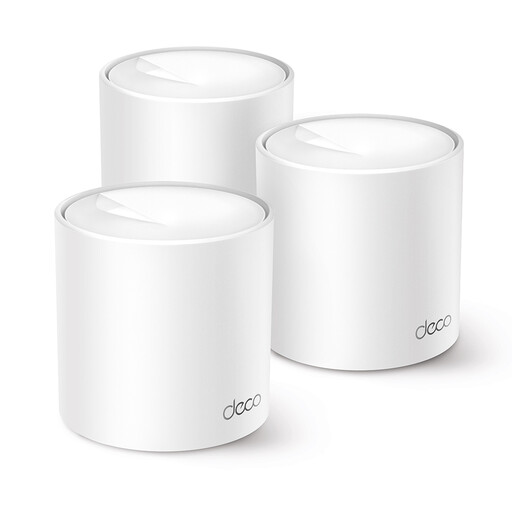 Image unavailable
TP-Link Deco X10 (3-pack), Wi-Fi 6
Suited to anyone looking to compare a three-node system and a shared network for several rooms.
The product description lists Wi-Fi 6, OFDMA, MU-MIMO and a guest network.
View at Joybuy
Frequently asked questions
Should you buy mesh straight away if your study portal is slow?
No. First, test the connection with an Ethernet cable at the router and compare it with Wi-Fi in the problem area. Consumentenbond recommends contacting your provider if a wired connection is repeatedly much slower than promised.
Where should you place a wireless mesh node?
Don’t place the node where there’s almost no signal left. Consumentenbond recommends keeping obstacles between nodes to a minimum and placing each one in an intermediate spot where the connection is still good.
Can you keep your existing provider’s modem?
That depends on the set-up you choose and the exact model. TP-Link describes an access point mode for Deco in which the existing router continues to manage the network, although some features may no longer be available. Also check your existing router’s settings.
What does a manufacturer’s guarantee mean for a group purchase?
A manufacturer’s or seller’s guarantee is separate from your statutory guarantee in the Netherlands. According to ACM ConsuWijzer, the expected useful life depends on factors including the type and price of the product and how it is normally used. There isn’t one fixed statutory guarantee period that automatically applies to every router.
What product requirements apply to radio equipment in the Netherlands?
For radio equipment sold in the Netherlands, Rijksinspectie Digitale Infrastructuur describes the applicable European requirements and the CE marking applied by the manufacturer when the product meets those requirements. A CE marking doesn’t tell you whether Wi-Fi will work well in your room.


