
People using a shared streaming screen
You want the screen to stay online while others use phones or laptops. Check both the screen’s connection and the link between the mesh points.


Start with the screen’s connection: connect it by cable where possible, then choose mesh points for areas that need extra Wi-Fi coverage. If you can run cables between mesh points, wired backhaul is an option; without cables, placement and the wireless connection between points are key. Separately, check whether phones on the intended network can access the screen for casting.
You want the screen to stay online while others use phones or laptops. Check both the screen’s connection and the link between the mesh points.
You mainly need coverage between your existing router and the lounge. Whether you can run a cable will help determine which mesh setup is right for you.
Several people need to be able to find the shared screen, without automatically gaining access to all your private devices. So check both network separation and whether the screen can be reached.
First, check the connection at the screen. Then decide whether a wired connection, extra coverage or guest access is the main priority.
| What to consider | What to look for when buying | Who is this important for? |
|---|---|---|
| A stable connection for the screen | Check the connection at the screen during normal use with several devices online; look for ethernet ports and the option of wired backhaul. | I want the shared screen to stay online while others use their devices; around 36% of consumers prioritise screen stability above all else. |
| Wi-Fi coverage in the lounge | Find out where the current signal becomes weak and whether you can run a cable between potential mesh point locations. | If the lounge is outside good range, I want to know where an extra point can go and whether cabling is an option; around 29% of consumers prioritise coverage in the lounge. |
| Casting from phones | Check whether devices on the network you intend to use can connect to the screen with your chosen casting feature; look out for AP or client isolation. | I want guests to be able to control the screen from their phones without unnecessary access to private devices; around 21% of consumers prioritise casting access above all else. |
| Compatibility with existing equipment | Note your router model, whether you want to use router or access point mode, the connections you need and what’s included in the box. | If I want to keep using my existing network equipment, I’m looking for an extension that works with it without unnecessary extras; around 14% of consumers prioritise compatibility above all else. |
A model’s stated radio speed is not the same as the connection your screen gets where it’s positioned.
Check the connection at the screen during normal use, and assess your internet connection, cabling and mesh point placement separately.
Network separation can block the communication needed for a phone and screen to connect to each other.
Test casting from the guest network. Don’t give visitors uncontrolled access to private devices just to solve this problem.
The FRITZ!Repeater 3000 AX extends an existing network; it doesn’t automatically replace it with a complete system.
Check that your existing FRITZ!Box supports the features you need as a Mesh Master, and see what’s included in the box.
With Deco, the permitted cabling route and the function of a designated IPTV port can vary by configuration.
Follow the connection diagram for your chosen router or access point mode, and check your provider’s IPTV requirements if needed.
Deco systems are an option if you’re setting up a new mesh network. The Deco X50-PoE V2 may be worth considering if ethernet-based placement or power is important.
The ZenWiFi XT9 is an option if you’re looking for a complete mesh system with tri-band Wi-Fi and multiple LAN connections.
The FRITZ!Repeater 3000 AX is designed to extend your network when you’re using a compatible FRITZ!Box as a Mesh Master.
The Velop Pro 6E is a standalone mesh option if support for the 6GHz band is important to you.
These Joybuy products are mesh solutions for extending coverage around your home. For each version, check which connections and wired options will work with your screen and existing network.
 No image available
Worth considering if you’re looking for a mesh network and want to check that the connections and wired backhaul will work with your router and screen.
The product title specifies a 2-pack.
 No image available
A good fit if you’re looking for several mesh points and want to check that a wired connection for the screen will work with your setup.
The product title specifies dual-band 2.4/5 GHz and Wi-Fi 6.
 No image available
An option if you’re looking for a mesh router for devices in different areas and want to check how it will connect to your existing network before buying.
The product title specifies dual-band and Wi-Fi 6.
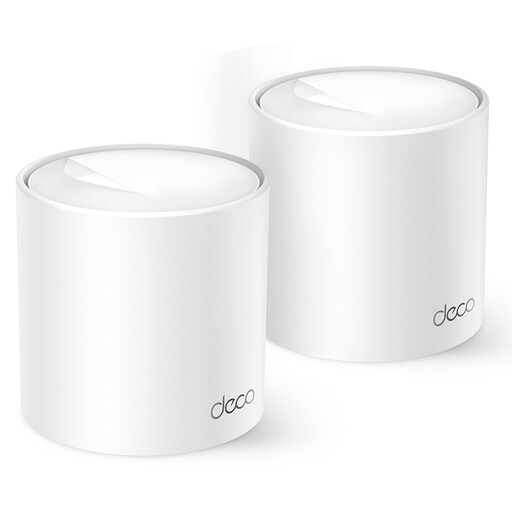 No image available
Worth considering if you’re looking for a Deco mesh network to cover several areas and want to factor in how your screen will connect.
The product title specifies dual-band 2.4/5 GHz and Wi-Fi 6.
 No image available
Could suit you if you’re considering several mesh points and an ethernet connection to the screen; check that the stated port speed is suitable for your needs.
The product title specifies dual-band 2.4/5 GHz and Wi-Fi 5. The product information states a maximum speed of 100 Mbps for the ethernet ports.
No. First, check your internet speed and the local connection at the screen. Netflix recommends a stable connection of at least 15 Mbps for one 4K UHD stream; that recommendation doesn’t mean mesh can fix a slow internet service.
Not automatically. With the Deco network separation described, guest devices can’t reach devices on the main network. Google says that Cast screen mirroring requires the same network name and AP isolation to be disabled. Test your screen, casting feature and guest network together before relying on them.
It depends on the system and its mode. For Deco in router mode, TP-Link specifies a connection from the LAN side of the main Deco; in access point mode, TP-Link also says you can connect through the main modem or router. After installation, check in the app that the satellite is actually using ethernet backhaul.
According to the Netherlands Radiocommunications Agency, radio equipment is subject to European requirements; equipment that meets the applicable requirements carries a CE marking. Check the marking and the specifications of the version of the device actually supplied.
No. ACM ConsuWijzer distinguishes between a manufacturer’s or seller’s warranty and the statutory warranty: if a product becomes faulty sooner than you could reasonably expect during normal use, the seller is responsible for providing an appropriate solution. This guidance does not set a fixed statutory warranty period for these mesh systems.