What should you look for when choosing?
First, decide how the signal will reach your garden office. A wired connection and a wireless mesh connection each require different checks at the location.
Wired mesh connection
Choose this option: if you can run a suitable cable to your garden office and want the mesh points to connect over a wired link.
Bear in mind: planning is needed for the cable route and any suitable PoE equipment.
Wireless mesh connection
Choose this option: if you would rather not run a cable and the signal works well at the intended location.
Bear in mind: distance and obstacles can limit the connection. For a wireless connection to the Deco X50-Outdoor, TP-Link recommends a maximum distance of 10 metres for a good signal and no more than 15 metres. This guidance applies to this model and is not a general guarantee of range.
| Consideration |
What should you check? |
Who is this most relevant to? |
| Connection between home and office |
Check whether you can run a cable, or test the wireless signal at the intended location. Check whether the exact model supports Ethernet backhaul. |
If I need access to club files while working, I want to know whether the connection between home and office will work well enough; around 36% of consumers put connection reliability first. |
| Secure archive access |
Decide who manages access and assess account security separately. If files need to be accessible over the public internet, look into a suitable secure connection. |
If I manage club files, I want to decide who can open them, separately from who can connect to the Wi-Fi; around 29% of consumers give archive security top priority. |
| Placement and power |
Decide whether the point will be indoors or outdoors, and check the mounting location, power method and model-specific conditions of use. |
If the location is difficult to reach, I want to know in advance how the point will be mounted and powered; around 21% of consumers put ease of installation first. |
| System compatibility and costs |
Check whether the new point is compatible with your existing mesh family and whether you will need a cable or extra power supply. TP-Link says that Deco units can work together; do not assume this applies to other brands. |
If I want to expand my existing network, I do not want to choose features or equipment that my setup does not need; around 14% of consumers put system compatibility and costs first. |
Mesh products on Joybuy
These Joybuy products are consumer mesh systems for connecting a garden office to your network. Check that the connection, model variant and placement suit your existing network; mesh does not automatically grant access to the club archive.
 No image available
TP-Link Deco BE68 2-Pack
An option for expanding a mesh network if a wired connection between the Deco units suits your setup.
The product description lists tri-band Wi-Fi, three Ethernet ports per unit, and wired or wireless backhaul. It also mentions expansion with other Deco models.
Joybuy
 No image available
TP-Link Deco X20 AX1800 Whole Home Mesh Wi-Fi 6 System, 2-Pack
A mesh option to consider if a wired connection between the units is possible and you want to expand a Deco setup.
The product description identifies this as the Deco X20 system and lists Wi-Fi 6, mesh roaming, Ethernet backhaul and compatibility with other Deco models.
Joybuy
 No image available
Huawei eKit OptiX FG736 BE3600 Dual-Band Wi-Fi 7 Mesh Router
A mesh router to consider if you are looking for a mesh setup for your workspace; check first how it will connect to your existing network.
The product title lists BE3600, dual-band, Wi-Fi 7 and a mesh router.
Joybuy
 No image available
TP-Link Deco XE75 Pro 3-Pack Tri-Band Wi-Fi 6E
An option to consider if you are looking for a three-unit mesh setup for a home or office.
The product description lists tri-band Wi-Fi 6E and Ethernet ports on each Deco unit. The title lists the 2.4 GHz, 5 GHz and 6 GHz frequencies.
Joybuy
 No image available
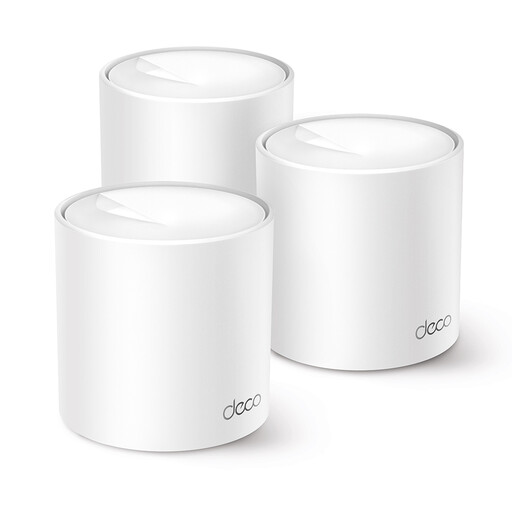
TP-Link Deco X10 Dual-Band Wi-Fi 6
A mesh option for a workspace you want to connect to a Deco network; check that it is compatible with your existing mesh family.
The title lists dual-band on 2.4 GHz and 5 GHz, and Wi-Fi 6 (802.11ax). The product description mentions compatibility with other Deco models.
Joybuy
Frequently asked questions
Does mesh Wi-Fi automatically give you access to the club archive?
No. Mesh improves your network connection, but access permissions need to be set up separately. If files need to be accessible over the public internet, the National Cyber Security Centre describes a private VPN server as an option for remote access without exposing the file server directly to the internet.
How do you install and power a Deco X50-Outdoor?
TP-Link lists IEEE 802.3at PoE or the specified AC power supply as power options for the Deco X50-Outdoor. Check which connection is available at the mounting location and follow the model-specific installation instructions.
Do you need a permit in the Netherlands for a mesh system in a garden office?
In the Netherlands, Wi-Fi can be used without a permit, subject to certain conditions. The Dutch Authority for Digital Infrastructure makes clear that this applies to specific frequencies and devices; use equipment and settings that are permitted for the intended use.
What warranty applies if a Wi-Fi point is faulty?
When a consumer makes a purchase in the Netherlands, statutory consumer rights apply alongside any manufacturer’s warranty. ACM ConsuWijzer explains that, under the applicable rules, a seller must resolve issues with a product that becomes faulty sooner than could reasonably be expected with normal use; there is no single fixed statutory warranty period for every product.


