
You're the only speaker at the table
You’re discussing the design with someone remotely, while there may be background noise around you. Your main priority is making sure your voice comes through clearly.


If you’re the only person at the table discussing the design brief with someone remotely, choose a headset with the right connection, a comfortable fit and a suitable microphone. A wired option means no battery to manage, while wireless gives you more freedom to move. If several people at the table need to join in, also compare a speakerphone for shared spaces: Microsoft distinguishes these from personal audio solutions.
You’re discussing the design with someone remotely, while there may be background noise around you. Your main priority is making sure your voice comes through clearly.
Several people need to contribute to the same remote conversation. Microsoft describes speakerphones for shared spaces as an option worth comparing.
You change location or device during the meeting and need to weigh freedom of movement against charging and managing the connection.
Choose this if: you mainly speak from one spot and want a direct USB connection without having to manage a battery.
Trade-off: the cable limits how far you can move from your device, so check your laptop’s connection.
Choose this if: you want to move around or change location during a conversation.
Trade-off: charging and managing the connection are part of using it. Also check which adapter and version are included.
Choose this if: more than one person at the table needs to speak directly to remote participants.
Trade-off: compare a speakerphone for a shared space. To help prevent echo, turn off audio on other devices that aren’t being used.
First, decide how many people at the table need to speak. Then compare the microphone, connection and freedom of movement that suit your setup.
| Factor | What should you check? | Who should pay extra attention? |
|---|---|---|
| How clearly your voice comes through | Check the microphone features of the exact version and make a test recording in the room where you’ll be on the call. | If I’m speaking at the table with background noise, I want the remote participant to be able to follow what I’m saying. Around 31% of consumers say making their own voice clear is their top priority. |
| Several people speaking at the table | Decide how many people will be speaking actively. If there are several speakers, compare a speakerphone for shared spaces. | If the people at my table also need to join in, I want their voices to reach the same meeting. Around 25% of consumers prioritise making sure several people in the room can be heard. |
| Connection and freedom of movement | Check the port, connector and box contents for the exact version. For wireless models, also check talk time under the stated settings. | If I change location during a meeting or need a particular laptop connection, I don’t want to choose something that won’t work with my device. Around 25% of consumers put connection or freedom of movement at the top of their list. |
| Comfort | Check the adjustability and ear cushions, and try the fit if possible. | If the meeting runs long, I want a headset that feels comfortable and can be adjusted. Around 19% of consumers consider comfort their top priority when choosing. |
Microphone noise reduction and ANC are not the same thing. The microphone feature affects the sound your conversation partner hears, while ANC reduces background noise for you as the wearer. Assess these features separately.
A noise-cancelling microphone focuses on your outgoing voice; ANC is designed to reduce noise for you as the wearer. Logitech describes these features separately for its headset models.
Check what the microphone does for the other participant and what ANC does for you. Assess each feature on its own.
A headset is worn by one person, so it isn’t automatically the right shared audio solution for several speakers. Microsoft distinguishes between audio devices for personal and shared spaces. Using audio on multiple devices in the same room at the same time can cause echo.
Before buying, decide how many people on site will be speaking actively. Choose one suitable meeting audio setup and turn off audio on other devices that aren’t being used.
Connections, adapters and versions for meeting platforms can vary between models. For example, Logitech lists different USB connections and versions across its headset ranges.
Compare the full product version with your laptop’s ports, and check which adapter and platform version are included.
According to the Dutch government, there is no fixed statutory warranty period in the Netherlands. Your statutory rights relate to receiving a product that meets the required standards and are separate from any manufacturer’s warranty.
Check the warranty terms for your specific purchase and contact the seller if the product is faulty.
The H390 is a wired USB headset. The specified Zone Wired 2 for Business version adds ANC for the wearer and two noise-cancelling microphones.
The Voyager Focus 2 is a wireless stereo headset for one speaker who wants freedom of movement and adjustable ANC.
The Evolve2 65 is a wireless headset for one speaker. Jabra also lists a separate Teams version.
The UH35 is a wired USB range with mono and dual versions for individual calls.
These are personal audio solutions for one speaker, with both wired and wireless options. Check that the connection and version suit your device and meeting.
 No image available
Suitable for one speaker who wants to make wired calls using a USB-C device.
Wired USB-C earphones with a built-in microphone and in-line controls.
Your device must support USB-C.
 No image available
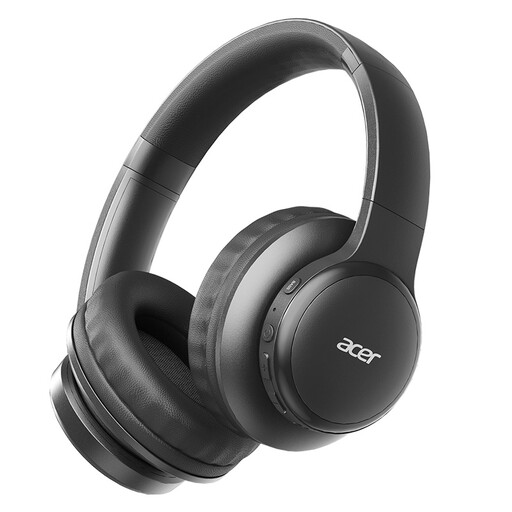
A wireless personal option for one speaker who wants to move around during a meeting.
The product name mentions Bluetooth, noise cancellation and four microphones.
These are rechargeable wireless headphones, so charging is part of using them.
 No image available
Suitable for one speaker looking for wireless headphones for calls.
The product information lists Bluetooth 5.3, a Type-C charging port and a microphone for calls.
 No image available
A personal wireless in-ear option for calls with one speaker.
The product name mentions True Wireless and ANC; the product description lists six microphones for voice processing during calls.
 No image available
Suitable for one speaker looking for a headset with a microphone for communication.
The product description specifies a cardioid microphone.
Don’t assume it will. If several people need to speak actively, compare a speakerphone for a shared space and test the setup with the people who’ll be using it.
Before or during the meeting, select the connected speaker and microphone in Teams and check that the device or browser has permission to access them. If there are several devices in the same room, turn off meeting audio on any that aren’t being used to help prevent echo.
It depends on the model, battery charge and features in use. For a specific Voyager Focus 2 Teams version, HP lists up to 19 hours of talk time with ANC on. This is the manufacturer’s figure, not a guaranteed battery life.
For an online purchase from a business, you’ll often have a 14-day cooling-off period. The Dutch government states that there is no fixed statutory warranty period in the Netherlands: you’re entitled to a product that meets the required standards and can contact the seller if it’s faulty. Check the terms that apply to your purchase.
Yes. The Dutch government states that electronic devices placed on the market in the EU must carry a CE mark. Check the product and manufacturer information for the specific version; a product listing alone does not show that it meets the applicable requirements.