
Media server user with 2.5GbE
If you regularly move large media files between a server and a compatible computer, check the ports at both ends before choosing 2.5GbE. TP-Link Netherlands and QNAP describe models with 2.5GbE ports.


Choose a gigabit switch if your media server and the devices you use to transfer files have gigabit ports. Choose 2.5GbE if the relevant devices support that speed too. Include the router connection when counting the ports you need, and only opt for management features if you want to separate or manage network traffic. The port speed does not guarantee the speed of every transfer.
If you regularly move large media files between a server and a compatible computer, check the ports at both ends before choosing 2.5GbE. TP-Link Netherlands and QNAP describe models with 2.5GbE ports.
Want to connect your server, router and work devices by cable without setting up network management? Count all the connections you need, including the one for the router, before choosing between five and eight ports.
If you want to place devices on separate VLANs or manage multicast traffic, for example, check the features of the exact model and allow for the time needed to configure it. TP-Link Netherlands describes VLAN and IGMP snooping features for the TL-SG108E.
Start with the connection you don’t want to bottleneck. Then count the ports you need and decide whether you need network management.
| What to consider | What should you check? | Who is this important for? |
|---|---|---|
| Local transfer speed | Check the Ethernet ports on your server and client, and whether the switch supports 2.5GbE on the ports you need. | If I move large media files between compatible devices, I want to know whether both ends support 2.5GbE. Around 40% of consumers rank local transfer speed as their top priority. |
| Enough connections | Count your server, router and work devices, and decide whether you want to leave room for another device. | When I want to connect several devices by cable, I count the router connection before choosing the number of ports. Around 30% of consumers give connection capacity top priority. |
| Network management | Decide whether you need VLAN or IGMP snooping, and check that your other equipment is compatible with the configuration. | If I want to separate network segments or manage multicast traffic, I look for a model with the right features and allow time to set it up. Around 20% of consumers prioritise configurable network management. |
| Noise and running costs | Check whether the exact model is fanless and look at its stated power consumption. | If the switch is near my desk, I want to know whether it has a fan. Around 10% of consumers say a quiet workspace is their main consideration. |
A five-port model has five physical connections in total, so the port connected to the router takes up one of them.
Map out all your cable connections before buying and compare the total with five- and eight-port models.
The switch won’t change the network connection on your server or client. A 2.5GbE link requires compatible ports on the relevant devices.
Check the port speeds of both devices you want to use for faster file transfers.
If a device doesn’t have a compatible port, you may need a suitable network adapter or connection.
Extra Ethernet ports don’t automatically give you configurable network segmentation.
Choose between plug-and-play and a specific smart or managed model with the features you need. Check the port speed too.
NETGEAR describes the GS305v3 as an unmanaged five-port gigabit switch for adding connections to a wired workspace.
TP-Link Netherlands describes both unmanaged 2.5GbE models and the configurable gigabit TL-SG108E.
QNAP describes the QSW-1105-5T as an unmanaged five-port 2.5GbE switch.
D-Link Netherlands describes several unmanaged 2.5GbE models in the DMS-1000 series, including the DMS-105 with five 2.5GbE ports.
This selection includes gigabit and 2.5GbE switches for a wired media server setup, with options for extra ports, PoE or network management.
 Image unavailable
A good fit for a wired workspace where five gigabit connections are enough.
5 ports; gigabit; metal casing.
 Image unavailable
An option for a wired gigabit setup where PoE may be useful.
5 ports; gigabit; PoE version. Check which ports supply PoE and whether the power output is suitable for your devices.
 Image unavailable
Consider this model if you’re looking for extra gigabit ports and network management features.
8 gigabit ports; Easy Smart; 4-port PoE version. Check that the available management and PoE features suit your network.
 Image unavailable
Worth considering for local 2.5GbE connections if the relevant devices support that speed.
5 ports; 2.5GbE; unmanaged; PoE version. Check the PoE ports and power budget if your devices need power over Ethernet.
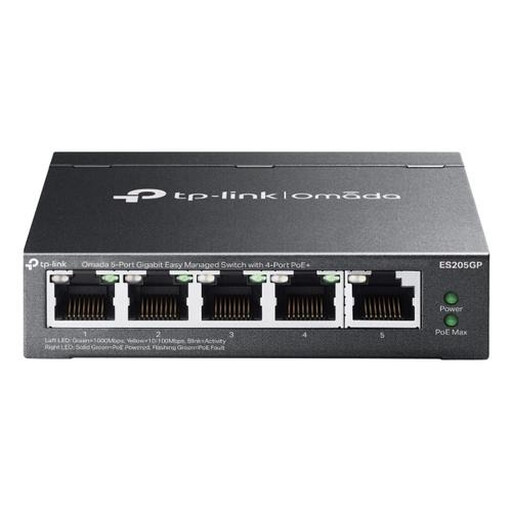 Image unavailable
An option for a gigabit network where you need management features or PoE.
Gigabit Ethernet (10/100/1000); managed; PoE; black. Check that the features and PoE support suit your devices and network configuration.
Not automatically. For a 2.5GbE link, the relevant ports on both your server and client must also support that speed. Check the rest of the transfer chain too.
Connect the switch to your router, then plug your server and work devices into the available Ethernet ports. According to NETGEAR, the GS305v3 doesn’t need any software configuration. However, if you want to use VLANs on a smart switch, you’ll need to configure the settings.
Only if a connected device needs power over Ethernet and both the switch and device support it. According to NETGEAR, the GS305v3 doesn’t have PoE. If you choose a PoE alternative, check the specifications of the exact model.
Your statutory consumer guarantee is separate from any manufacturer’s warranty. ACM ConsuWijzer explains that there is no fixed statutory guarantee period of exactly two years in the Netherlands. What you can expect in terms of product lifespan depends on factors including the product and its price, and the retailer is your point of contact if something goes wrong. Online purchases generally also come with a 14-day cooling-off period, subject to exceptions.
No. For products that must carry a CE mark under EU rules, the manufacturer uses the mark to declare that the product meets the applicable requirements. It is not an individual safety approval from the EU. Check the product information for the exact version and power adapter intended for the Dutch market.