Choose a switch based on the ports on your media server and workstations, the number of devices you need to connect, and whether users need to be kept separate. An unmanaged model is suitable if devices can share the same network; for configurable VLANs, you’ll need a compatible managed switch. Faster ports are only worthwhile if the connected devices and connections support those speeds, as the model specifications from TP-Link Netherlands and Zyxel Networks make clear.
Who is this guide for?
A team sharing media files
If you want to connect several workstations to one media server, start by checking that the port speeds are suitable and there are enough connections. TP-Link Netherlands’ model specifications and Coolblue’s buying guide cover what to consider.
Manager of a shared studio
You’ll need to decide whether users or devices should be separated using configurable VLANs, and whether someone can manage those settings. TP-Link Netherlands and Zyxel Networks describe models with VLAN features.
A studio with extra network devices
As well as a server, you may have access points or other wired devices. Consider how many spare ports you need, whether PoE is required, and where the switch will go. Linksys Netherlands and Coolblue highlight these points when choosing a switch.
What should you look for when choosing?
Start with the speeds and connections supported by your server and workstations. Then decide whether you need network management, extra ports, PoE or a quiet installation.
| What to consider |
What should you check? |
Who is this important for? |
| Speed to the media server |
Check the Ethernet speeds supported by the server and relevant workstations, and which switch ports support 1, 2.5 or 10 GbE. |
I want the server and workstations to exchange files over suitable connections, without paying for port speeds my devices won’t use. Around 33% of consumers say speed is their main priority. |
| Network separation and management |
Decide whether users or devices need to be kept separate, and check that the switch and other network equipment support the VLAN configuration you want. |
If I want to manage access separately for studio users or devices, I also need to consider who will manage those settings. Around 27% of consumers focus mainly on network separation. |
| Number of usable ports |
Count the router connection, server, workstations and other wired devices. Also check how many ports support the speed you need. |
I want to connect all my current devices and still have room to expand. Around 20% of consumers mainly need enough connections. |
| PoE power |
Check whether an access point or another device needs PoE, then compare the PoE standard and available power with that device’s requirements. |
If I want to power a device over the network cable, I need to choose a suitable model. Around 13% of consumers say PoE is their main consideration. |
| Noise and placement |
Check whether the exact model is fanless and whether its placement and mounting options will suit your studio. |
I want to place a switch close to a work or recording area without noise from a built-in fan. Around 7% of consumers put quiet operation first. |
Common mistakes
-
Assuming that every port on a switch with “10G” in its product name supports 10GbE
The Zyxel XGS1250-12 combines ports with different maximum speeds; not all twelve ports are 10GbE.
Plan which devices will connect to the switch, then check the connection type and supported speed for each port.
If the faster ports are already in use, you may need a different switch or additional network equipment.
-
Expecting every switch for a shared studio to support VLANs
An unmanaged 2.5GbE switch and a gigabit switch with configurable VLAN features are designed for different needs.
First decide whether you need network separation. Then check that your chosen switch supports the configuration and that someone can manage it.
If you later need configurable network separation, you may have to replace the switch with a managed model.
-
Confusing a non-PoE model with a PoE model
Linksys distinguishes the LN2308 from separate PoE models; PoE isn’t automatically included in every model in the range.
Compare the full model number and, if you need PoE, check the required standard and power budget.
If a device needs PoE, you may need an additional power supply if you don’t have a suitable switch.
-
Treating a future standby requirement as a current requirement for every switch
Ondernemersplein gives 1 January 2027 as the start date for the stricter EU standby power requirements described. That date is after October 2026, and the information states that the requirements apply to relevant product categories.
Check the start date and product category before applying a rule as a purchasing requirement.
Brands and models for reference
TP-Link
The TL-SG108-M2 is an unmanaged eight-port 2.5GbE switch; the TL-SG108E is a managed gigabit switch with VLAN features.
- According to the Dutch model specifications, the TL-SG108-M2 has eight 2.5GbE ports and a fanless design.
- The stated port speed isn’t the same as the measured throughput when transferring media files. The TL-SG108E offers VLAN features on gigabit ports.
NETGEAR
The MS308 is an unmanaged switch for anyone looking for several 2.5GbE connections.
- NETGEAR specifies eight 2.5GbE copper ports, with options to place it on or under a desk or mount it on a wall.
- The MS308 is specified as unmanaged, so don’t expect configurable VLAN features.
Zyxel
The XGS1250-12 combines web management with different types of ports for a mixed studio setup.
- Zyxel lists VLANs and link aggregation; the port layout includes different speeds and an SFP+ connection.
- Not all ports have the same maximum speed. Check the exact model and whether the features you need depend on the hardware version or firmware.
Linksys
The LN2308 is an unmanaged eight-port 2.5GbE option for a straightforward wired network expansion.
- Linksys specifies that the LN2308 has eight 2.5GbE ports and a fanless design.
- PoE is available on separate models. Check the full model number if connected devices need to be powered over Ethernet.
Joybuy products for this studio setup
This product selection includes unmanaged gigabit and 2.5GbE switches, as well as a managed gigabit switch, for a studio setup with wired devices.
 No image available
TP-Link 5-Port Gigabit Desktop PoE Switch with 4-Port
Suitable for a gigabit setup with PoE devices where configurable VLAN separation isn’t needed.
The product name specifies five gigabit ports and PoE. The switch is described as unmanaged, so don’t choose it if you need configurable VLAN separation.
Joybuy
 No image available
Linksys 5-Port Unmanaged 2.5GbE PoE Switch
Suitable for a wired setup where the relevant devices support 2.5GbE and configurable VLAN separation isn’t needed.
The product name specifies five ports, 2.5GbE, PoE and an unmanaged design. Check the PoE specifications required by the devices you want to connect.
Joybuy
 No image available
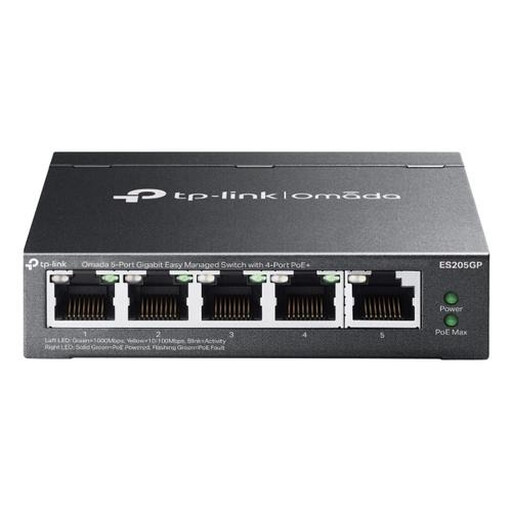
TP-Link Omada ES205G 5-Port Managed Gigabit Ethernet PoE Switch
Suitable for a studio where managed features and VLAN support are useful, and gigabit speeds are sufficient.
The product name specifies five gigabit ports, a managed design and PoE. The ports are gigabit, not a multi-gigabit option for devices that need more than 1GbE.
Joybuy
Frequently asked questions
Should I buy a 10GbE switch straight away for a media server?
No. First check which speeds your server and relevant workstations support. The Zyxel XGS1250-12 has different types of ports; connect a 10GbE device to a suitable port and check the port layout.
How do I connect a basic unmanaged switch?
According to Linksys’ installation instructions for the LN2308, connect the power supply, connect the switch to the router, then connect the other devices using Ethernet cables. These instructions apply to that model and aren’t a guide to configuring VLANs.
Will two server cables automatically make one connection twice as fast?
Don’t assume so. QNAP says that port trunking requires at least two network interfaces to be connected to the same switch, and warns that some modes need to be supported by the switch. Check the documentation for your server and switch before setting this up.
How can I avoid choosing the wrong PoE model?
Check the full model number and compare the PoE specifications with the requirements of the devices you’re connecting. Linksys distinguishes the non-PoE LN2308 from its separate PoE models.
What warranty applies to a switch I buy for a studio?
Check who the seller is and which terms apply to your purchase. The Dutch government describes repair or replacement of a faulty product as a consumer right; if you’re buying on behalf of a business, you can’t automatically assume you have the same consumer protections.


