
Editor in a shared workspace
You type a lot while working near colleagues and want to choose a switch variant without overlooking the keyboard’s typing sound. Logitech distinguishes between Tactile Quiet, Clicky and Linear variants.


If you edit in a shared space, check the exact switch variant and how the entire keyboard sounds. A compact model leaves more room for your mouse and proofs, while a full-size model can be useful if you enter a lot of numbers. Check the keyboard layout too, and whether you can customise the shortcuts you want. A keyboard is no substitute for adjusting your sit-stand desk and changing posture, as advised by Arboportaal.
You type a lot while working near colleagues and want to choose a switch variant without overlooking the keyboard’s typing sound. Logitech distinguishes between Tactile Quiet, Clicky and Linear variants.
You want to leave room for a mouse and proofs, and be able to readjust your workspace when the desk height changes. Arboportaal recommends a relaxed working posture and alternating between sitting and standing.
You regularly repeat the same formatting and proofreading tasks, and want to know whether the keyboard layout or customisable keys will suit your needs. Keychron describes the K3 Max as a model with QMK and customisable keys.
Start with the switch variant and keyboard layout: these help determine whether the keyboard suits your workspace and editing style. Then consider the space available on your desk, connectivity and any customisation options.
| What to consider | What should you check? | Who is this important for? |
|---|---|---|
| Typing sound | Check the exact switch variant and, if possible, assess the complete keyboard in a similar space. Logitech offers several switch variants for the MX Mechanical Mini. | If I’m editing with colleagues nearby, I don’t want to rely on the switch name alone. Around 36% of consumers prioritise typing sound above all else. |
| Workspace and desk height | Compare the space available for your keyboard, mouse and proofs when sitting and standing. If you’re choosing a wired model, also check that the cable can move freely. | When I adjust my workspace, I want to be able to position my things comfortably and readjust my posture. Around 29% of consumers put workspace and working posture first. |
| Keyboard layout | Check the layout of the version on offer and whether it has a numeric keypad. For example, Logitech distinguishes between the MX Mechanical Mini and the full-size version. | If I also enter a lot of numbers while editing, I want to know whether a numeric keypad is worth the extra desk space. Around 21% of consumers prioritise a layout suited to text and numbers. |
| Customisable keys | Check that the functions work with your computer and software, and that the configuration suits your regular tasks. Keychron lists QMK for the K3 Max. | For repetitive proofreading tasks, I want to check whether I can assign the actions I use to keys, and whether setting them up will take extra work. Around 14% of consumers prioritise customisable keys. |
A switch variant alone doesn’t tell you how the complete keyboard will sound on your desk. CHERRY MX Silent Red’s description applies to that specific switch, not automatically to every CHERRY keyboard.
Check the exact variant and, if possible, assess the complete keyboard in a similar space.
The Logitech MX Mechanical Mini doesn’t have an integrated numeric keypad; the full-size version does.
Before you buy, think about how much you’ll be typing and how often you enter numbers.
If you later find you need a numeric keypad, you’ll need a separate solution and extra desk space.
The layout and switches can vary between versions of the EPOMAKER x AULA F75. So a listing that only says AULA F75 doesn’t necessarily make it clear which version you’re getting.
Compare the full model name, layout, switches and relevant specifications before assuming two versions are the same.
The MX Mechanical range includes a Mini without an integrated numeric keypad and a full-size version with one.
Keychron describes the K3 Max as a compact mechanical keyboard with a 75% layout and customisable keys.
According to CHERRY, the MX BOARD 3.0S is a wired range with several switch variants.
EPOMAKER describes the x AULA F75 as a compact keyboard with a volume knob and several connectivity options.
This selection includes compact and full-size mechanical keyboards, with wired and wireless versions to suit different layout preferences.
 No image available
The wired version has a numeric keypad, making it a good fit for editing work that involves entering lots of numbers.
The product name lists Cream Switches, hot-swappable switches, RGB lighting, PBT keycaps and a volume knob.
 No image available
The 75% layout could suit you if you’re looking for a more compact model and the available shortcut and macro functions meet your needs.
The product information lists Flying Fish switches, macros, built-in memory and Bluetooth, 2.4 GHz or USB-C connectivity. The product name specifies an 8000 mAh battery and a US QWERTY layout.
 No image available
The wired 75% version could suit you if you want to save space and don’t need a numeric keypad.
The product name lists hot-swappable linear switches, a US QWERTY layout, 83 keys, PBT keycaps and a volume knob.
 No image available
The 60% layout is a compact option if you don’t need a numeric keypad.
The product name lists 61 keys, hot-swappable switches and Quiet Red switches. The variant name isn’t an independent measure of how the complete keyboard sounds. The product information lists a Bluetooth connection for up to three devices.
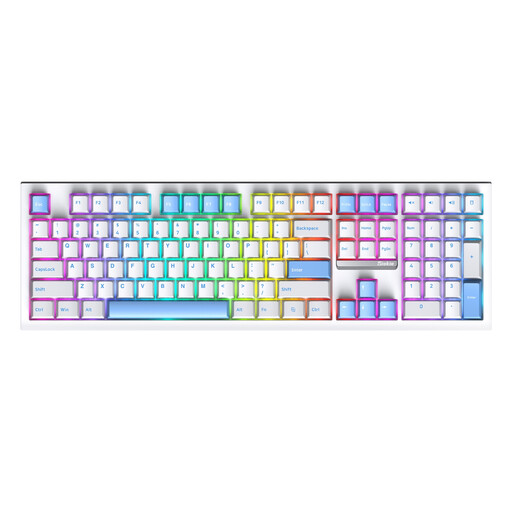 No image available
The 108-key layout with a numeric keypad could suit you if entering numbers is a regular part of your editing work.
The product information lists three connection modes: Bluetooth, 2.4 GHz and USB-C. The product name lists replaceable switches and RGB lighting.
No. A low-profile keyboard alone doesn’t determine whether your workspace is set up properly. Adjust your workspace when you change the desk height and vary your posture. Arboportaal recommends a relaxed posture with neutral joint angles as a starting point.
No. A switch name or manufacturer’s description doesn’t independently establish how the complete keyboard will sound on your desk. Check the exact version and, if possible, assess the whole keyboard in a similar space.
It can be useful if you want to free up desk space and don’t enter many numbers. Check that the layout suits your text work. If you regularly enter lots of numbers, an integrated numeric keypad may be more practical.
Check that the cable can move freely across the desk’s full range of adjustment and won’t become taut. Follow the instructions for the exact version when cleaning it or removing switches. Hot-swap functionality isn’t available on every model.
For many distance purchases made by consumers, there is a 14-day cooling-off period, with some exceptions, according to the Dutch government (Rijksoverheid). Faulty products are covered by the statutory guarantee; the Netherlands doesn’t have a fixed statutory guarantee period. Check the terms that apply to your specific purchase.