
Editor at a shared desk
Types a lot of yearbook copy while others are working in the same room, so wants to consider the switch type and typing sound.


At a shared desk, the switch type matters more than simply having a mechanical keyboard: Logitech distinguishes between Tactile Quiet, Clicky and Linear switches, while Razer describes the Pro Type Ultra as having silent switches and sound-dampening foam. Choose a compact layout if desk space is at a premium, or a full-size model if you regularly enter numbers. Check the exact layout and connection, too. Manufacturer descriptions do not provide comparable noise measurements for complete keyboards.
Types a lot of yearbook copy while others are working in the same room, so wants to consider the switch type and typing sound.
Needs space beside the keyboard for a mouse, documents or design work, and compares compact layouts with full-size models.
Works on different computers and is looking for a connection and key layout that suit the devices they use.
Start with the sound and the exact switch type. Then compare the layout and connection with the tasks and devices used at the shared desk.
| What to consider | What to look for when buying | Who is this important for? |
|---|---|---|
| Noise around others | Check the exact switch type. Logitech distinguishes between Tactile Quiet, Clicky and Linear switches; Razer describes the Pro Type Ultra's switches as silent. These are not comparative measurements of complete keyboards. | If I’m editing the yearbook alongside others, I want to keep typing noise down without assuming that a product described as silent guarantees silence. Reducing noise is the top purchase priority for around 40% of consumers. |
| Layout for typing | Compare the physical key layout and the feel you want when typing; also consider the setup of your entire workspace. | During long editing sessions, I want a layout that suits the keys I use most. A layout that works well for typing is the top priority for around 30% of consumers. |
| Desk space | Check whether you need an integrated number pad; compact layouts may not have one. | If I need space for a mouse and documents, I don’t want to give the keyboard more desk space than my tasks require. Saving space is the main reason for buying a keyboard for around 20% of consumers. |
| Connection and devices | Check which connection the version you choose offers and whether it works with the ports and devices you use. | When I switch between devices at the same desk, I want the connection and layout to work with each one. Switching between devices is the top purchase priority for around 10% of consumers. |
Different switch types can sound different. Manufacturer descriptions are not comparable noise measurements of complete keyboards.
Check the exact version and, if possible, try the keyboard in a similar room.
A compact model may not have an integrated number pad, which can be inconvenient if you regularly enter numbers.
Consider your typing, design and number-entry tasks before choosing a size.
If you later find you need a number pad, a separate one can take up extra desk space.
Keychron lists hot-swap support for a specific K3 Max version. ISO layouts can also vary; ISO alone does not confirm that the letters and symbols are the ones you’re looking for.
Compare the full version name, switch type and physical layout with the product listing.
Compare the product lines listed here by switch type, size and connection. Features of one version do not automatically apply to every model from a brand.
According to Logitech, the MX Mechanical range includes a Mini and a full-size model.
Razer positions the full-size Pro Type Ultra as a mechanical keyboard for office work.
CHERRY describes the KC 200 MX as a wired mechanical keyboard for the office.
According to Keychron, the K3 Max combines a compact 75% layout with several connection options.
CORSAIR sells the K70 CORE TKL as a gaming keyboard and also describes its typing features.
This selection includes wired and wireless mechanical keyboards, from compact layouts to models with a number pad. Compare the switch type, layout and connection with how you work at a shared desk.
 Image unavailable
The listed Beige switches and number pad may suit anyone who enters numbers and wants to consider noise at a shared desk.
Wired; number pad. The product description calls the linear Beige switches quiet and mentions a gasket construction for sound dampening; this is not a comparative noise measurement.
 Image unavailable
The compact 75% layout may suit you if you want to keep desk space free and use a wired connection.
QWERTY US layout; wired; linear Red Switch. The product description mentions five layers of sound dampening and a quieter acoustic profile, but not a comparative noise measurement.
 Image unavailable
The compact layout and several connection options may suit you if you want to save desk space and switch between devices.
82 keys; wired, Bluetooth and 2.4 GHz; hot-swappable. The product listing specifies a QWERTY US layout and sound-dampening foam.
 Image unavailable
The 60% layout may suit you if saving space is your main priority and you don’t mind the missing keys.
61 keys; tri-mode. The product listing mentions Quiet Red Switch and Bluetooth for up to three devices; the switch name is not a measurement of the keyboard’s overall noise.
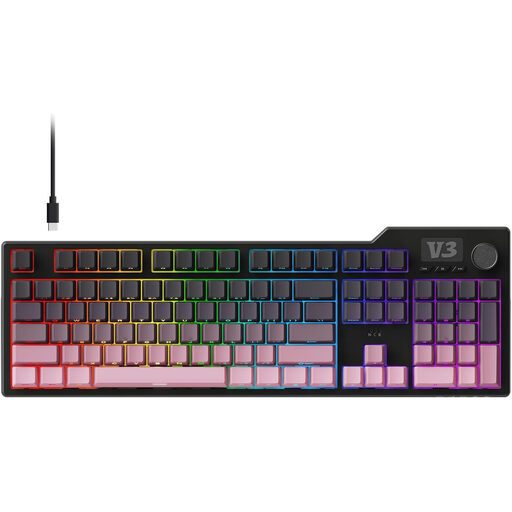 Image unavailable
A full-size keyboard with a number pad may suit you if you regularly enter numbers and have enough desk space.
104 keys and number pad. The product description lists a QWERTZ layout, hot-swap support and five layers of sound insulation.
It depends on your tasks. If you mainly edit text and want to save desk space, you could compare compact layouts. If you regularly enter numbers, you may prefer an integrated number pad. Logitech distinguishes the MX Mechanical Mini from the full-size MX Mechanical model.
Compare the ports, operating system and connections supported by the version you choose. Keychron lists Bluetooth, 2.4 GHz and wired use for the K3 Max; Logitech says the MX Mechanical Mini can switch between up to three devices.
That cannot be concluded from the product specifications listed here. Arboportaal highlights repetitive hand movements and static strain when working at a screen, so consider your whole workstation, not just the keyboard.
The Dutch Government states that you are entitled to a product that works properly and that the seller must provide a solution if a product is faulty. For an eligible distance purchase from a business, you generally have a 14-day cooling-off period. Check the terms and any exceptions that apply to your specific purchase.
Arboportaal’s guidance covers employees and screen work; it does not require a particular brand or mechanical switch. For employees who work at a screen for more than two hours a day, Arboportaal states, among other things, that the screen and keyboard must not be attached to each other. This does not automatically apply to every pupil or occasional yearbook user.