
Typing alongside colleagues
If you write and edit a lot of recipe text while sitting near others, look for a version that isn’t designed to click loudly. Logitech, CHERRY and Ducky offer a range of switch options.


For formatting a recipe book in a shared office, a mechanical keyboard with a switch option described as quiet is a sensible starting point, but it won’t be silent. A compact model gives you more room for your mouse, while a full-size model is more convenient if you often enter quantities or use Windows Alt codes. Always check the switch option, the keys available, and both the physical and software input layouts.
If you write and edit a lot of recipe text while sitting near others, look for a version that isn’t designed to click loudly. Logitech, CHERRY and Ducky offer a range of switch options.
If you often navigate through text and format documents, it helps to have the keys you need for shortcuts close to hand. Check the layout of the exact version you’re considering.
If you enter lots of ingredients and quantities, consider whether a numeric keypad is worth the extra desk space it takes up.
Choose this if: you mainly edit text, use keyboard shortcuts and want to keep space around your mouse.
Bear in mind: compact models don’t have a built-in numeric keypad.
Choose this if: you often enter quantities or use Windows Alt codes with a numeric keypad.
Bear in mind: the numeric keypad takes up extra space next to the keyboard.
| What to consider | What should you check? | Who is this important for? |
|---|---|---|
| Noise around colleagues | Check the switch option on the exact version; ‘quiet’ isn’t a measured noise level. | If I edit a lot of text while colleagues are working nearby, I don’t want a pronounced clicking sound. Around 33% of consumers put quiet operation first. |
| Navigation and formatting shortcuts | Compare the arrow, function and other keys with the shortcuts you use. | For regular formatting tasks, I want the navigation and shortcut keys I need to be easy to reach. Around 27% of consumers prioritise these keys. |
| Entering numbers | Decide whether you use the numeric keypad often enough to justify the extra width. | If I regularly enter recipe ingredients, I want to type numbers quickly; Microsoft’s Windows Alt codes require a numeric keypad. Around 20% of consumers prioritise entering numbers. |
| Layout, connection and desk space | Check the physical key layout, your software input layout and the connection you need. | If I want the key labels, computer settings and space for my mouse to work together, I want to check all three in advance. Around 20% of consumers prioritise layout and workspace. |
Logitech, CHERRY and Ducky offer different switch options, so the model name alone doesn’t confirm which switch is fitted.
Check the switch option on the exact version before you order.
The Ducky One 3 RGB is available in different sizes, so the keys included can vary between versions.
Compare the image of the exact layout with the shortcuts you use.
Windows lets you set the software keyboard and input layout separately. Changing this setting doesn’t alter the labels on the physical keyboard.
Check both the keyboard’s key layout and the input settings on your computer.
The MX Mechanical Mini is a compact option designed with office use in mind.
The KC 200 MX is a full-size, wired model.
The One 3 RGB is a range of wired mechanical keyboards available in different sizes.
Keychron describes the K1 Max as a low-profile TKL model with wireless and wired connectivity.
These picks include compact and larger mechanical keyboards for typing text and numbers, with a range of layouts and connections. Check the switch option and the keys you need for each version.
 No image available
A compact layout could suit you if you want to keep space around your mouse.
The product name lists tri-mode connectivity, RGB lighting and PBT keycaps.
The listed layout is QWERTY US; check that it matches your computer settings.
 No image available
A wired model could suit a permanent workstation where you want to use a cable.
The product name lists 94 keys, a detachable wrist rest and a phone holder.
The description mentions hot-swap functionality; check which switch option comes with the version you choose.
 No image available
The compact layout could suit you if you want to save space while keeping the arrow and function keys.
The product name lists wired, Bluetooth and 2.4GHz connectivity, hot-swap functionality and PBT keycaps.
The listed switch option is Flying Fish Purple. The layout is QWERTY US.
 No image available
A 60% layout could suit you if you’re looking for a compact keyboard.
The product name lists tri-mode connectivity, 61 keys and hot-swap functionality.
The title mentions Quiet Red switches, but this isn’t an independent noise measurement. Check that you can manage without the keys that are missing for your formatting work.
 No image available
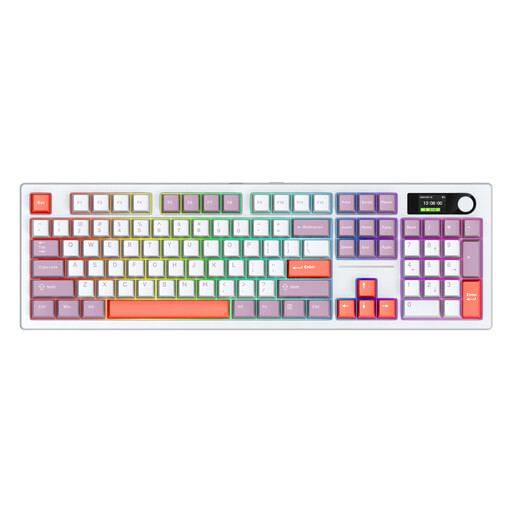
A 104-key version could suit you if you want plenty of keys close to hand.
The product name lists three connection modes and RGB lighting.
The Blue switches described produce an audible click, so bear this in mind in a shared office.
In Windows, check the keyboard and input layout under Time & language, then compare it with the physical keyboard layout. Changing a software setting won’t alter the labels on the keys.
Not with the Alt code method described by Microsoft: it requires a numeric keypad and doesn’t work with the number row at the top of the keyboard. Microsoft suggests using the symbols panel as an alternative.
No. A switch option described as quiet doesn’t mean the keyboard is silent. Logitech, CHERRY and Ducky distinguish quiet or damped options from other switches, but choose the exact version and consider your typing style and surroundings.
For online consumer purchases in the Netherlands, you generally have a statutory 14-day cooling-off period after delivery, with some exceptions. ACM ConsuWijzer recommends checking the applicable terms for trying and returning the product.
According to guidance from Arboportaal, monitors and keyboards must not be attached to each other for employees who work at a screen for more than 2 hours a day. When using a laptop, it must be possible to use a separate monitor or keyboard.