
Creator at a sit-stand desk
Writes and edits longer pieces and wants to position the keyboard, mouse and work surface comfortably when sitting or standing. Arboportaal recommends a relaxed posture with neutral joint angles as a starting point.


For puzzle work, start by choosing a layout that gives you easy access to numbers, arrow keys and the symbols you need. A full-size keyboard has a numeric keypad, while a compact or tenkeyless model leaves more desk space but may lack keys you need. Set up your keyboard and mouse so that your shoulders, forearms and wrists stay relaxed, whether you’re sitting or standing, as advised by Arboportaal. If you work in a shared space, check which switch variant you’re buying; a name such as ‘Quiet’ isn’t a sound measurement in itself.
Writes and edits longer pieces and wants to position the keyboard, mouse and work surface comfortably when sitting or standing. Arboportaal recommends a relaxed posture with neutral joint angles as a starting point.
Frequently enters numbers or grid data and weighs up the convenience of a numeric keypad against the extra desk space offered by a more compact keyboard.
Wants a mechanical keyboard and takes the sound of the chosen switch and specific version into account.
Start with the keys you need for numbers and symbols, then consider desk space, typing noise and access to shortcuts.
| What to consider | What should you check? | Who is this important for? |
|---|---|---|
| Posture and space | Compare the keyboard’s height and dimensions, and where the mouse sits, in both sitting and standing positions. | If I alternate between sitting and standing, I want to position the keyboard and mouse comfortably in both positions. Around 33% of consumers prioritise posture and desk space. |
| Layout and number keys | Check for a numeric keypad, arrow keys and the symbols you need, as well as the selected input layout. | When creating puzzles, I want easy access to the numbers, arrows and symbols I use often. Around 27% of consumers prioritise layout and number entry. |
| Typing noise and switches | Check the switch variant of the specific model; don’t judge the sound by the product name alone. | In a shared workspace, I consider both the feel of the keys and the sound of the chosen switch. Around 20% of consumers prioritise this combination. |
| Shortcuts and customisation | Check whether the model supports the keys or remapping you want, and whether you’re happy to use the required software. | For editing tasks I do regularly, I want to use shortcuts or set up my own key layout. Around 20% of consumers prioritise easy-to-reach shortcuts and customisation. |
A tenkeyless layout has no numeric keypad; even more compact layouts may make other keys less accessible too.
Before you buy, make a list of the numbers, arrow keys, function keys and symbols you use with your puzzle book.
A smaller layout may mean extra steps; you might want to add a separate numeric keypad later.
Switch variants can differ in feel and sound. A dampened switch doesn’t automatically tell you how noisy every version of the complete keyboard will be.
Check the exact switch variant and, if possible, assess its sound in a similar working environment.
A different keyboard won’t replace setting up your workstation properly. A split model also takes time to get used to.
Adjust your workstation for both sitting and standing, then decide which size and position will work best. Arboportaal recommends a relaxed posture and changing positions as points to consider.
The layout, switch options and hot-swap compatibility can vary between versions.
Before buying, compare the full variant and product specifications, including the physical key layout and switch type.
The MX Mechanical Mini is a compact, low-profile mechanical keyboard available with different switch variants.
The K1 version 6 is a low-profile tenkeyless model, while the Q6 Ultra 8K is a full-size keyboard with a numeric keypad.
The One 3 RGB is a wired mechanical keyboard, available in different sizes according to Ducky.
The MX BOARD 3.0S is a wired mechanical keyboard; CHERRY also makes the separate MX Silent Red switch.
The ErgoDox EZ is a split mechanical keyboard whose two halves can be positioned separately.
These Joybuy products include compact and full-size mechanical keyboards for writing, puzzle layout and number entry.
 No image available
The numeric keypad is worth considering if you regularly enter numbers or grid data.
Wired version with beige linear switches, volume knob, gasket construction, PBT keycaps and hot-swap support.
 No image available
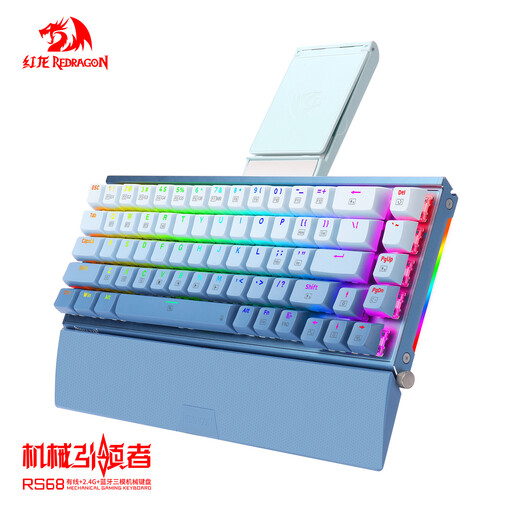
The compact 65% layout may suit you if you want to save desk space; check which keys you need for your puzzle work first.
The product information lists an aluminium case, detachable wrist rest, hot-swap support and tri-mode connectivity.
 No image available
According to the product information, the 75% layout retains the arrow and function keys; check that the US QWERTY layout suits the symbols you use.
The information lists hot-swap support, sound-dampening foam, and wired, Bluetooth and 2.4 GHz connectivity.
 No image available
The compact 60% layout can free up desk space; check which keys you need and how to access them on this layout.
The product information lists 61 keys, a Quiet Red switch, hot-swap support and tri-mode connectivity.
 No image available
The full-size 108-key layout with a numeric keypad may suit you if you enter lots of number sequences.
Wired mechanical keyboard; the product information lists interchangeable switches and hot-swap support.
Not necessarily. A full-size keyboard has a numeric keypad for anyone who often enters number sequences; a tenkeyless model leaves it out and may free up more desk space. Try it with your own puzzle work and check that the arrow keys and other keys are easy to reach too.
Adjust your workstation in both positions so that your shoulders, forearms and wrists stay relaxed, and change your posture regularly. Arboportaal recommends this as a starting point for good working posture; a mechanical or split keyboard won’t replace that adjustment.
Check both the labels on the physical keys and the input layout selected on your computer. Microsoft Support explains how to add and change keyboard layouts in Windows; then test the characters you actually use.
For most online consumer purchases, you have a 14-day withdrawal period starting from the day you receive the item, although exceptions apply; Your Europe explains these rules. Faulty products are also covered by the Dutch statutory guarantee. According to the Dutch government, there’s no fixed legal end date for this guarantee, and the seller is your point of contact.
Not for everyone doing puzzles at home. Arboportaal states that for employees who work with a display screen for more than 2 hours a day, the screen and keyboard must not be attached to each other; when using a laptop, it must be possible to use a separate screen or keyboard. This workplace requirement doesn’t apply as a general product rule to all buyers.