
Writers who want to feel each keystroke
If you write longer pieces, look for a switch feel that’s comfortable and consistent. Logitech and CHERRY describe several options, including tactile, linear and clicky switches.


Start with the switch feel and sound you find comfortable while writing. Then choose a layout that makes the keys you need for writing and editing easy to find. A compact wireless keyboard saves desk space, while a wired hot-swappable keyboard is a good fit if you want the option to change switches later. Always check the exact switch and key layout, as features can vary between versions.
If you write longer pieces, look for a switch feel that’s comfortable and consistent. Logitech and CHERRY describe several options, including tactile, linear and clicky switches.
If you share a room with housemates or need to work around conversations, the exact switch version matters. Logitech offers options including Tactile Quiet, Clicky and Linear. These names refer to different versions and don’t guarantee complete silence.
A compact layout can leave room for notes or a mouse. Keychron and Ducky offer different sizes, but check that the navigation and editing keys you need are easy to reach on your chosen layout.
First, decide on the key feel and sound you want. Then compare layouts and consider whether you need more than one connection option for your regular workspace.
| What to consider | What should you check? | Who might this matter more to? |
|---|---|---|
| Key feel and switch type | Check the exact switch type and whether that specific version is hot-swappable. | If I write for long periods, I want a key feel that’s comfortable and consistent. Around 40% of consumers would put switch feel at the top of their list when choosing. |
| Typing sound | Check whether the version has clicky or switches described as quiet; a name such as ‘Quiet’ isn’t a measured sound level. | In a shared space, I want to be considerate of housemates or people having conversations. Around 30% of consumers would put sound at the top of their list when buying. |
| Layout and desk space | Compare the physical key layout of the exact version and check that it includes the keys you need for editing. | At a small desk, I want to save space without losing the navigation keys I need. Around 20% of consumers would prioritise layout and desk space. |
| Connectivity | Check which connection options are supported by your devices and what’s included with the version you choose. | If I switch between devices while writing, I want a suitable connection option. Around 10% of consumers would put connectivity at the top of their list when choosing. |
The Razer Ornata V3 product description specifies mecha-membrane switches. So a description of how a keyboard feels to type on doesn’t necessarily tell you what type of switch it uses.
If mechanical switches are a must-have, check the actual switch type in the specifications.
Switch versions can vary within the same model range. For example, Logitech offers the MX Mechanical Mini with Tactile Quiet, Clicky and Linear switches.
Check the switch fitted to the specific version, especially if typing noise matters to you.
Keychron states that hot-swapping is only available on the K3 Max version sold as the hot-swappable RGB variant.
Check whether hot-swapping is specified for the exact version and which switches are compatible.
A similar model name doesn’t necessarily mean that its switch, layout and other features match what you’re looking for.
Before ordering, check the current product details for the model, switch and physical key layout.
Logitech describes the MX Mechanical Mini as a compact, low-profile mechanical keyboard available with different switch options.
Ducky describes the One 3 RGB as a wired range with different sizes and hot-swappable switches.
Keychron describes the K3 Max as a compact, low-profile mechanical keyboard with several connection options.
CHERRY describes the MX BOARD 3.0S as a wired mechanical keyboard available with different switches and lighting options.
This selection of Joybuy products includes compact and larger mechanical keyboards, with different switch, layout and connection options for writing at home.
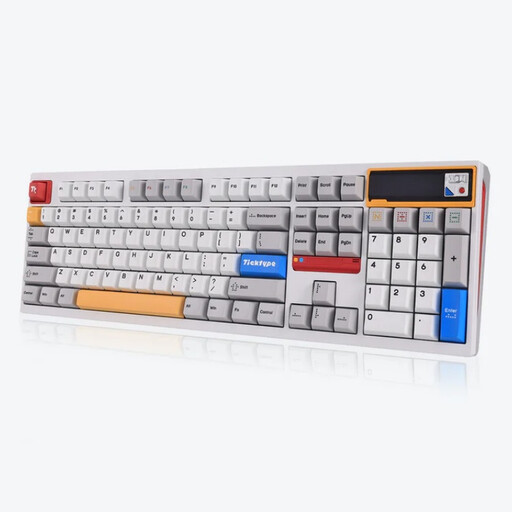 Image unavailable
This version is listed with Silent Tactile switches for those who want tactile feedback; the description doesn’t indicate a measured sound level.
The product name lists 108 keys, hot-swapping, Bluetooth, 2.4 GHz and USB-C. It has a US layout and a stated battery capacity of 8000 mAh.
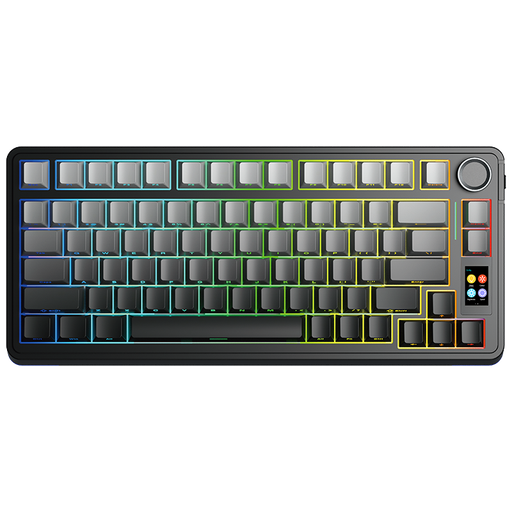 Image unavailable
The 75% layout is a compact option if you want to free up desk space and have the option to change switches.
The product name lists a wireless mechanical keyboard with hot-swappable Star Vektor switches. Check the physical key layout of the version on offer.
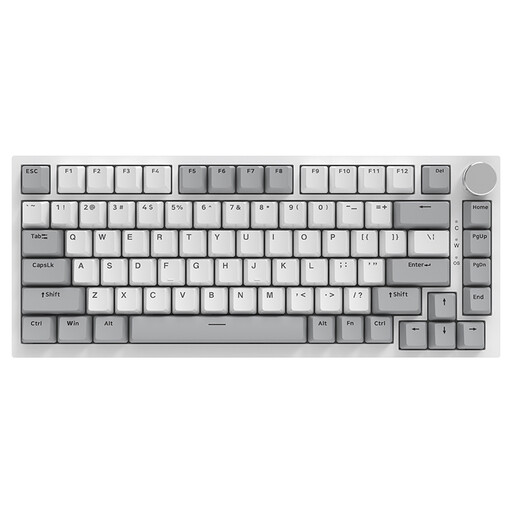 Image unavailable
This wired version suits a fixed workspace and anyone who wants to be able to swap linear switches.
The product name lists hot-swappable linear switches, 83 keys and a US QWERTY layout.
 Image unavailable
The compact 75% layout and listed connection options are worth considering if you want to save space or switch between devices.
The product name lists USB, Bluetooth and 2.4 GHz, hot-swapping and a US QWERTY layout.
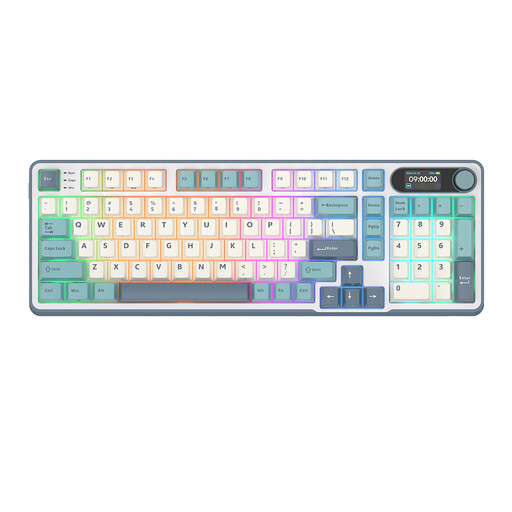 Image unavailable
The product name describes a 96% layout with 98 keys for anyone looking for a more compact keyboard that still has a larger number of keys.
The listed connection options are Bluetooth, 2.4 GHz and USB-C; the switches are hot-swappable.
No. The workplace rules for employees don’t require someone writing an essay at home for personal use to buy a particular mechanical keyboard. Arboportaal explains that employees who work at a screen for more than 2 hours a day must have a screen and keyboard that aren’t attached to each other. This rule for employees doesn’t automatically apply to writing for personal use.
Choose a version that the manufacturer lists as compatible with your devices. Keychron lists Bluetooth, 2.4 GHz and a cable for the K3 Max; Ducky lists a wired USB-C connection for the One 3 RGB. Check the connection options for the exact version.
Switch off and unplug the keyboard before removing the keycaps. Keychron recommends using a keycap puller and mentions a small brush for dirt between the keys. Take care with larger keys that have stabilisers, and follow the care instructions for your model too.
For a typical online consumer purchase, ACM ConsuWijzer says you usually have a statutory cooling-off period of up to 14 days after delivery. There are exceptions, so check which rules and returns conditions apply to your order.
If a product is faulty, the Dutch government says the seller is your point of contact for a solution. There is no fixed statutory two-year warranty period in the Netherlands. Ordinary wear and tear or damage caused by incorrect use isn’t automatically covered.