If you don’t want to use an extra socket while typing, choose a keyboard with a charged battery and a wireless connection supported by your computer. Wired typing uses a computer port, but doesn’t require a separate keyboard battery. Then consider the switches, sound and layout: a compact layout leaves more room for your mouse, while a larger keyboard keeps more keys within easy reach. Stated battery life and claims about quietness aren’t guarantees of how the keyboard will perform for you.
Who is this relevant to?
Writers without a spare socket
If you write at a computer for long periods, you’ll want to know in advance how to power your keyboard without using an extra socket while you type. Keychron and Logitech describe wireless models with rechargeable batteries.
Writers in a shared space
You’re looking for mechanical keys but want to be considerate of others in the room. The switch type affects the feel and sound described; Logitech, for example, offers three versions of the MX Mechanical Mini.
Writers with a small desk
You want to leave room for your mouse without losing keys you use often when writing and editing. The Occupational Safety and Health Administration advises that a keyboard without a numeric keypad leaves more room for your mouse.
What should you consider when choosing?
First choose your power and connection options, then compare the feel, sound and layout with your writing set-up.
The percentages indicate an approximate breakdown for this writing scenario.
| What to consider |
What to look for |
Who is this important for? |
| Power and connection |
Check the connection modes, computer ports and charging connection for the version you’ve chosen. |
If I don’t want to use an extra socket during a writing session, I’ll look for a charged battery and a wireless connection my computer supports. Around 33% of consumers put power and connection first. |
| Typing feel and set-up |
Check the switch type and arrange your work set-up so your wrists stay straight. |
When I type a lot, I want a feel that suits my preferences and a set-up that lets me keep my wrists straight. Around 27% of consumers give typing feel top priority. |
| Sound |
Check the exact switch type and, if possible, listen to a test of that specific version. |
In a shared space, I want to be mindful of the sound of repeated typing, rather than relying on a product description alone. Sound is the top priority for around 20% of consumers. |
| Layout and desk space |
Check which arrow, function and navigation keys you usually use, and measure the space available. |
If I need room for my mouse, I want to know which keys I might miss when editing. Around 20% of consumers put layout and desk space first. |
Common mistakes
-
Assuming wireless means you’ll never need to recharge
A keyboard with a rechargeable battery doesn’t use an extra socket while you type wirelessly, but it will need charging later.
Plan when you’ll charge it and check whether your chosen model can also be used wired when the battery runs flat.
-
Choosing a compact layout without checking the editing keys
A smaller layout may leave out keys you’re used to having at your fingertips; a full-size keyboard, on the other hand, takes up more room beside your mouse.
Before choosing a size, check whether the arrow, function and navigation keys suit the way you work.
-
Assuming ‘quiet’ applies to every version
Switch types can vary. A manufacturer’s claim about noise reduction isn’t an independent measurement of every version.
Check which switch type you’re ordering and, if available, look for a sound test of that specific version.
Brands to compare
Keychron
The Keychron K3 Max offers a compact layout and Bluetooth, 2.4 GHz and wired connections. According to the manufacturer, the Q6 Ultra 8K has a full-size layout and is considerably larger and heavier.
- Keychron states that the K3 Max offers up to 73 hours of battery life; this isn’t guaranteed for every version or setting.
- The manufacturer lists hot-swappable switches only for the RGB Backlight Hot-Swappable Version, so check which version you’re buying.
Logitech
The MX Mechanical Mini is a compact, low-profile mechanical keyboard available with a choice of switch types.
- Logitech lists the Tactile Quiet, Clicky and Linear versions separately.
- The manufacturer’s description isn’t an independent measurement of quietness or ergonomic effects. Don’t assume that features of one version apply to all versions.
CHERRY
According to CHERRY, the MX-LP 2.1 Compact Wireless is a compact model with 68 keys, Bluetooth, a 2.4 GHz connection and USB cable connectivity.
- CHERRY says it can be charged via USB-C while in use.
- Check whether the compact layout has enough keys for your navigation while editing.
Razer
The Pro Type Ultra is a wireless mechanical keyboard that Razer describes as a productivity model.
- For this model, Razer lists quiet mechanical switches, sound-dampening foam and three connection modes.
- The descriptions of sound and comfort come from the manufacturer and aren’t independent measurements of the version you buy.
Joybuy products
These models are aimed at compact mechanical typing, with wireless connection options and a wired option. Check the layout and connections for each version.
 No image available
Ticktype EVO75 Custom, 75%, US layout
A good fit if you’re looking for a compact mechanical keyboard with wireless and wired connection options.
75% layout, US layout, Bluetooth, 2.4 GHz and wired USB-C.
The product information lists hot-swappable switches and an 8000 mAh battery.
Joybuy
 No image available
AJAZZ AK820 MAX, 75%, US QWERTY
A good fit if you want a compact layout with wireless and wired connection options.
75% layout with 82 keys, Flying Fish switches and a volume knob.
Bluetooth, 2.4 GHz, wired USB-C and an 8000 mAh battery. The product name also lists hot-swappable switches.
Joybuy
 No image available
AJAZZ AK820 Pro, 75%, US QWERTY, Purple Flying Fish
A good fit if you’re looking for a compact keyboard with wireless and wired modes.
75% layout with 82 keys; Bluetooth, 2.4 GHz and wired USB-C.
The product information lists a 4000 mAh battery, hot-swappable switches and sound-dampening foam.
Joybuy
 No image available
RK Royal Kludge S98, 96%, 98 keys
A good fit if you want more keys within easy reach than a compact layout offers.
96% layout with 98 keys and Snow Emperor switches.
Bluetooth, 2.4 GHz and USB-C; the product information also lists hot-swappable switches and a display.
Joybuy
 No image available
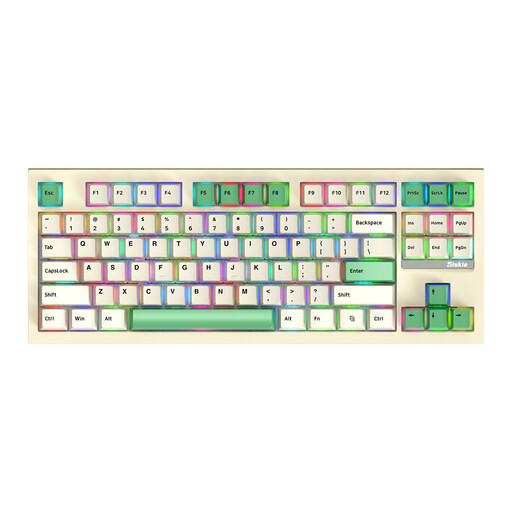
Siukie PL87W, 87 keys
A good fit if you want to compare a model with a stated 87-key layout.
87 keys, RGB and Bluetooth, 2.4 GHz and wired USB-C modes.
The product information lists hot-swappable switches and adjustable feet.
Joybuy
Frequently asked questions
Do you need a spare socket for a wireless keyboard?
Not while using it with a charged battery. You’ll still need a suitable power source when it’s time to charge; using it via USB takes up a computer port. Check the connections on the version you choose.
How should you set up your keyboard for a long writing session?
Place the keyboard directly in front of you and adjust your chair, desk and keyboard so that your shoulders are relaxed and your wrists stay straight. The Occupational Safety and Health Administration gives this as workplace advice; a wrist rest or low profile doesn’t replace proper adjustment or prove that a model prevents discomfort.
Can you return a keyboard bought online if the typing feel isn’t right for you?
For a standard online consumer purchase in the Netherlands, you generally have a legal cooling-off period of up to 14 days after delivery. ACM ConsuWijzer notes that exceptions may apply; the legal guarantee for a faulty product is a separate right against the seller.
Which EU rule is relevant to a wireless keyboard?
The Radio Equipment Directive applies to radio equipment placed on the EU market. The European Commission describes this regulatory framework; where EU product rules require a CE mark, the manufacturer uses it to indicate that the applicable requirements have been met. CE marking isn’t an independent assessment of typing quality.
Can you replace the switches later without soldering?
That depends on the exact version. Keychron lists hot-swappable switches for the K3 Max only on the RGB Backlight Hot-Swappable Version; also check which switch type the version supports before buying replacement switches.


