
Writer sharing a room
You write while someone else is studying or sleeping. The exact switch type and how loud the keys are matter more to you than lighting or gaming features. CHERRY and Logitech describe a range of dampened switch options.


If you write while someone else is resting or working, first look for a switch that’s explicitly described as dampened, and check the exact version: ‘mechanical’ or ‘linear’ doesn’t automatically mean quiet. Then choose a size with the arrow and editing keys you use, and check the physical layout and connection. Compact keyboards save desk space, but some functions may be accessed using key combinations.
You write while someone else is studying or sleeping. The exact switch type and how loud the keys are matter more to you than lighting or gaming features. CHERRY and Logitech describe a range of dampened switch options.
You want to keep space free for notes or a mouse, but often use navigation and editing keys when revising. Hardware Info has explained how functions such as Home, End and Delete may require key combinations on very compact keyboards.
You switch between devices as you work, so you’ll want to check the connection, physical layout and compatibility of the version you choose. Logitech and Keychron list models that can connect to multiple devices.
First decide what you don’t want to compromise on when writing: peace and quiet for your room-mate, direct access to editing keys, a familiar layout or the option to customise your keyboard.
| What to consider | What should you look for? | Who is this most important for? |
|---|---|---|
| Key noise | Check the full switch name for the version you’re choosing, and look specifically for sound dampening. | If I’m writing while someone else in the room is resting or working, I don’t want to rely on the word ‘mechanical’ alone. Around 36% of consumers put quieter keys at the top of their list. |
| Space and editing keys | Check where the arrow, Home, End and Delete functions are, including whether they’re accessed using key combinations. | At a small desk, I want to save space but still navigate my text quickly when editing. Around 29% of consumers prioritise this combination. |
| Layout and connection | Compare the physical keyboard layout with your current keyboard, and check the connection and device support for the exact version. | If I switch between devices or type a lot of punctuation, I want a layout and connection that work with my computer. Around 21% of consumers put these considerations first. |
| Customisation | Check whether the version you’re choosing supports hot-swapping and which components are actually included. | If I might want to use a different type of switch later, I want to know in advance whether this particular model is suitable. Around 14% of consumers prioritise customisation and the included components. |
The Logitech MX Mechanical Mini is available with Tactile Quiet, Clicky or Linear switches; the CHERRY KC 200 MX also comes with different switches. The model name alone doesn’t tell you which version you’re choosing.
Check the full switch variant in the product specifications before you order.
On very compact layouts, functions such as Home, End and Delete may require key combinations. This can make editing text less straightforward.
Check the keyboard layout and think about which navigation keys you use while writing.
Physical ISO and ANSI layouts, as well as regional variants, can differ even when the letters spell QWERTY.
Compare the image of the exact version with your current keyboard, and check the software layout on your computer too.
The KC 200 MX is a wired mechanical office keyboard; a version with MX2A Silent Red switches is also available.
The MX Mechanical Mini is designed for compact typing and switching between devices.
The K8 Pro ISO is a tenkeyless option with a familiar navigation cluster.
The One 3 RGB is a range of wired mechanical keyboards available in different sizes.
NuPhy describes the Air75 V2 as a compact, low-profile keyboard.
These Joybuy products are mechanical keyboards suited to a compact writing space. Compare the layout and connection of each version in particular; the product names list different switches and variants.
 Image unavailable
The 75% layout and multiple connection options make this a good fit for a compact writing space where you want to choose how to connect your device.
The product name lists a US QWERTY layout and tri-mode connectivity: wired, Bluetooth and 2.4 GHz. The physical US layout may differ from what you’re used to.
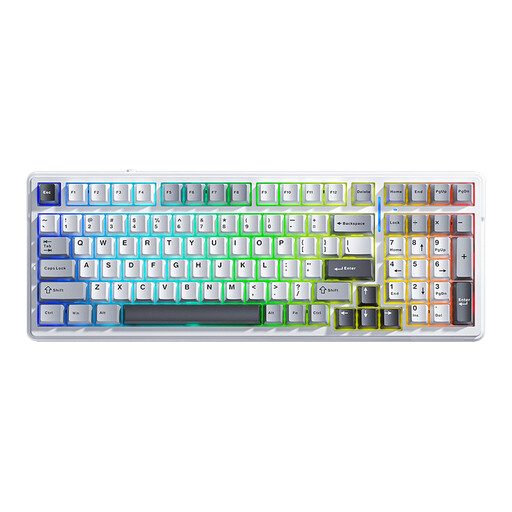 Image unavailable
This version is worth considering if you want to compare different connection options for your writing device.
The product name lists 99 keys, Bluetooth, 2.4 GHz and wired connectivity, hot-swapping, RGB and a US QWERTY layout. Check that the physical US layout suits the way you use your keyboard.
 Image unavailable
The compact layout may suit a desk where you want to save space; check where the keys you use for editing text are before you buy.
The product information lists 80 keys and a 75% layout. The product name lists tri-mode, a US layout, hot-swapping, VIA compatibility and Creamy Rye switches. Compare the physical layout with your own keyboard.
 Image unavailable
The 75% layout is a compact option; check the key layout to see whether the editing keys you use are easy to access.
The product name lists tri-mode, Flying Fish switches, hot-swapping and a US QWERTY layout. Check that the physical layout suits the way you use your keyboard.
 Image unavailable
A wired version is an option for a fixed writing space where you don’t need a wireless connection.
The product information lists a compact 75% layout with 82 keys. The product name specifies a wired connection and a US layout; check that the physical keyboard layout works with your computer.
No, you can’t tell from the word ‘linear’ alone. CHERRY specifically describes MX Silent Red as a linear switch with sound dampening. So check the exact switch variant; this information doesn’t guarantee how loud it will be in your room.
It depends on the layout. With tenkeyless, the number pad is generally removed; on more compact sizes, navigation functions may require key combinations. Check the layout of the specific model before you choose.
Check that the version you choose supports the cable, wireless connection or receiver you want to use, and that its physical layout matches your software settings. Follow your model’s instructions for cleaning and, if applicable, removing keys.
According to the Dutch Government, a 14-day cooling-off period applies in many cases to distance purchases. Whether it applies to your purchase depends on the circumstances.