
People who write for long periods
If you write and edit a lot, you’ll want to choose a layout, key feel and sound that suit the way you work.


First, choose a layout and switch type that suit your writing and editing work. Then consider how much room you have for your keyboard and mouse. A compact model can free up space on a crowded desk, but switching between devices only matters if you really do move between computers or tablets. Manufacturers’ specifications describe features, not which keyboard will feel best for you to type on.
If you write and edit a lot, you’ll want to choose a layout, key feel and sound that suit the way you work.
If you use two screens and want to keep space free for your mouse, compare a more compact layout with a keyboard that has a number pad.
If you really do switch between computers or tablets while working, check which connections and operating systems are supported. Two screens connected to one computer don’t, in themselves, mean you need a keyboard that switches between devices.
| What to consider | What should you check? | Who is this important for? |
|---|---|---|
| Layout, key feel and sound | Compare the physical layout and the editing keys you use most; check the exact switch variant and, if possible, try the feel of the keys for yourself. | If I write for long periods, I want the layout and key feel to suit my editing work, and the sound to be right for my workspace. Around 36% of consumers put this typing experience first. |
| Desk space | Measure the space available and decide whether you use a number pad and separate navigation keys. | With two screens, I want enough room for my mouse without missing the keys I use often. Around 29% of consumers give desk space top priority. |
| Connecting to devices | Make a note of how many separate devices you use, then check their operating systems and the connections available on the exact version. | If I switch between a computer and tablet while writing, I want to know whether the keyboard can connect to both. Around 21% of consumers put connectivity first. |
| Customisation and maintenance | Check whether the specific version on offer is hot-swappable and which switches it is compatible with. | If I want to replace the switches later, I want to be sure I can do so with the version I’ve chosen. Around 14% of consumers give replaceability and maintenance top priority. |
Device-switching features are designed for separately connected devices. They don’t move a window between two screens connected to the same computer.
First, count the computers and tablets you want to type on. Then decide whether switching between devices would be useful.
Keychron lists hot-swapping for the K3 Max only on the specifically named RGB version.
Check the full version name and switch compatibility before choosing replacement parts.
Manufacturers’ descriptions of quiet or muted models are not independent, comparable sound measurements.
Check the switch variant and, if possible, try the keyboard’s sound in an environment similar to your workspace.
According to Keychron’s official specifications, the Keychron K3 Max reviewed here is a compact, low-profile keyboard with multiple connection options and a 75% layout.
According to Logitech, the MX Mechanical range reviewed here includes a version with a number pad and a more compact Mini.
The models reviewed here offer different options: the compact KW X ULP 2.0 MINI for switching between devices, and the KW 300W MX with replaceable switches.
This selection includes mechanical keyboards with 75% or 96% layouts, as well as models with 104 or 108 keys. Compare the physical layout and listed connections with the desk space you have and the editing keys you use.
 No image available
The 75% layout is worth comparing if you’re looking for a compact keyboard for a desk with limited space.
 No image available
The listed function row and arrow keys may be useful if you often use them while editing.
 No image available
The 96% layout is worth comparing if you want a more compact shape without giving up many keys.
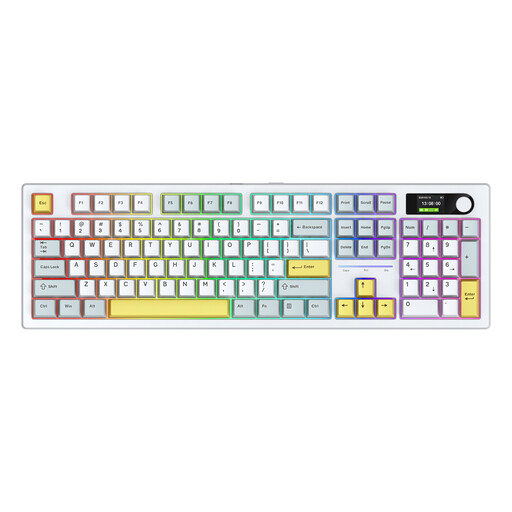 No image available
The Alice layout is a distinctive option to compare if you’re looking for a keyboard for longer typing sessions.
 No image available
A full-size layout may suit you if having the complete keyboard layout matters more than saving desk space.
No, not for that reason alone. The multi-device features on the models reviewed are designed to switch between separately connected devices. Choose this feature if you really do switch between computers or tablets; otherwise, focus on the layout and the space available on your desk.
The Arboportaal recommends using an external keyboard and mouse with a laptop, so you can position the keyboard and screen separately. It also outlines workplace requirements for employees who work at a screen for more than two hours a day; these are not general legal buying requirements for every individual writer.
That depends on the version. Keychron limits the stated hot-swapping feature on the K3 Max to the RGB Backlight Hot-Swappable Version; CHERRY lists a hot-swap socket for the KW 300W MX. Before replacing any switches, check which ones are compatible with your exact version.
According to ACM ConsuWijzer, online purchases usually come with a cooling-off period of up to 14 days after delivery, subject to legal exceptions. This is separate from your rights if a product is faulty: if, under normal use, it does not meet what you could reasonably expect, the seller is responsible for providing an appropriate solution under the statutory guarantee. There is no single fixed guarantee period for every product.
Yes. The European Commission outlines the framework for radio equipment placed on the market in the Radio Equipment Directive. The European Union explains that manufacturers indicate conformity with applicable CE rules by using the CE marking. Check the product information for the specific wireless version; don’t assume it complies based only on the brand name or a general keyboard description.