
Vandaag of morgen in huis

Kwaliteit gegarandeerd

Welkomstaanbiedingen ontgrendelen: GRATIS bezorging | Tot 80% korting | Gratis 30 dagen JoyPlus-proefperiode
Download de app
A mechanical keyboard can be comfortable for gaming, typing and everyday computer use, but the specifications do not always tell the whole story. Eye-catching RGB lighting, plenty of marketing jargon and a low price say little about the layout, connectivity or scope for customisation.
If you’re buying a new keyboard in the Netherlands, it’s worth checking three things first: the right layout, the connection you want and the options for changing switches or settings. This helps you avoid finding that a compact keyboard is impractical, a wireless mechanical keyboard needs charging too often, or a gaming keyboard isn’t a good fit for your computer.
A QWERTY keyboard can have different language layouts. For example, a US layout differs from a Dutch or Belgian ISO layout. This means the Enter and Shift keys, along with some punctuation marks, may be in different places.
So, before you buy, check:
A different layout doesn’t make a keyboard unusable, but it can take some getting used to and lead to typing mistakes.
A 75% keyboard generally keeps the arrow keys and a function row, but takes up less space than a full-size model. A 60% keyboard is even more compact and often omits the arrow, function and navigation keys. You can access these functions using combinations with the Fn key.
This saves desk space, but it isn’t practical for everyone. If you work with spreadsheets a lot, you may miss having a number pad. Check the dimensions too: a keyboard with a volume knob or extra display will take up a little more space than its percentage might suggest.
Terms such as “quiet”, “thocky” or “50 million keystrokes” don’t guarantee a particular user experience. Sound also depends on the keycaps, case, surface and typing style. A brand’s own research may suggest that certain constructions or damping layers affect the sound, but this should be treated as a brand claim rather than a universal result.
Focus on details you can verify:
Linear switches usually move smoothly without a noticeable click. Tactile switches provide noticeable resistance as you press them. Clicky switches generally make more noise. A hot-swappable keyboard lets you replace compatible 3- or 5-pin switches without soldering. Make sure the switches you want are electrically and physically compatible.
A magnetic Hall Effect keyboard works differently from a traditional mechanical model. The AULA WIN60HE, for example, is described as having an adjustable actuation point of 0.01 mm. Values like this are mainly relevant if you want to fine-tune the settings. Before buying, check which software and operating systems are supported.
A wired USB connection doesn’t need a battery and is ready to use straight away. A wireless mechanical keyboard usually connects via Bluetooth or a 2.4GHz receiver. For everyday use, it’s worth checking:
The HP 450 uses a USB Type-A receiver and, according to its specifications, works at a range of up to 10 metres. HP also states that battery life can reach up to 20 months, depending on use. This is the manufacturer’s estimate; actual battery life depends on usage and battery quality.
An RGB keyboard can offer lighting effects, but check whether you can adjust the brightness, colour and modes using key combinations or software. A programmable keyboard can be useful for shortcuts, macros and media controls. Check that the software is compatible with your operating system and whether settings can be saved directly to the keyboard.
A keyboard with a volume knob is handy for gaming, music and video calls. Check whether the knob only controls volume or can be used for other functions too.
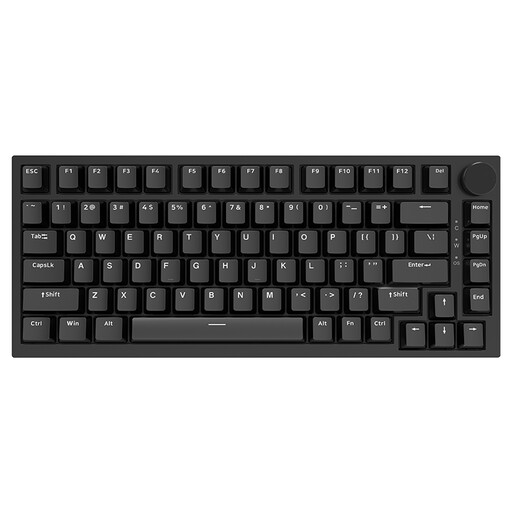
Why it suits this user: The 75% layout keeps the arrow keys and essential functions while taking up less desk space than a full-size keyboard.
The product description states that it has a QWERTY US layout, a USB-C connection and hot-swap support for 3- and 5-pin switches. If you’re used to a Dutch layout, check the layout before ordering.
75% size, PBT keycaps, a volume knob and a stated lifespan of 50 million keystrokes.
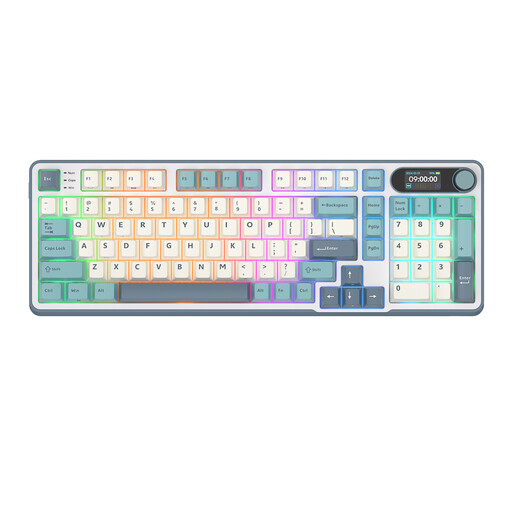
Why it suits this user: This model combines a 96% layout with wireless Bluetooth and 2.4GHz connectivity, USB-C, a display and a control knob.
The layout includes a number pad without the dimensions of a full 100% model. Hot-swap functionality means you’re less likely to need a completely new keyboard when you want to change the switches.
PBT keycaps, multiple connection options, RGB lighting, a smart display and five layers of internal padding, according to the product description.
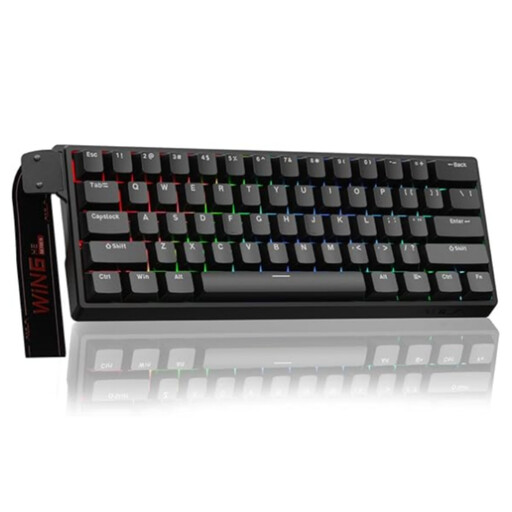
Why it suits this user: The 60% layout and Hall Effect magnetic switches are designed for gamers who want to save desk space and fine-tune actuation.
The product name specifies a wired connection, so you don’t have to keep track of the battery level. Bear in mind that on a 60% layout, the arrow and function keys are usually accessed using key combinations.
According to the product listing: an 8K polling rate, adjustable actuation down to 0.01 mm and RGB lighting.
We’ve put together a complete, up-to-date list of products that meet these strict selection criteria and comply with current European safety regulations.
Use this quick checklist:
Clean your keyboard regularly with a soft, dry cloth and keep liquids away from the electronics. When replacing switches, make sure the device is switched off and use a suitable switch puller.
Yes, but pay attention to the switch type and noise level. Linear switches tend to move smoothly, while clicky switches can be audible to housemates or colleagues. A model with damping material may have a different sound, according to the manufacturer, but the acoustics of your desk still play a part.
Lifespan varies depending on the switches, keycaps and how you use the keyboard. Manufacturers sometimes give a keystroke rating, such as 10 million or 50 million. This is a product specification, not a guarantee that every component will last just as long. Hot-swap functionality makes it easier to maintain the keyboard and replace switches.
That depends on the connection, lighting and battery capacity. RGB lighting can use more power than a keyboard without backlighting. To extend battery life, you can switch off the lighting and use wired mode when available.
