What should you look for?
Start by checking the keyboard’s position at both desk heights. Then compare the switch type and key layout with your working environment and the keys you use when writing and editing.
The percentages below show the main concern in each row among consumers considering a mechanical keyboard for this sit-stand desk setup.
| Buying concern |
What should you look for? |
Who might this matter more to? |
| Working posture |
Try the keyboard at both desk heights, paying attention to its height and angle, as well as the space available for your mouse. |
If I alternate between sitting and standing, I want to keep my shoulders and wrists relaxed while writing. Around 33% of consumers name working posture as their main buying concern. |
| Sound and typing feel |
Check the exact switch type; switches within the same model can feel and sound different. |
In a shared space, I want a pleasant typing feel without disturbing others unnecessarily. Around 25% of consumers prioritise sound and typing feel. |
| Desk space |
Compare the layout with your need for arrow keys, navigation keys and a number pad. |
If I need space for my mouse and notes, I still want to keep the editing keys I use most. Around 25% of consumers say desk space is their most important consideration. |
| Key layout and connectivity |
Check the physical layout, key legends and connection options for the exact version. |
When typing Dutch, I want the key positions and punctuation to suit my habits and computer. Around 17% of consumers prioritise key layout and connectivity. |
Compact mechanical keyboards on Joybuy
These Joybuy products are compact mechanical keyboards with a 75% layout. Check the physical key layout and switch type for each version before choosing.
 No image available
RK Royal Kludge M75 Phantom
The compact layout may suit you if you want to free up space on your desk.
75% layout with 81 keys; hot-swappable Cream Switches; connects via 2.4 GHz, USB-C or Bluetooth.
Joybuy
 No image available
Ticktype EVO75 Custom, US layout
The 75% layout may suit anyone looking for a compact keyboard who checks the physical layout first.
US layout; hot-swappable; connects via USB-C, Bluetooth or 2.4 GHz.
Joybuy
 No image available
AJAZZ AK820 MAX, US QWERTY
The compact layout may leave room for a mouse and notes; check that the key positions suit your typing habits.
75% layout; hot-swappable switches; US QWERTY layout; three connectivity options.
Joybuy
 No image available
AJAZZ AK820 Pro, US QWERTY
This compact version may suit a small desk; make sure the physical layout works for the way you use it.
75% layout with 82 keys; hot-swappable switches; US QWERTY layout; connects via USB-C, Bluetooth or 2.4 GHz.
Joybuy
 No image available
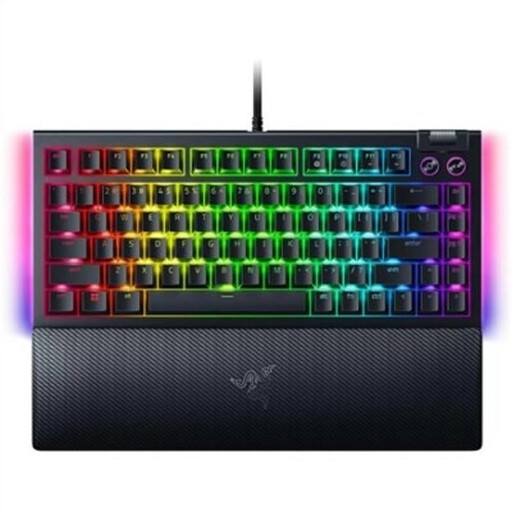
Razer BlackWidow V4 75%, US QWERTY
The 75% layout may suit anyone looking for a compact keyboard who is happy with US QWERTY key positions.
Hot-swappable mechanical keyboard; US QWERTY layout; wired USB connection.
Joybuy
Frequently asked questions
Do you have to stay standing throughout a writing session at a sit-stand desk?
No, alternating between sitting and standing is appropriate. Arboportaal recommends keeping your shoulders, wrists and forearms relaxed; readjust your workstation when you change position.
Can you fit different switches later?
Only if the exact version is hot-swappable and the replacement switches are compatible. Ducky lists hot-swappable switches for the One 3 RGB; for the Keychron K3 Max, this depends on the version. Check the product information for your variant before replacing any parts.
When buying online in the Netherlands, do you have a cooling-off period, and what if the keyboard breaks too soon?
For a standard online purchase by a consumer, you generally have up to 14 days after delivery to change your mind, subject to statutory exceptions. ACM ConsuWijzer also distinguishes between statutory guarantees and the manufacturer’s warranty: if a product used normally doesn’t meet what you could reasonably expect, the seller is responsible for providing an appropriate solution.
What product regulations apply to a wireless keyboard in the Netherlands?
Radio equipment placed on the EU market is subject to the Radio Equipment Directive, which sets requirements for areas including safety, electromagnetic compatibility and use of the radio spectrum. Products that require CE marking must meet the applicable requirements. The European Commission and the Dutch government explain these rules; check the product information for the specific version.


